19

I'm working under 12.04 and suppose I have a Firefox windows active (or in foreground) with English as input language and I need to type a document in other language using some text editor.

With the text editor in foreground (or active) and the input language set to a non-English one, when I bring Firefox in foreground (or making it active) the input language remains set to the non-English and the language flag does not switch to English (as it would be expected, since I do not alter the language during the whole Firefox session).

Because of this, I have to make extra moves and change the input language manually every time I switch from the text editor to Firefox and back to text editor. This was not happening with 10.04, and each application windows had the corresponding input language set to its default or previous session every time I was bringing it to the foreground!

How will I make 12.04 to behave the same way?

jokerdino
  • 41,000
  • 24
  • 132
  • 201
anvo
  • 587
  • 1
  • 4
  • 8

1 Answers1

28

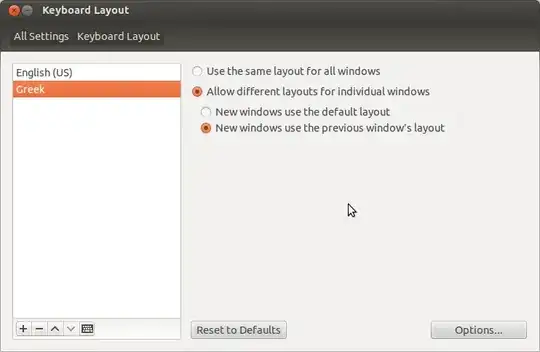
I opened System Settings, Keyboard Layout and Layouts.

On the right pane of that tab, I chose Allow different layouts for individual windows and that worked.

Note: For Ubuntu 14.04 use System Settings, Text Entry

enter image description here

Dimetry
  • 247
  • 1
  • 3
  • 13
anvo
  • 587
  • 1
  • 4
  • 8
  • Good answer. I have edited it a bit. Hope you don't mind that. You can accept the answer after 48 hours of posting your question. – jokerdino Jun 05 '12 at 10:59
  • Thanx for commenting and editing! I really don't have time for such a geeky work (I mean, the whole "Keyboard Layout" window)! – anvo Jun 05 '12 at 12:14
  • 1
    **NOTE FOR 16.04**: The path for this setting is now Settings -> Keyboard - > Text Entry (bottom left of the Keyboard menu) – Sergiy Kolodyazhnyy Dec 23 '16 at 02:07
  • 1
    for **Kubuntu 16.10**: System Settings -> Input Devices -> Keyboard Hardware and Layout -> Layouts tab -> Switching policy: Application or Window – Omid May 08 '17 at 05:15
  • 12
    **Ubuntu 18.04**: Settings -> Region & Language -> Options button on right of 'Input Sources' header -> Allow different sources for each window – Nozim Turakulov Apr 30 '18 at 17:15