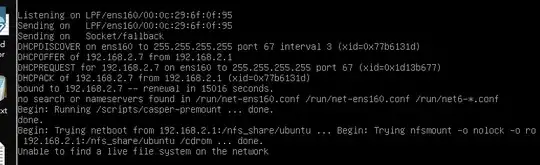
I ran into the same error as you.
The reason is probably that I used wrong boot files.
Here is what I did to make it work:
 mount -o loop  /var/www/kickstart/ubuntu2004/ubuntu-20.04.4-live-server-amd64.iso /mnt
 cd casper/
###
hwe-initrd  hwe-vmlinuz  initrd  vmlinuz
I used iPxe boot. Here is my boot menu.
:ubuntu2004

        # initrd=XXX of 'kernel` line is a must.
        # /boot/efi is a must if you don't partition automatically.
        # https://cloudinit.readthedocs.io/en/latest/topics/datasources/nocloud.html
        # You can provide meta-data and user-data to a local vm boot via files on a vfat or iso9660 filesystem. The filesystem volume label must be cidata or CIDATA.
        # Memory should be more than 4G, otherwise, cloud-init fails to start.
        # UEFI, https://askubuntu.com/questions/1238070/deploy-ubuntu-20-04-on-bare-metal-or-virtualbox-vm-by-pxelinux-cloud-init-doesn
        # cloud-net\; s=xxx

        kernel ${base}/images/ubuntu2004/vmlinuz root=/dev/ram0 ramdisk_size=1500000 ip=dhcp  url=${base}:8081/ubuntu2004/ubuntu-20.04.4-live-server-amd64.iso autoinstall ds=nocloud-net;s=${base}:8081/ubuntu2004/
        initrd ${base}/images/ubuntu2004/initrd
        boot || goto failed
        goto start