10

In recent releases of Ubuntu, adding a PPA automatically updates the package cache immediately.

Sometimes, I need to add several PPAs (e.g. after a new installation), and would like to manually run apt update in one go, after adding all the PPAs.

How to do that?

I found this question, which suggests using add-apt-repository -n ppa:user/repo.

How to change the default behavior so that the package cache will not be updated even when the -n flag is not supplied?

For example, in Linux Mint, the package cache is never automatically updated after adding a PPA. How to make that the default behavior in Ubuntu?

Archisman Panigrahi
  • 25,210
  • 17
  • 90
  • 185
  • 1
    Awesome question! I am not very good at aliases, but maybe setup an alias like `add-apt-repository -ny` but I am not that good at something like that. – Terrance Jan 31 '22 at 15:18
  • 1
    @Terrance Because the command uses `sudo`, you'd have to add an alias for the `sudo` command: `alias sudo='sudo '` (with a blank space after sudo). Otherwise, `sudo` commands will not use your aliases. – mchid Jan 31 '22 at 20:16
  • @mchid Told you I was bad at it! :) That makes a lot of sense. Thanks! :) – Terrance Jan 31 '22 at 20:24
  • 1
    As for Linux Mint, they use [their own antique copy of `add-apt-repository`](https://github.com/linuxmint/mintsources/blob/master/usr/bin/add-apt-repository). – muru Feb 01 '22 at 04:59

3 Answers3

7

For a specific user, you can add an alias for add-apt-repository.

Add the following lines to the end of your ~/.bashrc file:

alias sudo='sudo '
alias add-apt-repository='add-apt-repository -n'
alias apt-add-repository='add-apt-repository -n'

After you save the changes, don't forget to source your ~/.bashrc file:

. ~/.bashrc

Keep in mind that the first line is necessary to use aliases with sudo. If you have aliases you want to exclude from sudo use, this might not be the best method.

mchid
  • 42,315
  • 7
  • 94
  • 147
5

For system-wide method I would create local wrapper script placed into /usr/local/bin as follows

cat <<\EOF | sudo tee /usr/local/bin/add-apt-repository
#!/bin/bash
/usr/bin/add-apt-repository -n $@
EOF
sudo chmod +x /usr/local/bin/add-apt-repository

and do not forget about the apt-add-repository synonym command - run

sudo ln -s /usr/local/bin/add-apt-repository /usr/local/bin/apt-add-repository

Then use any of these commands with -n option auto-added.

N0rbert
  • 97,162
  • 34
  • 239
  • 423
3

Advanced Users

You can modify the source code to remove the apt update command.

Here is the code block you need to remove from the /usr/bin/add-apt-repository file:

        if update and not options.remove:
            os.execvp("apt-get", ["apt-get", "update"])
        sys.exit(0)

This will remove the update command.

NOTE: This piece of code comes two times in the file, you have to remove the LAST one. This piece of code in most files would be somewhere near line 198.

You can open the file using a text editor such as nano and remove this piece of code.

You can also modify the code a bit, something like:

        if update and not options.remove:
            os.execvp("apt-get", ["apt-get", "moo"])
        sys.exit(0)

NOTE: Edit this file with a terminal-text-editor like nano instead of GUI editors like gedit.

Beginners

Open a terminal using Ctrl + Alt + T

  1. First, install nano:

    sudo apt update
    sudo apt install nano
    
  2. Edit the file:

    sudo nano /usr/bin/add-apt-repository
    
  3. Press the down arrow key repeatedly,unless you reached the end of the file.

  4. You'll find an if statement which looks exactly like this:

            if update and not options.remove:
                os.execvp("apt-get", ["apt-get", "update"])
            sys.exit(0)   
    
  5. Remove the whole if code block mentioned above.

  6. Press Ctrl + X and then select Y and press ENTER.

Test
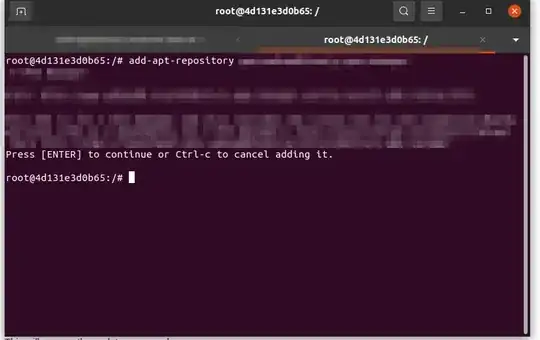
Test

Restore the file

Messed up?

No worry! If we run dpkg -S on the file, we can see:

$ dpkg -S /usr/bin/add-apt-repository 
software-properties-common: /usr/bin/add-apt-repository

So just run:

sudo apt update
sudo cp -r /usr/bin/add-apt-repository /tmp
sudo rm -rf /usr/bin/add-apt-repository
sudo apt install software-properties-common --reinstall
Error404
  • 6,920
  • 1
  • 26
  • 50
  • For our smart minded downvoter: Consider explaining why you downvoted. This is exactly what they wanted. Feel free to edit or give suggestions. At least tell a reason for the downvote. I don't think that you downvoted just to lose 1 rep. Consider telling a reason, so that your loss of 1 rep does not get wasted. – Error404 Feb 01 '22 at 11:23
  • You're breaking a lot of things for upcoming updates. If you want to use a custom version, place it in `/usr/local/bin` which should come in `$PATH` before `/usr/bin` and is never used by official programs. So you won't break updates of `apt-add-repository` and reverting the change would just require deleting the file in `/usr/local/bin`. You are also suggesting a custom script that cannot easily be checked when other answers already suggest minimal wrapper scripts, which also solve the problem, are easy to understand and installed in a way that doesn't break future updates. – allo Feb 01 '22 at 15:40
  • 1
    @allo OK, I agree and fully accept your concern. However, it still seems to be at least a *fine* answer to me. So, I am not gonna delete it... However, feel free to edit and insert your concern about `/usr/local/bin` or post a new answer about the same. *You are also suggesting a custom script that cannot easily be checked* I should have clarified that the script only removed a line of code from it which removes the apt update thingy. – Error404 Feb 01 '22 at 15:51
  • It's not a bad answer per se. I only thought when you're asking for details why someone may downvote it, I'll try to point out a few issues that may cause it to have lower votes than the other answers. If you're suggesting to remove a few lines, try to explain this change and it can be really useful. When the upstream version may change in the future, your changes can possibly still be applied to the new version, but the changed copy will not contain the updates from upstream. – allo Feb 01 '22 at 16:04
  • 1
    @allo **Seems like I have fixed those issues in my latest edit.** – Error404 Feb 02 '22 at 07:04
  • +1. However, this is way too complicated. – Archisman Panigrahi Feb 02 '22 at 13:45