10

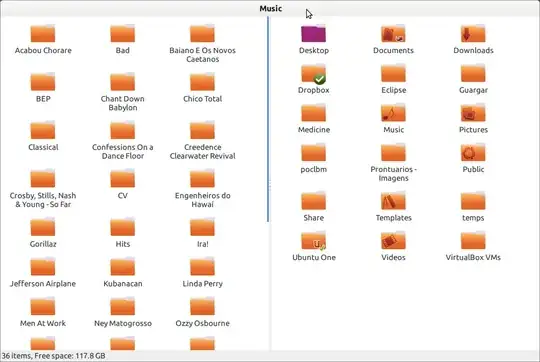
When I rightclick a folder in Nautilus I find these options "Open in New Window" and "Open in New Tab". Is it possible to add an option "Open in New Pane" which would open the selected folder in a new pane as it appears when I press F3?

example

What would be the parameters for Nautilus Actions or can I realize this with Nautilus Scripts?

Jakob
  • 10,421
  • 5
  • 46
  • 59

2 Answers2

8

First lets remember that Nautilus has the numbers of pane limited to 2.

You can create a script to do that.

1) First install xdotool and parcellite: sudo apt-get install xdotool parcellite

2) Then open a file (gedit /home/desgua/.gnome2/nautilus-scripts/Open\ In\ A\ New\ Pane) and paste this:

#!/bin/bash
echo -n $1 | parcellite
xdotool key F3 
sleep 0.1
xdotool key Tab
sleep 0.3
xdotool key ctrl+l ctrl+v 
sleep 0.1
xdotool key Return

exit 0

3) Save.

4) Make it executable (chmod +x /home/desgua/.gnome2/nautilus-scripts/Open\ In\ A\ New\ Pane)

5) Right click over a folder and select "Scripts" > "Open In A New Pane".


Result:
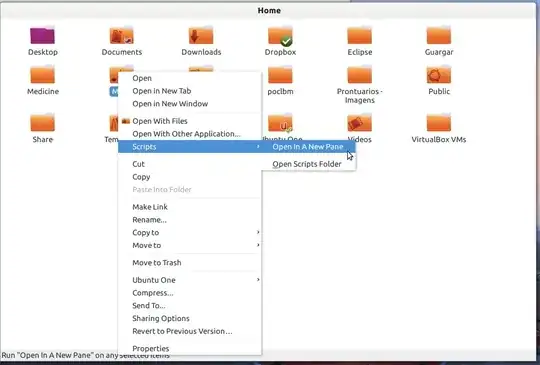
enter image description here

enter image description here


If you are feeling lazy, just paste this into terminal and you're done:

cd ~/.gnome2/nautilus-scripts && wget http://dl.dropbox.com/u/4098082/Open%20In%20A%20New%20Pane && chmod +x ./Open*

This script open the folder in an existing pane:

1) First install xdotool and parcellite: sudo apt-get install xdotool parcellite

2) Then open a file (gedit /home/desgua/.gnome2/nautilus-scripts/Open\ In\ An\ Existing\ Pane) and paste this:

#!/bin/bash
echo -n $1 | parcellite
sleep 0.1
xdotool key Tab
sleep 0.2
xdotool key ctrl+l ctrl+v 
sleep 0.1
xdotool key Return

exit 0

3) Save.

4) Make it executable (chmod +x /home/desgua/.gnome2/nautilus-scripts/Open\ In\ An\ Existing\ Pane)

5) Right click over a folder and select "Scripts" > "Open In An Existing Pane".

desgua
  • 32,669
  • 9
  • 99
  • 120
  • Yes for your first question (I've updated the answer). I will check if the second is possible. – desgua May 07 '12 at 20:24
  • I can not find a way for Nautilus to tell us if the pane is opened or not. You may make another script to open in an existing pane although. – desgua May 07 '12 at 21:00
  • Thank you for the second script, too! But somehow the first script doesn't run always as expected: Sometimes it opens the folder in the same pane, sometimes it opens just another pane, sometimes no pane becames opened. And the second script doesn't open the folder in the other pane but in the same - which would be the same if I just doubleclick the folder. – Jakob May 08 '12 at 07:17
  • To make the script more reliable just increase the sleep time (0.3 seems to be very reliable). – desgua May 10 '12 at 14:59
  • Still the folders become opened on the left, not on the right side. – Jakob May 11 '12 at 07:47
  • Increase all the sleep time to 1 and make sure it works. Then you can gradually decrease to the minimal time needed. – desgua May 11 '12 at 09:57
3

I'm sure there are many ways to do this... but here goes...!

Install nautilus-actions and xdotool

Create a new script in your home folder called newpane and paste:

sleep 0.3
xdotool key ctrl+c 
sleep 0.3
xdotool key F3 
sleep 0.3
xdotool key Tab
sleep 0.3
xdotool key Right
sleep 0.3
xdotool key Return
sleep 0.3
xdotool key Down
sleep 0.3
xdotool key ctrl+l
sleep 0.3
xdotool key ctrl+v
sleep 0.3
xdotool key Return

Give the file execute rights:

chmod +x ~/newpane

Run nautilus-actions-config-tool

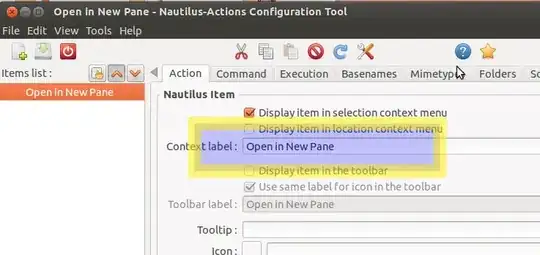
Choose edit - preferences and uncheck the options shown:

enter image description here

Create a new menu option:

enter image description here

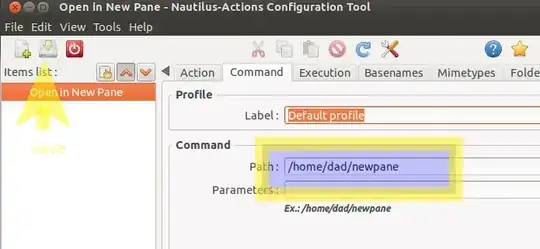
execute your new script - n.b. give it the full path to your script and save it, before closing the application.

enter image description here

Restart nautilus:

nautilus -q

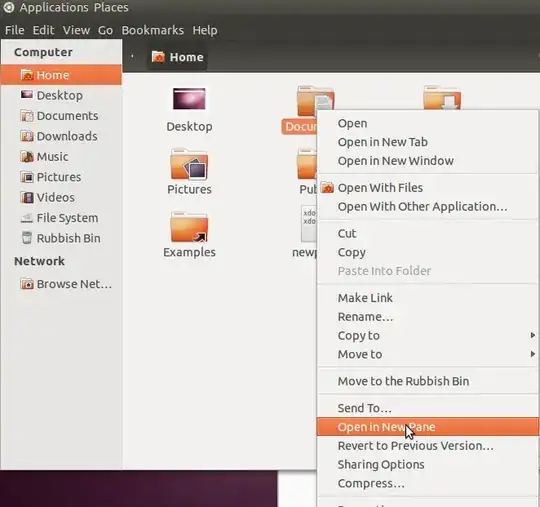
You'll now have a new option:

enter image description here

fossfreedom
  • 171,546
  • 47
  • 376
  • 404
  • 1
    I'll have a look - it seems nautilus remembers which pane was last clicked - so if you were on the right hand pane, next time you use "open in new pane" - it will open on the right-hand side. – fossfreedom May 07 '12 at 20:56
  • @Jakob - like desgua said - without changing nautilus code I dont think you can see the value of F3. I've changed the script slightly so that it always opens a folder on the right-hand side. – fossfreedom May 07 '12 at 22:27
  • Thank you. It takes a while to realize, but it works ... For the second case I added another action; just without the "F3"-line. – Jakob May 08 '12 at 07:26
  • Possibly you can remove the "sleep 0.3" times to something smaller or remove them. I included these for me to make debugging easier. Please can you update the answer with what you think it will make it better - if necessary, I'll update the screenshots with whatever you recommend. Remember, we are a collaborative website - so everyone should edit each others Questions and Answers to make them better :) – fossfreedom May 08 '12 at 13:29
  • I've had a go at reducing the sleep times to 0.2 or 0.1 - however, this makes the script slightly unreliable. It seems 0.3 seconds is a good compromise. – fossfreedom May 08 '12 at 22:17
  • should this still be working in Nautilus 3.10? it just enters the selected folder in the same window and opens the search field in my case –  Dec 04 '14 at 12:50