1

I have installed ubuntu-18.04.4-preinstalled-server-arm64+raspi3.img on my Raspberry Pi 3 B+. I have no problem to login, but there is a message during bootup the Pi3B+:

[FAILED] Failed to start Load Kernel Modules
See 'systemctl status systemd-modules-load.service' for details

Does anyone know how to fix it? Thanks.
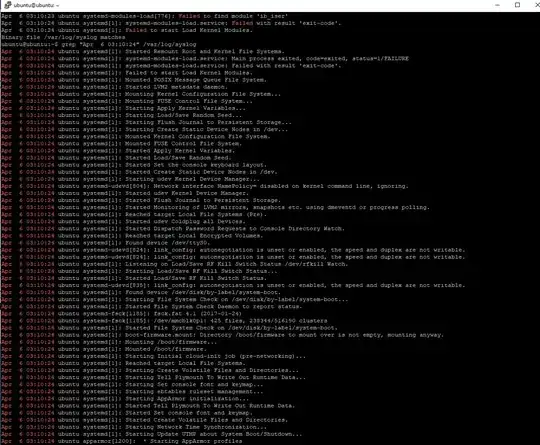
output

dragosht
  • 289
  • 4
  • 11
advanchip
  • 11
  • 3
  • When I ran "sudo systemctl status", State: degraded Jobs: 0 queued Failed: 1 units It didn't state which unit is failed. – advanchip Apr 06 '20 at 23:51
  • When I ran "sudo systemctl status systemd-modules-load.service", I got – advanchip Apr 07 '20 at 01:00
  • Please update an answer with `systemctl status systemd-modules-load.service` output. Comment doesn't seem to provide enough characters for this. – user3417815 Apr 07 '20 at 03:20
  • My question is whether we need 'ib_iser' module, can I ignore it or remove it in open-iscsi.conf? – advanchip Apr 07 '20 at 03:40
  • It's not even installed accordingly to message. This js why it fails. Check solution from this link https://askubuntu.com/questions/877245/systemd-modules-load-failed-to-start – user3417815 Apr 07 '20 at 03:43
  • To my knowledge this module is not mandatory – user3417815 Apr 07 '20 at 03:43
  • Thanks @user3417815. I followed your link to change #ib_iser, now I don't see the Failed message any more. Do you know what ib_iser for? Can I get it from somewhere? I don't want to miss out something. – advanchip Apr 08 '20 at 06:24
  • this module is an implementation of https://en.wikipedia.org/wiki/ISCSI_Extensions_for_RDMA , it's not needed on all kernels, only for specific infiniband devices. See this bug on launchpad https://bugs.launchpad.net/ubuntu/+source/open-iscsi/+bug/1833586 . Discussion confirms that iser_ib may be unavailable for regular kernels. – user3417815 Apr 08 '20 at 06:36
  • Thanks for solving my problem @user3417815. We don't use SCSI in our project, not for Raspberry Pi kernel. – advanchip Apr 08 '20 at 14:52

0 Answers0