14

I have already set VLC for default video player but still vids, movies, etc. open in Banshee and I cannot find anyway to turn that off. So far I have to manually tell each vid to open with VLC and to 'ignore' Banshee. Does anyone know any workarounds or hacks?? I think a plugin would be best ;)

May the Force be with you!!

Jeff Welling
  • 924
  • 2
  • 6
  • 13
jredkai
  • 505
  • 1
  • 6
  • 17
  • I assume you know to check and see if the videos you're trying to play in VLC aren't in a format that you have yet to configure VLC as the default player for? Eg, if you set VLC as the default for an .mp4 file and you try to open a .avi file then it won't open in VLC but in the other player. – Jeff Welling Apr 05 '12 at 16:02
  • Hi Jeff, you assume correctly. I have had Banshee un-installed since day one of 11.10 and used only VLC for everything because of this. Tonight I decided to be adventurous and I am amazed to see that still it has not changed. Even as the post below shows one way to do it, I do not want to do that every single time I want to watch something with my 'default' player VLC. – jredkai Apr 05 '12 at 16:14

2 Answers2

10

I had the same problem on Ubuntu 12.04. Changing the Video default app to VLC has no effect, while for the others (web, mail, music, etc... ) it does work. It seems that there is a bug.

A quick solution:

Open defaults.list with

gksudo gedit /usr/share/applications/defaults.list

Search for totem.desktop and replace ALL with vlc.desktop.

Save, close, and... enjoy!

f10w
  • 372
  • 1
  • 2
  • 17
  • Thank you! I've found a different route that I will try for now....if it doesn't work then I will come back to this. Thanks again. – jredkai May 02 '12 at 13:49
  • I had the same problem, this worked like a charm. thanks! – michael Jun 10 '12 at 13:02
  • 1
    Tried and it didn't work. What worked for me was to uninstall the Totem player. – Czarek Tomczak Jul 26 '14 at 13:45
  • This didn't work for me either, I uninstalled VLC, then totem became default player, I uninstalled totem, then videos opened with handbrake, I really don't want to remove handbrake... are there any other solutions? – George Dirac Dec 27 '14 at 05:01
5

Global change

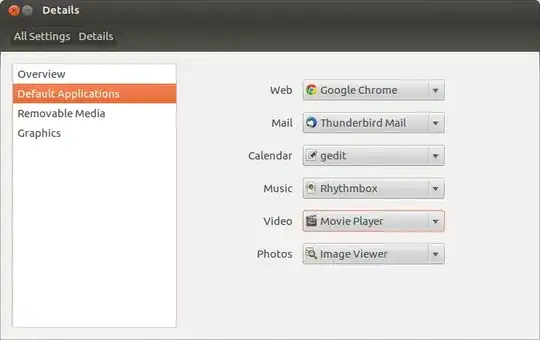
For changing the default Video Player, you need to change it from System Settings and goto Details

Then select Default Applications and change the Video

Global default video player


Only for specific file types

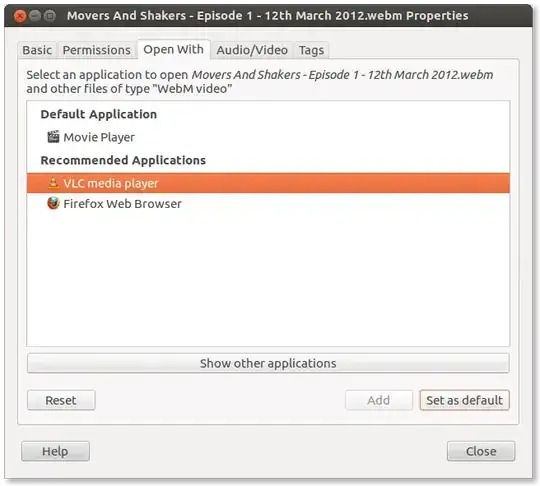
You can right click on any video and choose Properties, then goto Open With tab

Nautilus select properties

Nautilus Videos properties

Then select VLC and then click Set as default

Manish Sinha
  • 11,475
  • 2
  • 47
  • 63
  • Hi, I have seen this one already, however as stated by others this doesn't work globally, you have to do this with every single file. For example, this will only make "Movers and Shakers - ep.1" play with VLC. Next time you will have to do the same thing for the next vid. That is what I am trying to figure out how to do, make it work for ALL vids, especially since VLC is the default. Thank you for helping though!! :) – jredkai Apr 05 '12 at 16:12
  • I think that setting in the screenshot above is actually supposed to change the default globally, it does indeed say "and other files of type 'WebM video'" after all. If its not doing its job, I would suspect a permissions problem or a bug. Not sure how to check for the permissions problem though to be honest. – Jeff Welling Apr 05 '12 at 16:16
  • 1
    Okay, PROBLEM SOLVED (I still don't have the rights yet to answer my own question within the 8 hr period) I am still a bit o' a newb here (face palm), it is only doing it to certain file types. I am in the process of changing those now. Thank you all for your input and patience, you are what makes Ubuntu my fave distro!!!! May the Force be with you....always! – jredkai Apr 05 '12 at 16:22
  • @jredkai I updated the answer so that you can change it for all the file type of videos. May the force be with you too master :) – Manish Sinha Apr 05 '12 at 16:23
  • @jredkai Does this solve your problem? If yes, then please mark it as solved so that in future it can be used as a guide – Manish Sinha Apr 05 '12 at 16:37
  • @ManishSinha I know this is a newb question but where is the 'solved' button?? Sorry, hopefully I never have to ask _that_ question again – jredkai Apr 06 '12 at 09:44
  • @jredkai Just below the vote up/down button for every answer, there is a small checkbox. Click on it. – Manish Sinha Apr 06 '12 at 13:30
  • @ManishSinha Thank you! I probably should've seen that...oops. Anyway, thanks again! – jredkai Apr 08 '12 at 08:26