5

I'm trying to recover a single 4 TB ExFat partition made in Maverick's Disk Utility.

This single partition on the disk has storage files shared between Windows and Mac.

It became inaccessible after a Windows performed a repair reboot on the main hard drive.

Here's what TestDisk has found:

1) Disk selection
enter image description here

2) Quick scan finds MS DATA. Is the size correct for a 4 TB drive?
enter image description here

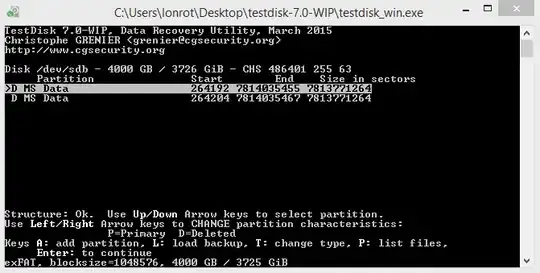
3) Deep scan finds another identically sized partition. Which one should I choose?
enter image description here

"Write" is the last option and I lack any other backup for this hard drive.

Doing it right the first time is a must.

Please advice.

Gabriel
  • 2,860
  • 11
  • 36
  • 51
  • **Before** you attempt any repair, **first make an image of the disk**. If your repair goes awry, you have recourse to the backup. – DrMoishe Pippik Mar 20 '15 at 18:13
  • 1
    I do not have any other 4 TB hard drive, so I must be absolutely sure if what I'm doing is right. – Gabriel Mar 20 '15 at 18:14
  • If you care to operate without backup, it's a risk you take. You could use a friend's disk, or even free cloud storage [http://www.1mtb.com/top-10-best-free-online-cloud-storage-services/ mentions Tencent Weiyun offers 10 TB]. Or live dangerously... – DrMoishe Pippik Mar 20 '15 at 18:20
  • Anyhow, the question is about taking the correct steps to recover an ExFat partition. A risk is a risk, but only after being sure I'm on the correct path. – Gabriel Mar 20 '15 at 18:28
  • Golden rule - never let Windows play with bootcamp partitions. I see klanomath has got your dupe in Ask Different. He's good at this kind of thing. – Tetsujin Mar 20 '15 at 20:54
  • Yes, using Macrium Reflect to backup the Windows partition was the worst mistake, since it not only failed but also modified another hard drive in the process. For Bootcamp as you mentioned better stay with Mac Apps such as Winclone and CarbonCopyX. – Gabriel Mar 20 '15 at 21:34

1 Answers1

5

I found all the necessary steps in the TestDisk guide.

With the P key I was able to see all the files, and proceeded to Write the partition table.

For future reference, select rDisk instead of Disk, it's the raw format and reads the partition much faster.

A big thank you to the developers behind TestDisk, without it the solution would have been much harder!

Gabriel
  • 2,860
  • 11
  • 36
  • 51