I am signed into iChat with my Mobile Me account, Is there a way to add google talk contacts to the account and chat through iChat?
Asked
Active
Viewed 1,647 times


1 Answers
2
Here's how to configure iChat to connect to Google Talk:
- Open iChat.
From the iChat menu, select Preferences...
Click Accounts along the top of the dialogue box.
Click the + button along the bottom to add a new account.
Select Jabber Account from the Account Type drop-down menu.
Enter the following information in the appropriate fields:
- Jabber ID:
- If you're signing in with a Gmail or Google Mail username, enter your full email address.
- If your Google Talk username isn't associated with any Google email product, add
@gmail.comto the end of your username. For example,iloveyokowill become[email protected] - If you're a Google Apps user, enter your full email address (
[email protected]). - Password:
Your password. - Server:
talk.google.com
- Jabber ID:
Click Add.
- Highlight your new account in the Accounts section, and then click Server Settings.
Enter the following information in the appropriate fields:
- Server:
talk.google.com Port:
5223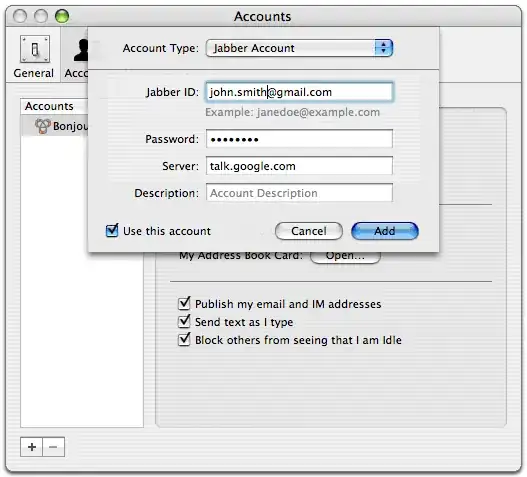
- Server:
Check the boxes next to Connect using SSL and Allow self-signed certificates. You don't need to check the box next to Warn before password is sent insecurely -- your password is always secure with Google Talk.
Enter iChat in the Location field. If this field is left blank, you won't be able to sign in.

Gaff
- 18,569
- 15
- 57
- 68

Sathyajith Bhat
- 61,504
- 38
- 179
- 264