1

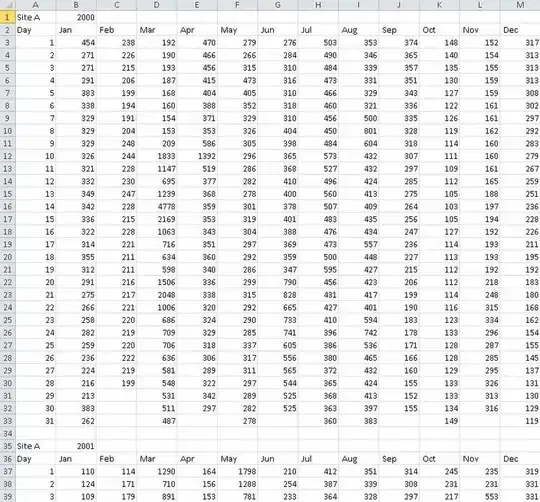
I have daily data for different sites organized as shown here:
I'd like to organize the previous data using Excel to look this figure:

I have tried using pivot table to change rows into columns but it didn't work with me. It would be highly appreciated if you could help me organize it.

fixer1234
  • 27,064
  • 61
  • 75
  • 116
  • http://www.howtogeek.com/howto/12366/convert-a-row-to-a-column-in-excel-the-easy-way/ try this. – Roxx Dec 23 '14 at 05:40
  • It'd be helpful if you were more specific than "it didn't work". Can you show a screenshot of what you tried? – slhck Dec 23 '14 at 05:45
  • @user2301394 That does not work here, since both rows and columns make up the individual date. A simple transposition will not achieve that, and only swap months and days. – slhck Dec 23 '14 at 05:47
  • Pivot table is for aggregate & analyze data, not for organize data. Maybe you can try using some formula/macro to organize your data. – David S. Dec 23 '14 at 06:28
  • possible duplicate of [Is it possible to "unpivot" or "reverse pivot" in Excel?](http://superuser.com/questions/78439/is-it-possible-to-unpivot-or-reverse-pivot-in-excel) – agtoever Dec 23 '14 at 19:41
  • Use the answer I just marked for each site. – agtoever Dec 23 '14 at 19:41
  • Your difficulty may come from describing the problem wrong. Your question doesn't involve changing rows into columns or pivoting anything. You are stacking (ranges of) the month columns one under the other by year (turning each 12 column table into one long 365 row column), and removing the blank and header rows between years so the year data is contiguous (about 3,652 rows per site for the 10 years of data, times n sites in that column). Then you're taking ranges from that column for each site and stacking them in columns next to each other. Because of the massive data, use VBA. – fixer1234 Dec 24 '14 at 03:23
  • @agtoever - interesting link but it won't work for this problem (question wording about pivot tables and transposing rows and columns is confusing; not actually the case for this problem). – fixer1234 Dec 24 '14 at 04:27

1 Answers1

0

You can select the dating row at a time, right click where you want the column to begin, go Paste Special... in the context menu, and select Transpose.

enter image description here

PFitz
  • 2,478
  • 1
  • 17
  • 24
  • @P Fitz Thanks for your help. But transpose won't work in this case. –  Jan 04 '15 at 23:38