0

How do I automatically change the length of a column with the numbers 0-n, where n = a number in a certain field?

I'm thinking of something like this:

enter image description here

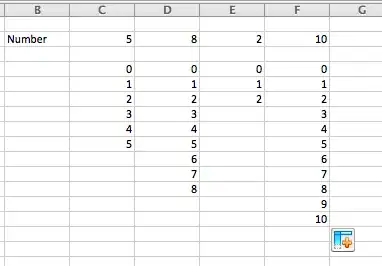
EDIT: Seems like I was bad at explaining exactly what I would like. Here's a second try I'm looking for a solution that will allow me to input one number in a field which would create a column of numbers from 0 to the input number. Here's what it would look like with different numbers. Note: I only need one field for number input, which would then create the column of numbers, as illustrated.

enter image description here

CharlieRB
  • 22,566
  • 5
  • 56
  • 105
Mike Haye
  • 111
  • 1
  • 4
  • 2
    Welcome to SUper User. Please share with us what you have already tried and where you got stuck. Details are helpful, like what version of Excel you are using. What VBA you have already started with and what errors you are getting. – CharlieRB Dec 16 '14 at 13:48
  • 2
    Again, what have you tried? We are not a script writing service, so sharing what you have already tried will show us you aren't just expecting us to do it for you. Please include the VBA you are using. – CharlieRB Dec 17 '14 at 15:08

2 Answers2

1

Here is some code to get you started (based on the cell placement in your image).

Sub SeriesFill()
    Dim RowCount As Long
    Range("C4:C1000").Cells.Clear
    RowCount = Range("C2").Cells.Value + 4
    Range("C4").Cells.Value = "0"
    Range("C4").AutoFill Destination:=Range("C4:C" & RowCount), Type:=xlFillSeries
End Sub

This was tested in Excel 2010. You will need to determine how you are going to trigger it and modify it to work on other columns.

CharlieRB
  • 22,566
  • 5
  • 56
  • 105
0

This does what you want.

In your example, you have 4 columns (C, D, E and F). Well, you could add another (G, H, I, J etc) and the code below will still execute for all of these columns.

You will need to tell it a few things though, such as rowsRequired (in this case this is row 2, it is the row where you define the requirements (such as how many values you want)).

You need to tell it what row to start pushing the results, in this case I chose row 4

You need to tell it the starting Column, in this case C

Sub DoTheThing()

@AHOY ME HEARTIES, SEE BELOW FOR WHAT YE CAN EDIT

Dim rowsRequired As Integer
rowsRequired = 2  ' THIS IS THE ROW NUMBER WHERE YOU ENTER THE NUMBER YOU WANT TO SEE

Dim startingRow As Integer
startingRow = 4 ' THIS IS THE ROW NUMBER YOU WANT TO START SHOWING RESULTS

Dim startingColumn As String
startingColumn = "C" ' THIS IS THE FIRST COLUMN

'I SUGGEST YOU LEAVE THE BELOW ALONE LESS YE WALK THE PLANK

Dim startingColumnInt As Integer
startingColumnInt = Asc(startingColumn)

Do While (Range(Chr(startingColumnInt) & rowsRequired).Value <> "")

    Dim valToUse As String
    valToUse = Range(Chr(startingColumnInt) & rowsRequired).Value

    Dim row As Integer
    row = startingRow

    Dim i As Integer
    For i = 0 To valToUse

        Range(Chr(startingColumnInt) & row).Value = i
        row = row + 1
    Next i

    startingColumnInt = startingColumnInt + 1
Loop

End Sub

Before
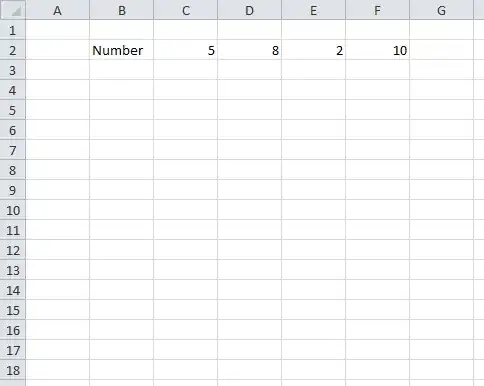
enter image description here

After VBa executes

enter image description here

How do I add VBA in MS Office?

Remember, with VBa there is no undo button (usually) so make sure you save first or create a back up!

Dave
  • 25,297
  • 10
  • 57
  • 69