31

I've been using Google Drive for a while, but recently I have a strange and very annoying problem:

After the computer has been idle for a while, the Google Drive icon grays out and hover over it shows the error:

Google Drive - Unable to connect
Google Drive - Unable to connect

Opening the menu reveals the same error:
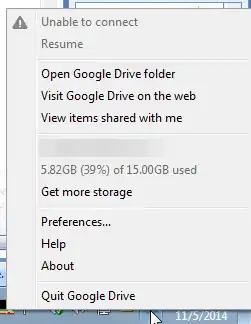
Google Drive menu

If I quit Google Drive and restart it, it connects without any problem.

My questions are:

  1. Does anyone know a way to get Google Drive to reconnect without having to restart the application?
  2. Does anyone know why this is happening in the first place so I can fix the problem at its core?

Update Regarding #2 above, it appears the reason this is happening is that any interruption in Internet connectivity causes Google Drive to disconnect but then it never tries to reconnect, even if connectivity is restored. See the comments below for more information.

Oz Solomon
  • 571
  • 2
  • 5
  • 11
  • 8
    A small update: I figured out that the reason this was happening is that my ISP often disconnects me for a few seconds at random times of the day. Google Drive loses connectivity, but it never tries to reconnect after that and there is no way to force a re-connection attempt. This seems like a rather silly design decision by Google, and it carries over to the most recent version of Drive at the time of this writing (1.19.8268.4572) – Oz Solomon Jan 21 '15 at 17:17
  • I notice you're in Toronto. Who's your ISP? I'm experiencing the same problems. – TheCloudlessSky Feb 17 '15 at 17:52
  • @TheCloudlessSky my ISP is Rogers. – Oz Solomon Feb 18 '15 at 18:30
  • Interesting. I'm with TekSavvy and have the same issues (I wasn't sure if it was ISP related). – TheCloudlessSky Feb 18 '15 at 18:32
  • 3
    @TheCloudlessSky the problem isn't that the ISP is disconnecting. It's that Google drive doesn't reconnect after it looses connectivity. It happens all the time on laptops as you are moving between WiFi hotspots, resuming from sleep, etc. Basically this is a bug in Google Drive. – Oz Solomon Feb 18 '15 at 23:46
  • Yup, I got that. I was just curious since we're both in the same city if it was ISP related. – TheCloudlessSky Feb 19 '15 at 02:50
  • The same happens to me in Chile on Windows 7, and other similar problems on OS X 10.10.3 –hangs, goes offline or unable to connect, crashes; I'd say Google Drive apps (sadly) are still on beta, despite being ~3 years old now, and wouldn't blame it on Canada or Toronto ;) – Jaime Santa Cruz May 16 '15 at 18:21
  • Is this occuring on a desktop or a laptop? I would check windows power settings to determine if your NIC is entering a low power state – Jason Bristol May 19 '15 at 15:07
  • @JasonBristol even if that's the case (it isn't), it's still a bug in Google Drive. It should try to reconnect periodically, just like Dropbox. – Oz Solomon May 20 '15 at 15:57
  • 1
    I dont have this problem , are you sure you dont have other network problems ? – sino May 25 '15 at 15:02
  • Having had this problem too, I thought to myself that I've never seen an update to Google drive on my PC. So I manually downloaded the installer, and it is significantly newer. Not sure why it wasn't updating itself. Not sure if a newer version will fix the problem. Shall see. – Fauxcuss Sep 25 '15 at 12:33
  • It just occurred to me you could create a task in task scheduler to restart the program once internet connectivity is lost (and comes back up). I would post details as an answer but you specifically asked for a solution that didn't include restarting the application. 2c – Insane Sep 28 '15 at 15:36
  • Just a tip for others having this problem: check your network activity. My Google Drive app said "Unable to connect", but I noticed my internet was real slow. Checked network activity and saw that Google Drive was hard at work, maxing out my upload speed. – DavidS Jul 13 '16 at 15:05

4 Answers4

4

I was having the same problem, a simple work around is to quit google drive. Then follow this path "C:\Program Files\Google\Drive\googledrivesync.exe"

If you can't find google drive sync, go to your main drive and enter it in the built in search engine.

Don't forget to create a desktop shortcut if this becomes a recurring problem.

Bankie-ZN
  • 51
  • 2
2

This isn't Exactly A fix For your Issue as your ISP is Partially to Blame but i can show you a little bit of a work around and show you how to make a basic script to force refresh google drive i hope it help (Windows vista-10)

Step One: Right click and create a new .txt file

Step Two: Open the New txt file an type the following line (Make Corrections as need)

@Echo Off

taskkill /F /IM googledrivesync.exe

Start /min "googledrivesync.exe"

exit

Step Three: Save the file as a .bat or .cmd to the location that contains your googledrivesync.exe.

Step Four: Create A shortcut or keybind (or anything else of your preference linking to the file.) and run it any time google disconnects

NOTE: You can Corrupt files "IF" they are in the "MIDDLE" of sync it's "UNCOMMON" as google is very good about handling files but force refreshing Programs can cause negative effects they are few and far between and often very uncommon but "YOU HAVE BEEN WARNED!" don't blame me if you just start rapid refreshing in the middle of an upload to see what it does.

1

I've experienced a similar problem with google drive on Linux, if my internet interface is turned off, google drive will lose it's connection, and when the interface is turned back on, google drive remains "unable to connect" until restarted.

It's possible that one of your power-saving options may be set to disable your network when the computer is "idle". While this normally wouldn't affect anything, as when you start moving the mouse it should automatically reconnect instantly, this could cause some programs to lose connectivity while idle.

Google drive seems to have difficulty re-connecting when the interface itself is disconnected from the internet, and then re-connected.

Perhaps you should take a close look at all of your power settings and make sure that windows isn't set to "disable network interface when computer is idle", as I know that has been an option on most network interface settings in the past, and certain versions of windows have it enabled by default.

Josh Raymond
  • 399
  • 1
  • 3
  • 14
0

Quick answer: Check the time on your PC.

Details: I had the exact same symptoms on an old XP server I usually have running all the time (and it had never been a problem before). It turned out to be that the clock battery was going flat, and when I turned it off briefly for whatever reason, the clock drifted and got slower.

At first it struggled to connect and then eventually, it wasn't even loading the google drive menu when clicking the taskbar icon. I updated the clock which by now was a few days out, and problem solved.

I believe this has something to do with HTTPS security certificates as I was also getting **Your connection is not private** problem when opening Google with Google Chrome. (I hadn't noticed because I don't normally surf from a server). This was also fixed by updating the time.

Ramhound
  • 41,734
  • 35
  • 103
  • 130
www-0av-Com
  • 124
  • 5