48

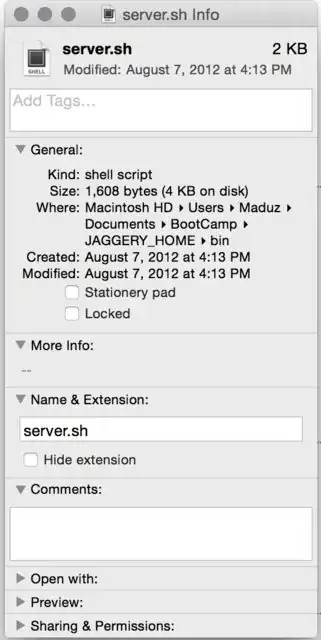
When I try to get the path of a file using ⌘ (Command)+I, it gives the path in a different way.

I see this only after updating to Yosemite. It is not a text. How do I get it in the format /Users/Myself/Documents/…?
Sathyajith Bhat
  • 61,504
  • 38
  • 179
  • 264
Madusanka
  • 583
  • 1
  • 4
  • 7

5 Answers5

45

Just select the file itself in Finder and press CmdC or go to Edit » Copy. You can then paste the path directly to a terminal window.

Note that this will escape special characters.

If you want the path in human-readable form, you need to do the following:

  • Open Utilities/Automator.app
  • Create a new Service
  • Set it to receive no input from Finder.app
  • Drag Run AppleScript from the left pane to the right
  • Paste the following into the field:

    tell application "Finder"
        set sel to the selection as text
        set the clipboard to POSIX path of sel
    end tell
    
  • It should look like this:

  • Save the service under any name you like, e.g. Copy human-readable path.

This is part one. Now, set a keyboard shortcut:

  • Head to  » System Preferences » Keyboard » Shortcuts
  • Go to the Services section and scroll down
  • Set a keyboard shortcut for your service

Et voilà, now press that shorcut when you need the path of any selected Finder item.

slhck
  • 223,558
  • 70
  • 607
  • 592
  • 8
    thank you man. I think it's unacceptable (especially by apple) that someone like me has to waste time to find out a way to copy a file path in 2014!!! – Apperside Oct 28 '14 at 09:17
  • This is very helpful! However how do i get it to appear in my shortcuts list as its not there. (saved it as a service). Does it need to be in a particular location? – v3nt Oct 29 '14 at 08:29
  • 1
    @danielCrabbe It should be saved in `~/Library/Services`, I think. [FastScripts](http://www.red-sweater.com/fastscripts/) may help you if the default shortcut preferences do not work. – slhck Oct 29 '14 at 09:29
  • @slhck - thanks. Just seemed to take a few minutes to appear! – v3nt Oct 29 '14 at 09:52
  • 1
    I wish this worked for pasting into Finder's `Go to Folder…` (`command-shift-g`). – 2540625 Jan 07 '15 at 18:10
  • Thanks, this worked perfectly with the copy-paste to the term !! – Ektos974 Mar 03 '15 at 13:18
  • What a relief! Dealing with the file inspector for soo many years and to realize this is so easy to do. Fantastic answer. – Brad Goss Mar 21 '15 at 14:39
  • I think it's important to mention that there are many shortcuts that are already occupied by the system. The system shortcuts **override** the user shortcuts and there is no warning when this is the case. I tried three different shortcuts and it didn't work (Shift+Cmd+7, Shift+Cmd+P, Shift+Cmd+C). So make sure you try out a variety of shortcuts before resigning... – Mischa Apr 07 '15 at 21:58
  • 1
    I made a better Automator workflow, which does accept input from Finder and therefore will properly be available/unavailable depending on what you're doing in Finder: https://dl.dropboxusercontent.com/u/147461/screenshots/Screen%20Shot%202015-06-21%20at%204.53.40%20pm.png – Abhi Beckert Jun 21 '15 at 06:58
  • does not work for other terminals such as Iterm2/3... – Michahell Aug 10 '16 at 07:24
  • @MichaelTrouw I'm not sure what you mean. This doesn't have anything to do with the terminal – it's an automator action that can be run everywhere. Did you mean to comment on JakeGould's answer below? – slhck Aug 10 '16 at 18:26
  • @slhck meant to react to this: "Just select the file itself in Finder and press CmdC or go to Edit » Copy. You can then paste the path directly to a terminal window." – Michahell Aug 11 '16 at 08:04
  • @MichaelTrouw Actually, it works for iTerm2 too – copy the file in Finder, then paste it into the terminal window. It'll show a normal Unix-style path. – slhck Aug 11 '16 at 08:45
  • WTH? it does work... funny, yesterday I tried it multiple times and it didn't. Software be weird... thanks! @slhck – Michahell Aug 11 '16 at 09:00
  • The paste operation also works in TextWrangler, and BBedit. – Sherwood Botsford Mar 31 '18 at 13:34
13

Open up the “Terminal” in Applications > Utilities > Terminal and then drag the file into the window. The full Unix path of the file will show up.

Giacomo1968
  • 53,069
  • 19
  • 162
  • 212
  • 4
    I already mentioned that in my answer. The problem is that the OP doesn't want an escaped path, I guess. – slhck Oct 22 '14 at 16:34
  • 1
    @slhck Ehhh. Okay. But now it’s yet another reason to delay upgrading to Yosemite. So many issues big & small for anyone doing production work. – Giacomo1968 Oct 22 '14 at 16:36
  • 2
    Yeah, it's a little inconvenient. I don't use this Mac for "production" anymore, but I keep discovering minor changes that makes it feel like I should've stayed with 10.9 for a little longer. – slhck Oct 22 '14 at 16:37
3

Right-click (or control-click) on the file icon, then hold down the option key. In the pop-up menu that appears there will be a "Copy "filename" as Pathname" menu item. That menu item will put the POSIX path to the item on the clipboard.

ThomasW
  • 383
  • 2
  • 7
  • 1
    According to http://osxdaily.com/2015/11/05/copy-file-path-name-text-mac-os-x-finder/ This became available with version OS X 10.11 – TecBrat Dec 10 '16 at 19:18
  • @TecBrat Yeah, this might not be in Yosemite, but it is available now. – ThomasW Dec 11 '16 at 04:24
1

Drag the file into textEdit to get the path.

Dragging the file into Terminal will replace spaces or special characters in the file name with backslashes.

Cool Brian
  • 21
  • 4
  • Can you explain what you mean by "random forward slashes"? When you drag the file to a Terminal window, and the file has spaces in it (or other special characters), those will be escaped for the shell with backslashes, e.g. `foo bar` will be converted to `foo\ bar`. – slhck Oct 22 '14 at 15:55
-1

Navigate to the file. Copy the file (Cmd+C). Open TextEdit or Notes. Paste (Cmd+V).

Magic!

  • 6
    This does not copy the path, but just the filename. The application that you paste to implements this behavior, and only Terminal seems to paste the full path (escaped though). – slhck Nov 11 '14 at 17:30