16

I have installed an 32-bit Ubuntu based Linux OS, Elementary, on a VirtualBox installed in Windows 7 (32 bit) , on a 64-bit laptop which has a 2-core Intel i3-2330 CPU @2.20Ghz, and 4GB RAM (2.45 usable).

I have allocated 1.2 GB RAM to the virtual system and left the CPU allocation default. The VM processor setting looks like so:

enter image description here

The Linux VM system is too slow.

Looking at the Task Manager in Win7 and at System Monitor in Linux, I can see that this is probably not because of the amount of RAM used, but because the virtual Linux has too little processor power. In Windows, VirtualBox takes 25% of CPU power and only about 160 MB of RAM (summing up the 4 instances that I see). In Linux, not even half of the 1.2 GB of RAM are normally used, while the CPU resources seem used 100% all the time.

Can I allocate more CPU resources to the VM? How to do that? Can I do that for the system that is already installed in VM or should I re-install the virtual OS?

CPU-Z displays this about the CPU in Windows:
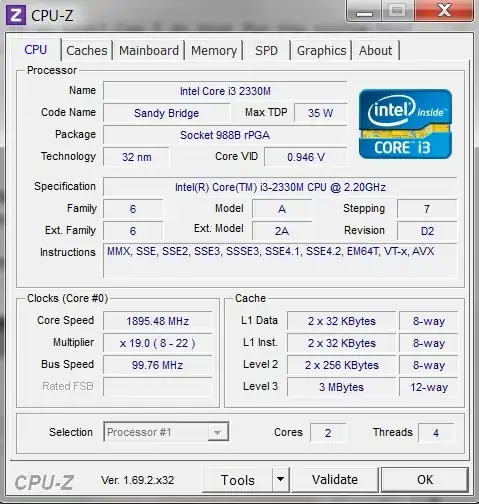
enter image description here

My purpose is to use the Linux from time to time while not using Windows 7, so, I would prefer VirtualBox to take more of the CPU resourses from Windows, because I will not be needing those when using the VM. (I am aware that my purpose would be suited better with a dual-boot installation of the Linux system, but the GPU on this laptop doesn't have the proper drivers in Linux: it heats up so hard that the computer is shut down before the Linux is even installed, or before installing the proper drivers etc.)

  • 1
    Silly question. Have you shut down all of your VMs before trying to allocate more CPU cores? If not all of them than at least shut down the one you are trying to give more cores to. – MonkeyZeus Oct 09 '14 at 15:51
  • @MonkeyZeus - it depends what you mean by silly. I was not aware that I needed a 32-bit guest. The guest was shut down but the setting looked inaccessible because - as the below answer argues - a 64-bit system is needed. Edited the question to say that the guest was 32 bit. –  Oct 09 '14 at 15:55
  • I wasn't judging your question, I was merely marking my incoming question as being potentially silly =). Sometimes it's the simple things that get you! – MonkeyZeus Oct 09 '14 at 15:58
  • Rather late to the game, @MonkeyZeus and others, you only looked like you were criticizing because of punctuation, I read it the same way first time, instead could be, "Silly question: Have you shut down..." or better "I have a silly question: ..." (yes comment off topic but might help all those ESL folks out there :) – JimLohse Jan 07 '19 at 00:29

1 Answers1

14

Getting a host computer that's running something better than an i3 would be the real answer (IMO). :)

Regardless of that...

The reason it's using 25% at most is because your i3 has 2 cores, but 4 threads, so the host sees it as 4 processors.

The VM is set to use only one of them, up to 100%, so when it's maxed out it's using only 25% of the total CPU power of the host.

For setting up VB to allow more than 1 virtual CPU, additional settings need to be configured:

  • enable I/O APIC in the Motherboard settings tab

    enter image description here

  • enable hardware virtualization (VT-x/AMD-V) in the Acceleration tab

    enter image description here

To avoid problems, don't set it any higher than your number of PHYSICAL cores; so in your case, don't try to use more than 2 virtual CPUs.

You should not configure virtual machines to use more CPU cores than you have available physically (real cores, no hyperthreads).

If the Acceleration options are not available, ensure you have enabled virtualization technology in your BIOS.

Ƭᴇcʜιᴇ007
  • 111,883
  • 19
  • 201
  • 268
  • My current guest in an eOS Freya (Ubuntu) 32-bit. So, I need the 64 bit version –  Oct 09 '14 at 15:51
  • 1
    I do find the instruction to set it to a 64-bit guest to be a little dubious. If you skip that step, and just use the other suggested settings, does it work? – Ƭᴇcʜιᴇ007 Oct 09 '14 at 15:55
  • As I said, I have a 64 bit machine but a 32 bit Win 7 on that. VirtualBox does not display 64-bit option when trying to create a new VM. Maybe similar to [Why Virtual Box won't give me option to create 64 bits guests](http://superuser.com/q/668006/162573). -- And (that settles it) - no acceleration: that tab is greyed out! –  Oct 09 '14 at 16:11
  • 2
    I kind of assumed you had already turned them on in the first place.. ;) – Ƭᴇcʜιᴇ007 Oct 09 '14 at 16:37
  • 1
    @techie - before asking this question had no idea what virtualization was ;) –  Oct 09 '14 at 17:45
  • 2
    indeed the 64-bit part is not a must. I have tested with Lubuntu 32 bit in VMware and it works fine with 2 processor cores. **Enabling the virtualization is what was missing.** –  Oct 11 '14 at 12:23
  • "Getting a host computer that's running something better than an i3 would be the real answer" - indeed. Even Elementary OS which is supposed to be a light OS is still slow. Lubuntu is a better solution for a VM on my system. –  Oct 11 '14 at 12:25
  • @TECHIE - you are right about the 64/32 bit part I think –  Oct 11 '14 at 12:26
  • considering the limitations of my machine and its capacity of running VM: the best solution is to choose very light distros - I have tested with Lubuntu and Semplice Linux (with Openbox). And they feel maybe lighter in VMware than in VBox. –  Oct 11 '14 at 23:29
  • Very helpful for me to get Windows 10 guest on Ubuntu running Corel Video Studio Ultimate 2018 to run on ALL 4 cores, AND it takes advantage of all 8 virtual processors! Rendering time much faster now. – JimLohse Jan 07 '19 at 00:25
  • I bring this up to reinforce why to only choose # of physical cores, not virtual, VirtualBox does the rest (I used Hypervisor setting.) Also, in case someone has never dealt with virtualization before, it's often overlooked that you have to choose a setting in BIOS setup to allow virtualization (and if you can't find it your computer is too old) – JimLohse Jan 07 '19 at 00:26