17

Here I have this file in Windows:

enter image description here

But isn't 62,563 bytes 62.6 KB?

enter image description here

Daniel B
  • 60,360
  • 9
  • 122
  • 163
Kirk Ouimet
  • 2,715
  • 8
  • 37
  • 56
  • 24
    See [XKCD #394](http://xkcd.com/394/) – Nick T Jul 22 '14 at 21:07
  • 6
    possible duplicate of [What is the difference between a kibibyte, a kilobit, and a kilobyte?](http://superuser.com/questions/287498/what-is-the-difference-between-a-kibibyte-a-kilobit-and-a-kilobyte) – Doktoro Reichard Jul 22 '14 at 21:28
  • 11
    Mac uses decimal kilobytes (the IEC standard), while Windows still uses binary kilobytes (since renamed to kibibytes), Linux usually refers to KiB (the renamed binary kilobytes). Personally, I think this is all kinds of mucked up. One doesn't buy a stick of RAM with 1,000,000,000 bytes in it, but instead buys a stick of RAM with 1,073,741,824 bytes. But when you buy a hard drive, you buy it with 500,000,000,000 bytes available on it, even though sectors are allocated in multiples of 512 bytes. I liked my kilobytes when they were binary... – phyrfox Jul 23 '14 at 03:48
  • 1
    @phyrfox: 1 MHz of CPU is 1 million cycles, not 1,073,741,824 cycles. 1 Mbps of network traffic is also 1 million bits. – Zan Lynx Jul 24 '14 at 09:55
  • The prefix for kilo (1000) is "k" - *lowercase* - *not* "K"... Eg. kB = kilobyte, kb = kilobit, kHz = kilohertz... *not* "Kb" or "Khz" – Baard Kopperud Jul 24 '14 at 13:38
  • @ZanLynx Apples and oranges. Storage was traditionally measured in binary sizes, speed in decimal sizes. In the 1980's, there was no confusion, and I wasn't even in grade school yet. Mhz and Mbps is a measure *per second*, and do not describe storage *capacity*. Files are still stored eight bits at a time, not ten, and I've never heard of a 200 MB stick of RAM. CPUs have buses measured in bits, such as 32-, 64-, and 128-bit. Network traffic originally had ten bits per byte because of a start and stop bit, and so it made sense to measure them in decimal. – phyrfox Jul 24 '14 at 16:13
  • @phyrfox: Mega is 1 million no matter what unit it applies to. This is the only thing that makes sense. – Zan Lynx Jul 24 '14 at 17:20
  • @ZanLynx Mega = 10^6 **in decimal**. Since tradicionally storage is measured in **binary sizes (not in SI)**, it's used the nearest power-of-2 - which is 20, so the result is 1048576 bytes. – Fabricio Araujo Jul 24 '14 at 18:11
  • @FabricioAraujo: *Traditionally* we measured things in ounces, pounds, troy ounces, slugs, tons, stones, pinches, etc. And you had to know what you were measuring to know how big the unit was. Gold used different ounces from flour. *Tradition* is not a reason to do things the wrong way. – Zan Lynx Jul 24 '14 at 18:14
  • @ZanLynx: Sincerely, even being born and live in a metric country my whole life, some measures of the Imperial system are **MUCH** better for everyday use. I tried it for 2 days and never in my life I had a so successful experience in estimation. Inches in television sets, for example. So, they are not **wrong**. That system is coherent once you understand it. So is the system used in storage of bits/bytes. It describes the quantities of **binary units**. So makes **a lot of sense** to use powers-of-2 for it. It's perfectly coherent. – Fabricio Araujo Jul 24 '14 at 18:34
  • 3
    @ZanLynx Mega is not 1 million, it's adapted "great" from Greek. Also, as they are, SI prefixes only make sense with physical units. But bytes and bits aren't physical units. Moreover, as SI prefixes are standardized, there's also a [standard](http://en.wikipedia.org/wiki/JEDEC_memory_standards#Unit_prefixes_for_semiconductor_storage_capacity) for memory sizes, which defines meaning of kilo, mega and giga as 1024, 1048576 and 1073741824 respectively. – Ruslan Jul 24 '14 at 20:07

4 Answers4

52

62,563 bytes are 61.0966797 kibibytes. The kibi prefix means that the base for calculation is 1024, bi standing for "binary" because 2^10 = 1024. It's only one of the binary prefixes, others being mebi or gibi.

A kilobyte on the other hand is 1000 bytes, using the classic SI prefixes that you know from kilometers and kilograms. It's using the decimal base, 10^3 = 1000, so Google is actually right. If you had googled for the same amount in kibibytes, you'd have gotten the right answer in computing terminology.

It's really important to make the distinction between kilo and kibi these days, and actually, Windows should report it as "61 KiB" to be absolutely precise. This is the IEC convention for making the distinction easier.

That being said, there's still a lot of ambiguity these days, where hard drive sizes are typically reported in binary units (but not always explicitly), and connection speeds are given in SI units.

slhck
  • 223,558
  • 70
  • 607
  • 592
  • Well, kibibytes was accepted as of 1998 and I'm pretty sure that I remember this issue existing long before that. Good answer though. – EBGreen Jul 22 '14 at 20:39
  • note 1024=2¹⁰=2×2×2×2×2×2×2×2×2×2, where as 1000=10³=10×10×10 – ctrl-alt-delor Jul 22 '14 at 20:40
  • I remember an old manual for some ancient computer was refering to 1024 bytes as `1 K`. Similarly, 1024 K were `1 M`. Just "key" and "em". Sounds reasonable, but it didn't catch on. – Joker_vD Jul 23 '14 at 06:32
  • 1
    @Joker_vD: Luckily so ;-) *kilo* and *mega* (and whatever other prefixes would follow) are just factors, not quantities of their own, so using just *K* and *M* (and *G* and *T* and *P* etc.) would be quite pointless. (The same is valid for the prefixes *kibi*, *mebi* etc., obviously.) Moreover, all commonly used units are nicely free of ambiguity, as no abbreviation is used twice, but *K* would at first glance look the same as *K for Kelvin*. – O. R. Mapper Jul 23 '14 at 06:35
  • 1
    @O.R.Mapper Yes, and *T* would be mistaken for *Tesla*. Because obviously, programmer's manuals often discuss underlying physics. – Joker_vD Jul 23 '14 at 06:43
  • 1
    @Joker_vD: Whether or not physics could appear there is irrelevant. The point is, unit signs *K* and *T* wouldn't be unambiguous without any context any more - thus creating an undeniable disadvantage compared to a unique mapping between unit signs and units -, making such a convention highly undesirable. – O. R. Mapper Jul 23 '14 at 06:46
  • 1
    Who outside of a niche of the computer world knows what a 'kibibyte' is? By the way, it was only recently that Google was 'right'. It's *still* a very alive debate on whether a kilobyte is 1000 or 1024 bytes. – Justine Krejcha Jul 23 '14 at 06:48
  • 9
    Am I the only one who's a little upset that this gets truncated to 61.0, rather than rounded to 61.1? – Christofer Ohlsson Jul 23 '14 at 07:05
  • @ChristoferOlsson indeed. – Iraedei Jul 23 '14 at 09:57
  • 1
    Darn Kibibytes man. Bytes were our best chance to have a standard unit of measure that everyone could agree on, that would purely logical in it's definition, since it only originated in the past few decades, and we still managed to screw it up. – DLeh Jul 24 '14 at 19:47
21

Yeah, think of google as the Mad Hatter. You have to ask the right question. Or perhaps an Elf: Sometimes your answer will be both yes and no.
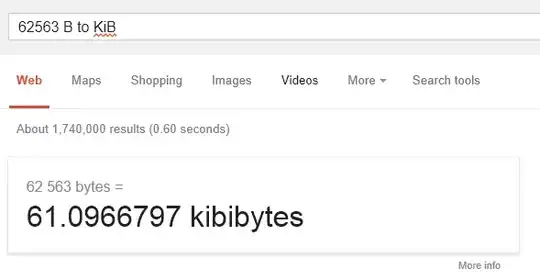
byte to KiB. The computer's kilobyte; or the kibibyte.

Iraedei
  • 487
  • 2
  • 7
6

1KB = 1024 bytes. Thus:

62563 / 1024 = 61.097KB

As a shortcut many people and systems treat a KB as 1000 since Kilo is the SI prefix for 1000. Computer scientists however use the prefix for 2^10 which is 1024.

EBGreen
  • 9,127
  • 1
  • 36
  • 40
5

Most computer-related numbers use binary prefixes, in contrast to SI system which uses decimal prefixes. It means that:

  • 1 kilogram = 103 grams, but
  • 1 kilobyte = 210 bytes

That's respectively 1000 grams and 1024 bytes. 62563 / 1024 ~= 61, so Windows is right.

Not everything computer-related is based on binary prefixes, though, and this inconsistency often leads to misunderstandings. This Wikipedia page describes what prefixes are used for measuring different things.

One extreme case is bandwidth. It's typically using binary prefixes when expressed in bytes per second and decimal prefixes when expressed in bits per second. So this sentence is true:

1 byte per second = 8 bits per second

But this one is false:

1 kilobyte per second = 8 kilobits per second

Because:

  • 1 KB/s = 1024 B/s
  • 1 Kbps = 1000 bps

(related question)

gronostaj
  • 55,965
  • 20
  • 120
  • 179
  • 1
    Mistake: 2^8 = 256 ---> I suppose that should be 2^10 ;-) – Hannu Jul 22 '14 at 21:00
  • The WP talk page is much more interesting than the actual article (a very giant debate on whether a KB is 1024 or 1000 bytes). – Justine Krejcha Jul 23 '14 at 06:47
  • Bandwidth is properly expressed in Hz, where the SI prefixes use powers-of-10. The reason throughput (transfer rate of data, equivalently bandwidth multiplied by encoding efficiency) is ambiguous is because the first definition leads to `(KB)/s`, where KB uses the binary-based prefix, and the second is based on kHz or kbaud, using the decimal-based prefix. – Ben Voigt Jul 24 '14 at 17:32