2

I've spent the whole day trying to find solution and there are solutions, but they don't seem to work with my PC and device.

I just install Windows 7 and install Windows Mobile Device Center. Then I connect my device running under Windows Mobile 6, but it can not connect. I uncheck the "Enable advanced network functionality" through Setting -> Connections -> USB to PC, then restart the device and still it can not connect.

I uninstall WMDC, then restart my PC, and connect to device, but I still can not make a connection.

Simon Sheehan
  • 9,114
  • 12
  • 52
  • 71

3 Answers3

5

Thanks for responding. I just got it to work by following the instructions on http://www.microsoft.com/windowsmobile/en-us/help/synchronize/device-center-troubleshooting.mspx

While the device is connected, I uncheck the Enable advanced network functionality on the device (Settings -> Connections -> USB to PC), and then I uninstall any existing device driver under the Portable Devices node. Start -> Control Panel -> Hardware and Sound -> Devices Manager, Portable Devices. Disconnect the device and connect back-in, until Portable Devices node lists the actual connected device ID, and then install the Windows Mobile Device Center.

Peter Mortensen
  • 12,090
  • 23
  • 70
  • 90
  • Alright. Thanks for the link from MS Site on Troubleshooting this problem. If it worked for you, then you may consider marking this question as "resolved" – kamleshrao Nov 17 '09 at 17:19
  • I just I unchecked the "Enable advanced network functionality" on the device (a CK3X in my case) and re-seated the device in its cradle and Win7 Mobile Device Center _finally_ connected to it. Thanks! – Doug J. Huras Dec 02 '15 at 14:40
  • Seems like the link doesn't work anymore :S – Teysz May 24 '16 at 08:20
1

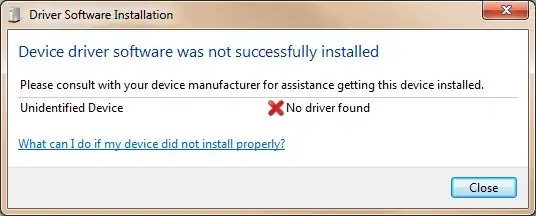
On my Windows 7 64-bit machine, when I plugged in HTC Viva (USB), it couldn't detect the phone:

enter image description here

Later, I kept the phone connected (through USB) and manually went to Control Panel > Windows Update and clicked on Check for updates. After a few seconds, it detected the device and installed the appropriate driver.

enter image description here

Gaff
  • 18,569
  • 15
  • 57
  • 68
kamleshrao
  • 813
  • 4
  • 14
  • 20
0

Try installing Zune software from Zune.net. It's supposed to fix ActiveSync issues in Windows 7.

nc4pk
  • 9,037
  • 14
  • 59
  • 71