-1

I have looked at this post and identified the services svchost eating up memory
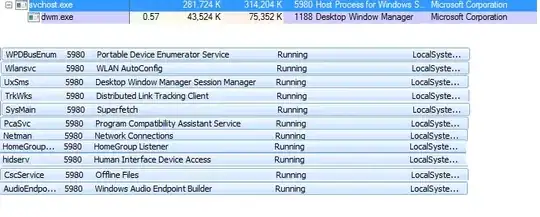
enter image description here

Also yesterday I fixed an issue with a corrupt user profile service failed to start I used the technique in this video to fix that and edit the registry. I notice the User path was pointing to c:\users\Temp instead of c:\Users\Mike. The next day I booted up and my logon icon changed from the default flower to the jumping jack icon. This made me a bit nervous.

I am worried I have sometype of virus because all the games are running slower in general. I scanned with MalwareBytes, AVG, MS MSRT. Nothing was found.

Any advice where to go from here?

Edit: I also just notice my screensaver was disabled.

Mike
  • 139
  • 2
  • 10
  • You could also try [Spybot 1.6](http://www.safer-networking.org/mirrors16/) (Spybot 2 is rubbish). But if you really want a fast and clean PC, the best solution is: back up your data and reinstall the OS. – Oriol Jan 25 '14 at 18:01
  • both of them are rubbish, time to reinstall windows. and software recommendations are a no, no on this site. – Outdated Computer Tech Jan 25 '14 at 18:02
  • What software recommendation did I make? – Mike Jan 25 '14 at 18:19
  • @Oriol, even if I do that I feel that what ever I did lately will slow it down again. – Mike Jan 25 '14 at 18:27
  • @Mike - You can't make a computer slow. If its slow something is running in the background. The simplest solution is verify the problem exists on a new user profile, if it does, this proves your Windows installation is corrupt. If the problem goes away then only your user profile is corrupt. – Ramhound Jan 25 '14 at 18:42
  • I don't think this is out of the ordinary. I have a svchost.exe in Windows 7 that is about the same size and it runs just fine. Is there a problem that we are trying to solve? Cause you can just turn off all those services. . . – surfasb Jan 26 '14 at 02:07
  • The problem seems to be two days ago I got the User Profile Service failed. The light on the front of my computer seems to always be on, as if something is accessing the disk. Loading games and programs seem to freeze hard during the start up and the first time using a resource. I thought the above was contributing to that sort of like running windows on low memory or something. I have a computer with 8 gigs and seem to be running fine last week. – Mike Jan 26 '14 at 20:27
  • If I do decide to reinstall windows should I backup my files A)With Backup and Restore 2)This "easy" tool http://windows.microsoft.com/en-us/windows7/products/features/windows-easy-transfer 3)Manual copying. – Mike Jan 26 '14 at 20:35
  • The user profile got messed up somehow. Before reinstalling Windows, create a new user account, and see whether you can login successfully there. – and31415 Jan 27 '14 at 18:17

1 Answers1

1

This memory usage comes from the Superfetch service. It needs itself some memory to preload other data into the cache.

magicandre1981
  • 97,301
  • 30
  • 179
  • 245