1

I have a client certificate for Satrtcom. I'm trying to authenticate to their service, but I'm receiving a "Secure Connection Failed" error with error code ssl_error_handshake_failure_alert:

enter image description here

The Startcom certificate and private key are present in Keychain:

enter image description here

The certificate sumps correctly using Peter Gutmann's dumpasn1:
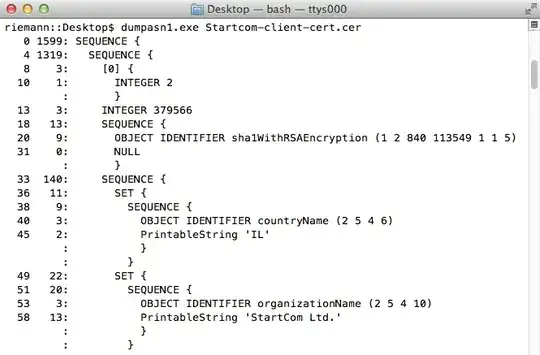
enter image description here

And it dumps correctly using OpenSSL's x509 utility:
enter image description here

The Keychain allows access to the certificate by Firefox (I just added it).
enter image description here

However, the issue persists. Tracing with Wireshark, I can see the client's Certificate message, but I don't see my client certificate in it (notice Certificate Lengths is 0):
enter image description here

Does anyone know what knobs to turn to have Firefox send the certificate rather than an empty Certificate message?

UPDATE: from https://stackoverflow.com/questions/1331722/client-certificates-and-firefox, the certificate is not listed under "My Certificates". This is expected since I want Firefox to use the certificate and private key in the Keychain.

So the question becomes, how do I instruct Firefox to use the certificate and private key in the Keychain?

UPDATE: This looks like a Firefox on Mac OS X bug (there was another similar bug in Firefox's bug reporter). See Cannot use Client Certificate stored in Mac OS X Keychain (or cannot figure out how to do it).

Any workarounds for this issue are welcomed.

jww
  • 11,918
  • 44
  • 119
  • 208
  • Does another browser work by chance? – Ramhound Jan 23 '14 at 20:45
  • Thanks Ramhound. I'm not sure if other browsers work. Safari is broken and I can't get it to start. I don't really care its broken since I use other browsers, so I've never taken the time to track down the problem. In the past (about a year ago), I believe it worked with Safari. – jww Jan 23 '14 at 20:48
  • I asked with the intention of you verifying it works with other browsers.. – Ramhound Jan 23 '14 at 21:19
  • Thank Ramhound, gotcha. Then I don't know if it works. The best I can tell, the problem seems to be specific to Firefox since its not sending the client certificate in the Certificate message. – jww Jan 23 '14 at 21:24
  • Well if you won't verify if the certificate works with safari I can't help – Ramhound Jan 23 '14 at 22:18
  • Thanks Ramhound. It worked in the past with Safari, but I can't test it now. Plus, it was imported into the Keychain, so that's a second program that validated the certificate and private key. I'm not sure what the fixation is on Safari because the problem is with Firefox. – jww Jan 23 '14 at 23:30
  • You could use Chrome if you wanted. The point is to verify if the problem is with Firefox simply does not recognize your certificate as being valid or if the problem is something else. – Ramhound Jan 23 '14 at 23:36
  • Thanks Ramhound. I exported the certificate and dumped it using both Guttman's `dumpasn1` and OpenSSL's `x509` utility. There were no problems. – jww Jan 23 '14 at 23:50
  • I was able to log in by exporting the certs from Firefox and importing them to Chromium using the built-in browser UI, but this was on Linux so no Keychain involved. – unhammer Apr 01 '15 at 11:00

1 Answers1

1

Firefox does not store passwords, certificates or credentials in KeyChain, it uses its internal storage database instead (within Firefox profile data).

Go to Preferences > View Certificates... > Import... to import your certificate into Firefox.

This is not exclusive for Mac OS, quoting: https://wiki.mozilla.org/CA:AddRootToFirefox

There are lots of organizations that use their own certificate authorities (CAs) to issue certificates for their internal servers. Since Firefox does not use the operating system's certificate store by default, these have to be manually added into Firefox.

Capilé
  • 111
  • 2
  • Thanks @Capile. Yeah, this is the problem: *"...these have to be manually added into Firefox"*. The browsers lack protected storage, so all their storage is insecure. That's why we want to use Keychains (Android, iOS or OS X), or ProtectedStorage (Windows). Peter Gutmann has a very good analysis of key chains at [Engineering Security](https://www.cs.auckland.ac.nz/~pgut001/pubs/book.pdf). – jww Dec 20 '17 at 16:32