5

I'm not too computer savvy so sorry if I'm missing something important or I say something dumb. I'm really frustrated and I'm trying my best to learn and solve this problem.

So I bought this Vaio with Core i5-3210M, 4GB RAM, Windows 8 64-bit. I had really high hopes for it, coming from an i3. For the first few weeks it worked fine, but then it started to freeze while watching movies. Then it started happening all the time, and the cooling fan became consistently noisy for working at full capacity.

I was used to opening task manager on older systems when this happened to see if there was a non-responding program and force it closed, so I noticed Task Manager offers some more features in Win 8. Here, I see that CPU usage is high, staying always around 70% and from time to time reaching 100. At this moment, the process taking the biggest slice is called VCS System Tray with 58%.

What's perhaps more concerning, is that Disk usage is almost constantly on 100%. And by this I mean it reaches 100 and stays there for long periods of time, perhaps up to 20 minutes, then it falls down a few seconds and up again to 100. During this time the computer is excruciatingly painful to use. To even open a program takes forever. When this happens, it seems that Chrome is at the top of the list of processes with most disk usage, with about 1-2Mbps, but this sometimes changes and the list can be led by System, Utorrent, Octoshape, VCS System Tray, Communications Service...I think it's not related to any process by itself, but its nearly ALWAYS at 100%.

Finally, memory usage is also pretty high at 78%, but I guess this may be because 4Gb is not too much for this computer. I'm hoping to upgrade to 8 soon. Out of the 10 processes consuming most memory, 9 is Google Chrome (how's that even possible?).

In case it helps, here's a capture of the Disk Usage stats enter image description here
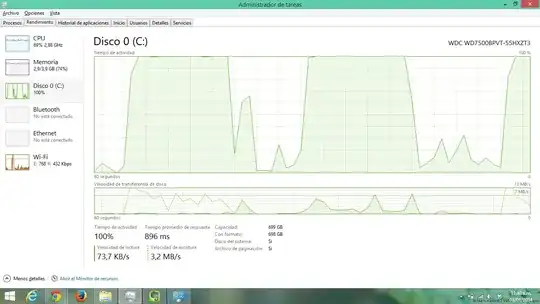
And one of the processed with the most disk usage and the Resource Monitor at the side: enter image description here

Varaquilex
  • 3,848
  • 3
  • 30
  • 47
user286537
  • 71
  • 1
  • 4
  • Welcome to superuser! Have you scanned for virus/malware? I'm not a 100% sure but it seems like a malicious program is wasting your resources. – Varaquilex Jan 03 '14 at 15:16
  • 1
    Chrome is a major memory hog, it runs a ton of backround procesess. There may be something here that could help: https://www.google.co.uk/search?hl=en&q=controlling+chrome+memory+usage Alternatively (and I hate to admit this) try using IE instead. Taking the free upgrade to 8.1 may also help. – CLockeWork Jan 03 '14 at 15:20
  • The 100% disk usage is Windows8 paging things from memory into "swap" and then retrieving them again. VCS is Vaio Care System, see if there's an update on Sony's site. A memory upgrade is a good idea anyhow. – NickW Jan 03 '14 at 15:27
  • Google Chrome uses a process for each tab, Chrome using a fair amount of memory, is actually pretty normal. Unless you are running out of memory this isn't behavior you should worry about ( the memory usage ). Unused memory is useless memory. – Ramhound Jan 03 '14 at 15:49
  • the "system" process is, more or less, a handler for other programs and from your screen capture there is a lot of activity. Resource monitor (resmon.exe) is part of windows and can tell you what files are being read and written by the offending process. This will point you to a possible cause. – horatio Jan 03 '14 at 15:49
  • 1
    The disk activity looks odd, since the transfer speeds are very low. Maybe [Extremely high disk activity without any real usage](http://superuser.com/questions/470334/extremely-high-disk-activity-without-any-real-usage) can help. The CPU usage of VCS System Tray is abnormal. Look for it in the *Inicio* or *Servicios* tab, disable it and reboot to see if the CPU usage problem persists. – Dennis Jan 03 '14 at 16:17

1 Answers1

0

The processor consumer is the Windows host for apps. Any Metro-styled app that you run will use the "Host de Microsoft WWA". You should check the running Windows 8 apps. For the problem wih VCSysemTray, try upgrading it.

Simon Oroño
  • 101
  • 1