1

I am trying to create a Virtual Desktop collection, when ever i reach the page where it asks to select a Virtual Desktop Template it does not detect any Virtual Desktop even when I have a VM on the server and it has been sysprep'd. Is there any specific location where I should store the Virtual Desktop?

can any one suggest what should I do, I have attached a picture of where I get stuck.
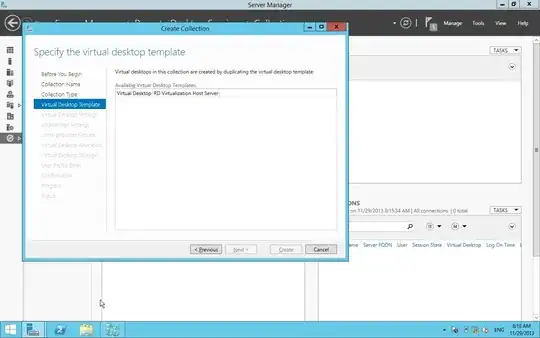
http://i.imgur.com/gzl2A2g.jpg?1

Scott Chamberlain
  • 30,694
  • 7
  • 96
  • 109
user273284
  • 11
  • 2
  • 4

1 Answers1

0

I ran in to this issue myself. VDI does not work with Generation 2 VM's. Remake the sysprepped VM as a Generation 1 VM and it should show up.

Scott Chamberlain
  • 30,694
  • 7
  • 96
  • 109
  • Thanks for the reply Scott but its already a generation 1 VM. can you please tell me the other steps that you had performed in this process? – user273284 Nov 29 '13 at 17:10
  • Do you have the VM still attached to hyper V and is the VM in a "shutdown" state? When you do the sysprep you should doing the command `sysprep /generalize /oobe /shutdown /mode:vm`? I just followed [this test lab guide](http://technet.microsoft.com/en-us/library/hh831663.aspx) and i got it to work. – Scott Chamberlain Nov 29 '13 at 17:17
  • Oh, one more thing. If the VHD file was a differential image based off of a base image I could not get it to work. Having the VM not based on any external VHD files was the only way I could get it to work. – Scott Chamberlain Nov 29 '13 at 17:23
  • yes i had followed the same sysprep command. This is a lab/test environment. all the things are running on the same physical server. I am trying to create a new VM, i hope it work this time. if it doesn't can I ask to to help me via remote desktop? or team viewer? – user273284 Nov 29 '13 at 17:38
  • No, I can't do that. I would double check that you really made a Generation 1 VM, that the VM is still attached but in the off state on the Hyper-V server, and the VHD file the VM is based off of is not based on a 2nd VHD file. – Scott Chamberlain Nov 29 '13 at 17:39
  • okay, I just want to confirm a few things, It should be a generation 1 machine, it should be connected to the domain ? then sysprepp'd right ? – user273284 Nov 29 '13 at 17:45
  • The sysprepped images should **NOT** be joined to the domain, in the answer file (either automatically generated or provided) on the `Unattened Settings` step two steps after you are stuck on will do the domain joining for you. – Scott Chamberlain Nov 29 '13 at 17:56
  • To help check if you made a generation 1 or generation 2 VM, I have a screenshot of both generation's settings page so you can see the difference [in one of my old answers](http://superuser.com/questions/664574/server-2012-hyper-v-manager-remotefx-missing-from-hardware-list/665020#665020). The easiest telltale is the fact that it will say `Firmware` instead of `BIOS` if it is Generation 2. – Scott Chamberlain Nov 29 '13 at 18:10
  • Thanks for all the help Scott, I'm working on it so that I can solve the problem using your advice. I hope it work. Thanks again – user273284 Nov 29 '13 at 18:10
  • I have deleted the VM, will create a new VM from scratch. can you please list down the things that i should do in this VM? – user273284 Nov 29 '13 at 18:16
  • 1) Create a Generation 1 VM 2) Install windows, 3) Update Windows, 4) Install VM Tools, 5) Take VM Snapshot (in case you ever want to update the image), 6) run `sysprep /generalize /oobe /shutdown /mode:vm`, 7) once the VM is in the `shutdown` state start the VDI wizard with the hyper-v server that is hosting the shutdown vm selected. – Scott Chamberlain Nov 29 '13 at 18:20
  • okay, I'm Installing the VM now. hope it works this time. Thanks a lot for the help. – user273284 Nov 29 '13 at 18:24