Google Chrome recently asked for password access to my Carbonite backup account. How can I be sure it didn't get it and/or block it from future access?
Asked
Active
Viewed 127 times
0


-
1Change your password...? – Austin T French Oct 15 '13 at 20:45
-
Eh? If you logged into Carbonite and have Chrome set to save passwords, this is news because??? – Fiasco Labs Oct 15 '13 at 20:52
1 Answers
1
You can be save, if you don't allow google to save passwords/not to ask you. chrome won't save passwords without your permission. You can disable this offer by opening the password-manager:
- Click the Chrome menu on the browser toolbar.
- Select Settings.
- Click Show advanced settings.
- Adjust your password settings in the "Passwords and forms" section:
Now you can change the button at the field Passwords and "untick" the Offer to save passwords I enter on the web.
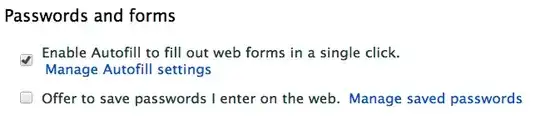
If you want to be save, that your password wasn't saved by chrome, you can click on the Manage save passwords - button. Now you should see this menu where you can check the saved passwords. If it is there, and If you want to remove it, just click on the X - icon on the right of the password and click Done - button:
And don't worry. Chrome doesn't save passwords without your permission.

Christian
- 7,102
- 1
- 22
- 36