I think it will be very difficult (seeing your example) to work with the normal "Automatic numbering". It can be done with some effort but there are serious drawbacks. You can't use the space below the first line of text because your number is big. You can only put a frame there. Also with every enter you do, there is a new number created.
Your best bet would be to use linked-frames with numbers.
Set a comfortable margin for your document (enough for the numbers). Set your cursor on the first line and choose Insert, Frame and set the properties:
Also set the borderlines/Linestyle to None. After that set a big number 1 in the frame and drag the frame left of the margin (before the paragraph). Make sure the anchor stays on the first letter of your line. In the properties of the frame the Horizontal by will be negative.

Selecting the frame you can press Ctrl+C and going to the next line and pressing Ctrl+V to copy a frame there. Change the numbers accordingly.
Now these frames (which are left of the margin) are linked to the first character of your chosen lines and they will flow with it.
Instead of setting a big number in the frame you could set Numbering On and adding a space. When copying the frames the frame will number automatically. But you need to see if this is convenient. Adding a number between two others will result in the numbers not being sequential. I think numbering manually is easiest in this situation.
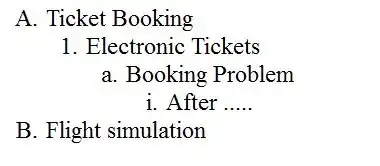
Edit: I found another method of autonumbering:
You can use this with the linked frames but you can also make a table without borders e.g. 6x2, whichever you find easier, for example below i used a table. A table might be handier when inserting a new section.
Instead of typing the 1, 2 etc you choose Insert, Fields, Other (or use Ctrl+F2), Choose Variables and Number Range and in Name type Nr1 and a value of 1 and press Insert.
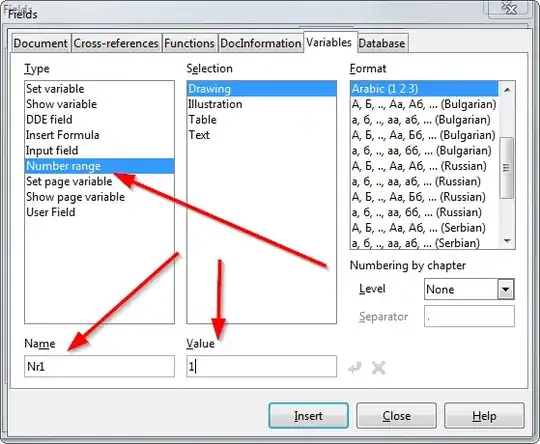
Now close the dialog and goto the second row. Open the dialog again (Ctrl+F2) choose Nr1 from Selections and press Insert. (The Value is empty in this dialog but because it's a number range it will automatically take last value +1.
Now you can copy the numbers from row 2 to the other rows or use Ctrl+F2 and choose Nr1 again. (Don't copy it from row 1 because that has value 1 set, and not +1)
The result should be like this: (You can switch between numbers and hidden variable with Ctrl+F9 and whenever you insert a row you can use Ctrl+F2 to insert the number, it will keep the numbers sequential, also when inserting a row.) Of course you can make the numbers bigger.

And after Ctrl+F9 and making the numbers bigger: