5

I have absolutely zero desire for Firefox to have flash and any other 3rd party plugins installed for rendering web content.

Many times when I view web pages I get presented with obnoxious dialogs requesting me to install these 3rd party plugins. Is there any way to completely disable this?

Chris Marisic
  • 1,153
  • 2
  • 19
  • 30

2 Answers2

7

For Firefox v22 or less

  1. Go to about:config
  2. Search for plugins.hide_infobar_for_missing_plugin and set its value to true.

The MozillaZine Knowledge base article on this config settings says

In Firefox, if media embedded in the page require a plugin that is not currently installed, an information bar is displayed at the top of the page allowing the user to install the required plugin. This preference will hide the information bar even if plugins are missing.

This sounds exactly like what you want to do...

For Firefox v23 or greater

The plugins.hide_infobar_for_missing_plugin config setting has been merged with plugins.notifyMissingFlash. See these bug reports on Bugzilla for more details: 869191, 870112.

  1. Go to about:config
  2. Search for plugins.notifyMissingFlash and set its value to false.

Note that from what I've read this only works for the Flash player plugin.

Alternative Option

When you get the infobar, next to the Install Flash button, there should be an arrow. If you click on this there should be an option that says Don't ask again
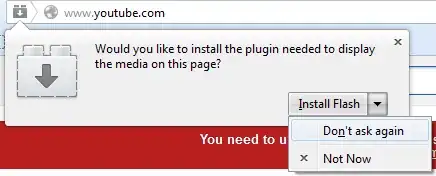
Firefox Missing Plugin Don't ask again

Drew Chapin
  • 5,890
  • 11
  • 51
  • 67
  • That entry doesn't exist in more recent versions of Firefox – justbrowsing Sep 07 '13 at 21:35
  • @justbrowsing, What makes you think it doesn't? I'm using Firefox version 22.0 and it's listed for me when I go to `about:config`... – Drew Chapin Sep 07 '13 at 21:36
  • @justbrowsing, Never mind. I figured it out. Looks like only in the very latest version (v23) they have removed it. I updated my answer. – Drew Chapin Sep 07 '13 at 22:02
  • `plugins.notifyMissingFlash` needs to be set to **false** not true. And yes **true** for `plugins.hide_infobar_for_missing_plugin` – justbrowsing Sep 07 '13 at 22:16
  • @druciferre Great answer – Chris Marisic Sep 09 '13 at 14:05
  • @Chris Marisic, I'm kind of glad you accepted @justbrowsings answer. He posted `notifyMissingFlash` first, so I feel like he deserves the credit for that. I posted `hide_infobar_for_missing_plugin`, but he later pointed out that doesn't work in FF 23, so rather than deleting my answer I chose to improve it. – Drew Chapin Sep 09 '13 at 14:23
3

Not sure about other plugins but at least for Flash

Go to about:config

Set notifyMissingFlash to False (double-click on it to toggle)

justbrowsing
  • 2,659
  • 16
  • 16
  • Marking this one as accepted as I'll be using notifyMissingFlash, i might raise it to hide_infobar if other things bug me outside of flash. – Chris Marisic Sep 09 '13 at 14:06