36

I want to remove Notepad++'s annoying shell integration when right-clicking a file in Windows.
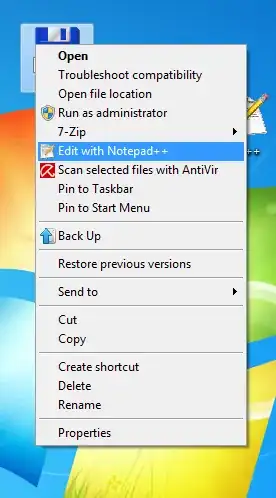
Right-click context menu

How do I do that?

Stevoisiak
  • 13,555
  • 39
  • 101
  • 154
Grumpy ol' Bear
  • 6,271
  • 12
  • 58
  • 78

3 Answers3

42

Here's the non-registry, non-download way to uninstall the Notepad++ shell extension. Using the Command Prompt as an admin, run the following:

  1. cd "\Program Files (x86)\Notepad++"1
  2. regsvr32 /u NppShell_06.dll2

To make this change active, you may need to restart explorer.


You can also reinstall the extension and get customization options:

regsvr32 /i NppShell_06.dll

1: If you use 32-bit Windows or installed Notepad++ in a different folder, the path may be different.

2: NppShell_06.dll is the correct filename for the most recent version of Notepad++ (6.6.9). If NppShell_06.dll is not found, you may have a different version.

source

Chris
  • 1,655
  • 6
  • 19
  • 25
  • 3
    Don't forget to restart explorer to make this change effective. – Patrick Szalapski Dec 04 '12 at 19:37
  • 2
    It's `NppShell_05.dll` for the most recent version (v6.5.4). – Paul Feb 24 '14 at 17:58
  • 2
    Perfect, quick and easy solution. Thank you (+1). I updated it to current (6.6.9) version of Notepad++. Waiting until it is peer reviewed. – trejder Sep 23 '14 at 17:24
  • @Chris. I see that you completely misunderstand the idea of sharing knowledge and allowing others to change your own answer or question, since you destroyed my answer and put... this in place of it. These are fundamentals of Stack Exchange, so pity, that you don't get it... – trejder Sep 23 '14 at 18:55
  • 1
    That's a rather dramatic response, don't you think? I'm happy to explain over chat why I added further changes in addition to the ones you made, if you'd like to talk about it. – Chris Sep 24 '14 at 20:41
  • When I run the install command I get a success message, but there is still no context menu entry after I restart explorer.exe - and when I run the `regsvr32 /i NppShell_05.dll` command again, there is no more tick but a filled box against the option again... Any ideas what registry keys I need to add manually to make it work for Notepad++ 6.4.5? – Christian Apr 22 '15 at 10:51
  • @Christian not entirely sure what "no more tick but a filled box against the option again" means, but did you run it as an admin? – Chris Apr 22 '15 at 16:48
  • 1
    @Chris: I'm not sure what I did. I think I eventually realised I had two dll files, `NppShell_05.dll` and `NppShell_06.dll`, available. In the end, it suddenly worked. The command prompt was in admin mode throughout, though... – Christian Apr 22 '15 at 22:38
  • I had to search to find the .dll, but it worked – Umber Ferrule Nov 12 '19 at 16:47
  • NppShell_06.dll is still the correct file for the latest version 7.9.1 (as of Jan 29, 2021) – John B Jan 29 '21 at 16:40
21

Open the registry editor (Start->Run) and type in "regedit".

Navigate to the following key:

HKEY_CLASSES_ROOT\*\ShellEx\ContextMenuHandlers

You will see the key "Notepad++". Simply delete it.

user
  • 310
  • 1
  • 5
  • HKEY_CLASSES_ROOT consolidates entries from HKLM and HKCU. If there are permission issue with HKLM, it will disallow deleting the key. I worked around this, by creating same key in HKCU with different (invalid) default value. – industryworker3595112 Jan 11 '16 at 06:40
  • Under `ContextMenuHandlers` the key could be named not exactly `Notepad++`, but some variation of it, so do the "fuzzy" matching. (e.g. "ANotepad++64") – industryworker3595112 Jan 11 '16 at 06:41
19

If you are weary of editing the registry you can try ShellExView which is a free application that allows editing of Shell Extensions.

Shell Extensions are in-process COM objects which extends the abilities of Windows operating system. Most shell extensions are automatically installed by the operating system, but there are also many other applications that install additional shell extension components. For example: If you install WinZip on your computer, you'll see a special WinZip menu when you right-click on a Zip file. This menu is created by adding a shell extension to the system. The ShellExView utility displays the details of shell extensions installed on your computer, and allows you to easily disable and enable each shell extension.

Kruug
  • 5,222
  • 3
  • 22
  • 30
Unfundednut
  • 7,070
  • 4
  • 28
  • 54