1

The solution is to input Unicode characters (see here: http://www.unicode.org/charts/PDF/U1F300.pdf, 1f36c for example) with the keyboard of a Dell Latitude e6420 which, a quick Google image search tells us looks like:
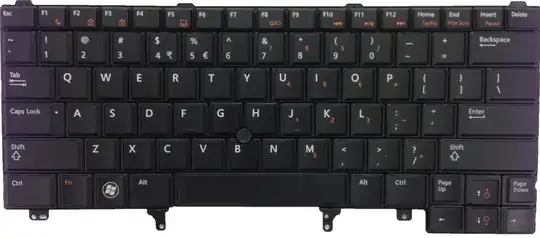
enter image description here. Notice in the picture how the orange keys Fn allows access to a "numeric keypad" type function.

Question then is: how can one input the Unicode character 1F36C using the keyboard only?

eichoa3I
  • 1,512
  • 8
  • 18
  • 29
  • Possible duplicate: http://superuser.com/questions/47420/insert-unicode-characters-via-the-keyboard – Brad Patton Mar 13 '13 at 19:08
  • 1
    possible duplicate of [How do you type Unicode characters using hexadecimal codes?](http://superuser.com/questions/13086/how-do-you-type-unicode-characters-using-hexadecimal-codes) – Pylsa Mar 13 '13 at 19:35
  • shouldn't be duplicates when Re is made to specific models of laptop since key combinations will differ between models. – eichoa3I Mar 13 '13 at 20:17

1 Answers1

2

Assuming you are using Windows (XP or later), hold down the Alt key then type +1F36C. To enter the + sign on this keyboard, you will hold down the Fn key and the ? / key simultaneously (while still holding the Alt key).

If this does not work, sometimes a registry key must be changed (regedit). Under HKEY_Current_User/Control Panel/Input Method, set EnableHexNumpad to "1". If you have to add it, set the type to be REG_SZ. It should then work (after a reboot).

If none of this works, you can use the standard decimal value Alt code, which is to hold down Alt while typing 127836 (the decimal value of 0x1F36C).

Dan
  • 1,071
  • 1
  • 10
  • 23
  • Doing as you've said, holding down the Fn AND alt AND pressing the ?/+ key ... windows makes a ding sound. Tests results same before/after regedit. – eichoa3I Mar 13 '13 at 19:33
  • @jhstuckey Try my last resort, just added it to response. – Dan Mar 13 '13 at 19:55
  • @jhstuckey also note that you must reboot for any registry changes to take effect, so that may be why it didn't work.... – Dan Mar 13 '13 at 19:56
  • After reboot, \ is produced by alt + 127836 (but note you have to use the Fn key w/ orange numbers). Pressing Fn + alt + /? gives a windows "ding" after reboot. – eichoa3I Mar 13 '13 at 20:08
  • 1
    Correction, it gives a windows ding when I try to type in *this* comment box, but in other areas it gives me a rectangle (w/ the test unicode value). – eichoa3I Mar 13 '13 at 20:09
  • @jhstuckey you don't enter a `+` sign with the decimal value, just the number.... – Dan Mar 13 '13 at 20:11
  • I just did it successfully on Windows 7 with the Alt decimal code. Not sure what else to tell you. – Dan Mar 13 '13 at 20:12
  • 1
    º was produced for 127911, and \ --- disregard my comment about entering a +, that was an id10t error. – eichoa3I Mar 13 '13 at 20:14