4

I installed the Java Development Kit (64-bit) recently and saw it includes the JRE plugin for 64-bit as well. But, since Firefox is 32-bit, I also installed JRE 32-bit version. This is what is shown in Programs and Features.

enter image description here

Now, the problem is, the other day, I opened a site which required the Java plugin. The frame showed the regular Java loading animation and hung. Nothing happened after that. Like this:
enter image description here

I checked Firefox's plugins section and it shows Java is enabled, so no issue there

enter image description here

I tried other browsers - IE10 and Chrome but to no avail. It doesn't work anywhere. I saw another question which said that you have to install 64-bit then 32-bit. That's what I actually did as well. First, installed JDK 7 64-bit (which includes JRE 7 64-bit) and then installed JRE 7 32-bit.

I even tried the Java website's Do I have Java? section and over there too, it just keeps spinning for ages (I have waited for more than 10-20 seconds).
enter image description here

How do I go about now? This never happened to me in Windows 7. I am on Windows 8 Pro.

EDIT: I have removed AdBlock, reinstalled the JRE plugin but it still doesn't work.

EDIT 2: I uninstalled JDK (64-bit), JRE (64-bit and 32-bit), restarted my laptop, cleaned the registry and all the cache and temporary files with CCleaner, again installed JDK (64-bit) and then JRE (32-bit; 64-bit is installed along with JDK). Still didn't work. Then I went to this link found on Troubleshooting Java http://www.java.com/en/download/testjava.jsp. The first time it gave an error which I'm unable to recall because when I refreshed, the animation just hung like in the second screenshot above.

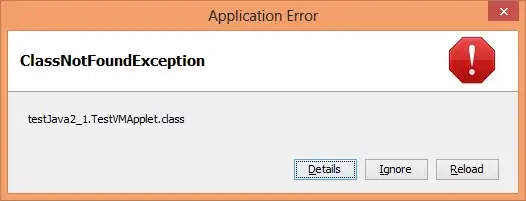
EDIT 3: I managed to reproduce the error and I'm attaching the screenshots here
enter image description here

I clicked on details and this is what I saw:

enter image description here

I also tried disabling Kaspersky Internet Security 2013. Didn't work. I have disabled KIS's browser addons: Anti-Banner and Content Blocker. No luck still.

EDIT 4: I tried this on the 64-bit version of Internet Explorer as well. The spinner just keeps rotating like on the 32-bit browsers. Moreover, I tried on my PC at home which runs 32-bit Windows 8. I installed 32-bit JRE on it and well, Java works perfectly on that. So what's the problem with my box?

pratnala
  • 2,016
  • 2
  • 24
  • 38
  • Do you use an Adblocker or NoScript? – magicandre1981 Dec 21 '12 at 12:19
  • I have AdBlock Plus. I disabled it completely, restarted Firefox and tried again. Still doesn't work. I read somewhere about something called Java WebStart. What's that? – pratnala Dec 21 '12 at 13:16
  • Read here what this Webstart is: http://en.wikipedia.org/wiki/Java_Web_Start. Try to reinstall the JAVA Runtime. Maybe this fixes it. – magicandre1981 Dec 21 '12 at 19:35
  • Please see the edited question – pratnala Dec 22 '12 at 14:46
  • Run ProcessMonitor and look if you can see why JAVA doesn't start. Look at the Result column. – magicandre1981 Dec 22 '12 at 19:01
  • Pls see the edited question @magicandre1981 How to do what you have told ? Am a little lost – pratnala Dec 24 '12 at 13:25
  • Here are 2 videos which show you how to sue ProcMon : http://channel9.msdn.com/Shows/Defrag-Tools/Defrag-Tools-3-Process-Monitor http://channel9.msdn.com/Shows/Defrag-Tools/Defrag-Tools-4-Process-Monitor – magicandre1981 Dec 24 '12 at 22:27
  • @PratyushNalam may be jre version is a problem here check out this [link](http://board.jdownloader.org/showthread.php?t=44220) an try to install old version of jre. – avirk Dec 25 '12 at 02:40
  • @magicandre1981 Pls see edited question. I managed to reproduce the error. – pratnala Dec 25 '12 at 10:29
  • Has anyone else faced this problem? @avirk I'll try that (installing JRE 6) and get back – pratnala Dec 25 '12 at 10:30
  • @magicandre1981 I opened ProcMon. I see only explorer.exe. No firefox or java. – pratnala Dec 26 '12 at 10:57
  • Also, how to extend the bounty time? – pratnala Dec 26 '12 at 17:05
  • The last java version adds a control panel item where you must enable "Java in Browser" first. Is this activated for you? http://www.ghacks.net/2012/12/19/java-7-update-10-introduces-new-security-features/ – magicandre1981 Dec 27 '12 at 06:34
  • Yes it is enabled – pratnala Dec 27 '12 at 08:46
  • @PratyushNalam: Where is your java installed? In Java Control Panel, under java -> view, you will see Java Runtime Settings. Check whether the path is right or not and see whether they are enabled. Did you checkout these pages? https://www.java.com/en/download/faq/firefox_newplugin.xml https://www.java.com/en/download/faq/win8_faq.xml https://www.java.com/en/download/help/firefox_addons.xml – Bharadwaj Srigiriraju Dec 27 '12 at 11:39
  • I checked the Java Runtime settings. They're fine. Nothing helpful in the links. I'm on a Desktop and have both 32-bit and 64-bit versions of JRE installed – pratnala Dec 27 '12 at 13:27
  • Please see the updated question. – pratnala Dec 29 '12 at 10:08

2 Answers2

0

Download the full 32-bit JRE from here.

Also, try going to the command-line (Ctrl+R, then type in cmd). Once there, type in java and see what happens. If it says something like java not recognized as an internal or external command then it may be a problem with your environment variables.

If it does indeed run and print out its command-line options, then perhaps try looking to see if your browsers for some reason are using an old version of the Java Applet plugins.

In my experience, if the Java Webstart isn't working, its generally because Java isn't set up correctly.

Hassan Khan
  • 151
  • 6
0

I had to do a refresh of Windows for some other reason. This time when I installed, everything works now - browser plugin etc.

Weird.

pratnala
  • 2,016
  • 2
  • 24
  • 38