0

I just recently replaced the stock heatsink that came with the AMD FX-8150 with a Cooler Master Hyper 212 Evo and have been having a lot of issues with my computer ever since.

I first noticed the problem when I was playing Skyrim, the computer just shut off after an hour of gameplay. I tried again and it happened even faster. So I tried a prime95 test to see if it was overheating and yep, it sure was.

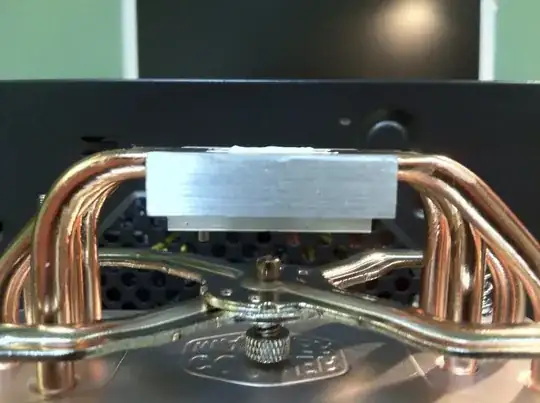
I ran a Large FFTs tourture test in Prime95 and it lasted around 45 minutes until the computer overheated and shut down. Two out of the eight workers halted due to hardware issues and only six workers padded the 128k test. Here are two pictures with the amount of TIM I applied: Heatsink with TIM Side Shot of TIM

And here is the Prime95 error log:

[Wed Nov 07 12:19:03 2012]
FATAL ERROR: Final result was 00000000, expected: EEEC1181.
Hardware failure detected, consult stress.txt file.
Self-test 480K passed!
[Wed Nov 07 12:25:38 2012]
FATAL ERROR: Rounding was 0.5, expected less than 0.4
Hardware failure detected, consult stress.txt file.
[Wed Nov 07 12:37:36 2012]
Self-test 128K passed!
ecnepsnai
  • 686
  • 2
  • 8
  • 26

1 Answers1

1

It shuts down as a security mesurement, but it totally seems like the heatsink is not applied properly. Did you use proper silver paste on the CPU surface and secured the sink tightly to the mainboard?

On the picture it looks like there's not enough spread out paste.

Redsandro
  • 564
  • 1
  • 9
  • 18
  • I've tightened all of the screws and the stand-offs. I can rotate it a little bit with some force. – ecnepsnai Nov 07 '12 at 21:08
  • And what do you mean by not enough spread? It should spread when I put the heatsink on the CPU. – ecnepsnai Nov 07 '12 at 21:09
  • I agree that from the picture the paste seems like not enough force has been applied (ie the heatsink isn't fitted tightly enough) - it should be forced into all the nooks and crannies with a lot of force but there it's still the two lines you applied it in! – Shinrai Nov 07 '12 at 21:09
  • 2
    It definitely seems like the heat sink is not mating with the CPU perfectly flat with sufficient pressure. Also, any contaminant that sneaks between the CPU and the heat sink can do it. I've fixed machines with this symptom -- one had a hair on the CPU, the other had a *sticker* on the CPU. – David Schwartz Nov 07 '12 at 21:24
  • Don't worry, I made sure to take the sticker off before installing it. I'll double check my installation and look for videos to make sure it's done properly. – ecnepsnai Nov 07 '12 at 21:49
  • If there was a sticker on the CPU's mathing surface, you need to make sure the CPU is *perfectly* clean. I'm not sure why anyone would put one there, but I did once find a "warranty void if removed" sticker some incompetent distributor had placed there, and it took some alcohol and some effort to get the mating surface clean. – David Schwartz Nov 07 '12 at 22:19
  • I realized that my fan position was redundant and taking air away from the CPU when it needed it, so I fixed my fans and am running a lot cooler and more stable now. Thanks! – ecnepsnai Nov 08 '12 at 00:58