With Vista and up, 64-bit versions of Windows no longer support 16-bit programs, but 32-bit versions can still run them. Windows 8 has changed a lot of things from even Windows 7, and there were rumors a while back that it would only be available in 64-bit[1][2] which seems not to be the case anymore. It’s no secret thet Microsoft is pushing users to migrate to 64-bit systems. Have they dropped 16-bit support from Windows 8 altogether (including 32-bit versions)?
Asked
Active
Viewed 2.4k times
11

-
Why would you want to do such a thing? – Natalie Adams Oct 22 '12 at 18:10
-
5@NathanAdams, your question makes no sense. Why would someone want to jump out of a plane or move to another country? Just because *you* have no need doesn’t mean that nobody else in the whole world does (hence the continuing 16-bit support in Windows 8). If you are simply asking of a practical reason, then the answer is *because some people have 16-bit programs that have/want to run*. – Synetech Oct 22 '12 at 20:23
-
The point is that most 16bit programs that attempt to run on a modern processor may not run (right) at all due to the vast difference in clock speed. This is apparent in many games. You wouldn't want your book keeping application as a 16bit application. With the advent of services available via the cloud, software available for pennies on the dollar, and subcontracting for super cheap - it doesn't make sense to run such archaic software. – Natalie Adams Oct 23 '12 at 02:35
-
@NathanAdams, again, you are simplifying things for yourself. There do exist tools that may run just fine. For example, I have some simple command-line tools that are 16-bit like old `.com` files or programs compiled with Pascal for DOS that do things like `echo` without a newline, move the cursor, set text colors, print the date/time, parse a file, etc. These work just fine and while some functions may now be built-in, many/most are not and it is not always feasible (or even possible in some cases) to update and/or re-compile them for 32- or 64-bit. – Synetech Oct 23 '12 at 04:12
-
1We actually use (modern) software that requires a dongle. The dongle requires a driver that is 16bit. – cpuguy83 Jan 07 '13 at 18:05
3 Answers
0
This is the same as Windows Vista or Windows 7. If you have a 64bit version of Windows, you cannot run 16bit applications. If you have a 32bit version of Windows, you can run 16bit applications.
Workaround for 64bit systems: In Windows 7 64bit you could just download the Virtual PC XP Mode and run your 16bit application there. I'm not sure if Windows 8 also provides an XP Mode (I don't think so) but (some versions?) of Windows 8 come with Hyper-V support. So you could easily run e.g. Windows XP in your Hyper-v to have 16bit support.
http://www.microsoft.com/windows/virtual-pc/download.aspx Link

Glorfindel
- 4,089
- 8
- 24
- 37

juFo
- 388
- 4
- 13
- 25
-
Yup, there’s [already plenty of that](http://superuser.com/search?q=64-bit+16-bit). I guess people *are* still using 16-bit programs. ☺ – Synetech Oct 21 '12 at 15:06
0
As per Windows 7, 16-bit applications simply cannot run on a 64-bit Windows 8 installation.
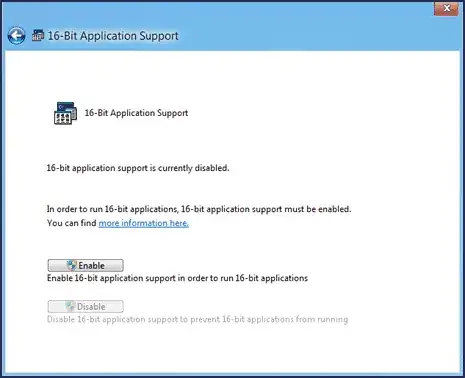
However, the NTVDM required to run 16-bit applications is still available on 32-bit Windows 8 systems:
The NTVDM is present in all 32-bit NT-based Windows versions including Vista, 7 and 8, except for in 64-bit versions.
As Synetech noted, this feature is disable by default and must be manually enabled.

bwDraco
- 45,747
- 43
- 165
- 205