I have a Microsoft .docx document that is locked down and can't even be viewed without the forgotten password.
I'm wondering if there is an easy way to unlock it or get the computer to remember the password itself with a hint or something.
I have a Microsoft .docx document that is locked down and can't even be viewed without the forgotten password.
I'm wondering if there is an easy way to unlock it or get the computer to remember the password itself with a hint or something.
DocX is a compressed zip container file. Make a copy of the original docx file. If you unzip it, there is a subfolder named word with a file named settings.xml. You can open settings.xml with a plain text editor.
Within that there is a block of text:
<w:documentProtection
w:edit=""
w:enforcement="1"
 w:cryptProviderType=""
 w:cryptAlgorithmClass=""
 w:cryptAlgorithmType=""
 w:cryptAlgorithmSid=""
 w:cryptSpinCount=""
 w:hash=""
 w:salt=""/>
You can either change w:enforcement value to 0 or remove the block entirely.
Then you zip up the whole thing again (don't zip up the whole folder: the content_types.xml and subfolders must be root of the zip file.), rename the result to have a Docx extension, and then open it in word.

From this link: http://people.csail.mit.edu/seth/misc/unlockworddoc.html
How to Unlock a Word Document under Windows
Seth Teller, August 2009
Some authors (for example, of forms to be filled out) "lock" their documents under Windows. This is annoying, as it prevents you from fixing errors or adding anything to the document.
If you web-search on "unlocking word document," you get a bunch of pages with advice that doesn't work under Windows, or pointers to paid software. Here is a method that works, and is free:
Open your document in Word, then save it in ".xml" format.
Open the .xml doc in wordpad, emacs, or your favorite text editor.
Search for the string w:enforcement="1".
Replace the "1" with a "0" to disable enforcement (i.e., unlock the document).
Save the document from your text editor.
Open the .xml document in Word.
Choose "Save as..." and save it as a .doc or .docx file.
Your Word document can now be edited normally. Enjoy!
Mac users: ExtendScript Toolkit works well as a text editor in this workaround.
MS Word has used 128-bit AES encryption since Office 2007 so no, there's no easy way to unlock it.
If think your password is simple enough or vunerable to a dictionary attack, you could try one of the various password cracking apps available (caveat downloader).
It's trivial to remove the Edit protection from Word documents by editing 'settings.xml' within the compressed .docx file as discussed in other answers here. However, as you have applied 'Encrypt with Password' to require a password to open the document, that method won't be available.

If your document, renamed to .zip, has no settings.xml file in it but contains a file called EncryptionInfo instead, there's a good chance that strong encryption was used with a more modern version of Office.
Your only chance is really to brute-force decrypt it, for which there are guides.
Broadly speaking:
office2hashcat.py from https://github.com/stricture/hashstack-server-plugin-hashcat/blob/master/scrapers/office2hashcat.py (This tool hasn't been updated and works with an older version of
Python, try version 3.0:
https://www.python.org/downloads/release/python-301/)office2hashcat.py document.docx > hash.txtThe full instructions can be found here:

Which OS and version of Word? If messing about with XMLs and text editors is not your cup of tea, in Word 2010 for Windows at least you can remove all restrictions, passwords, final locks etc. from File / Info / Permissions:
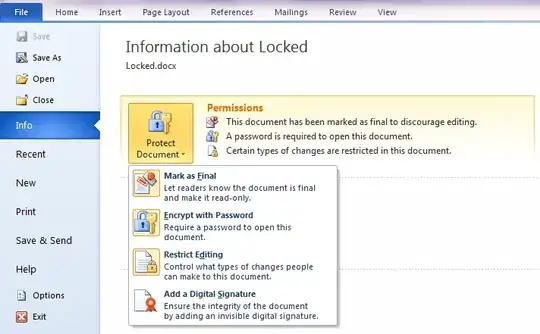
Also make sure the file is not set to Read-only (close Word, right-click the file, check Properties / General tab / Attributes).


