5

Firefox Sync continues to sync bookmarks and history from home computer to work computer even though I told it not to.

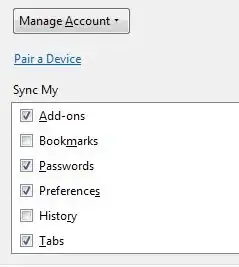
In Firefox Sync options, I de-select "Bookmarks" and "History":

enter image description here

I clear out the history and delete the bookmarks I don't want on my work computer. A few days later, they're back, and the Sync options have "Bookmarks" and "History" enabled again.

How do I permanently disable syncing bookmarks and history with this computer?

endolith
  • 7,507
  • 25
  • 84
  • 121
  • Is it enabled on the other computer? – soandos Aug 01 '12 at 22:55
  • @soandos: yes it is – endolith Aug 01 '12 at 23:12
  • I mean after you disable it on one machine, does it also get disabled on the other? – soandos Aug 01 '12 at 23:13
  • @soandos: Why yes. Yes it does. That shouldn't happen. – endolith Aug 01 '12 at 23:14
  • It should, there should only be one setting shared between the machines. Just try changing the settings from the other machine and see if it sticks – soandos Aug 01 '12 at 23:27
  • @soandos: Well that's not the way it *should* behave. Are you saying that's the way it was *designed* to behave? So it's fundamentally impossible to share bookmarks with some machines and not others? – endolith Aug 01 '12 at 23:51
  • That is correct (or so I believe) – soandos Aug 02 '12 at 00:09
  • You could set up a second Firefox account and have all your Work friendly sync-ables on that account as I believe it is the account that sync and not the machines. Then you could set up the sync account, activate the work comp with new code (after you deactivate it from your original account of coarse) and sync just that account. Just a thought. – Carl B Aug 17 '12 at 05:52
  • 1
    @CarlB: I already started using XMarks to keep different profiles of boookmarks separate. I just thought it was possible to sync different components of firefox sync on different browsers, which it's apparently not. if you change the settings on one, it changes on all the rest – endolith Aug 17 '12 at 14:29
  • Did you have to pair the computers with a sync code (I think it was 6 or 8 characters)? – Carl B Aug 22 '12 at 20:47
  • @CarlB: yes ... – endolith Aug 22 '12 at 21:07
  • you could brake the pairing to the work terminal couldn't you? It would disable all syncing though. But, it would keep the NSFW stuff at home and out of the work environment. – Carl B Aug 22 '12 at 22:24
  • @CarlB: Yes I already did that. I am only syncing add-ons and using Xmarks to sync bookmarks (though that's very buggy, too) – endolith Aug 22 '12 at 23:10

1 Answers1

2

The comments have already suggested Xmarks to have different profiles, since Firefox Sync itself cant have them.

I, myself, am used to bookmark every single page i like, (nsfw included), but in time, it is just not a good idea, because firefox itself tend to get slow having to sort out so many bookmarks (i now have over 5500).

So what i started doing is, NOT use regular bookmarks for every single page i want to save. Instead, i started to use online bookmarking services, namely Diigo and Delicious.

In that way, you can save as many bookmarks as you want, and keep them apart of your "real" bookmarks, that is, pages that you actually visit frequently and want to have them quickly available. For any other page you want to save, a nice youtube video, an interesting article, a kinky nsfw link, a DIY website, a good joke, youo name it, it is beter (IMHO) to save them outside firefox.

The aditional perk is that you can the retrieve ANY of those pages from any other machine, and any other browser. just loging into your account, even share them, marking links as private (so only you can acces them via your account) or public, as a "social bookmarks" service.

Plus, that way you never have to worry if your firefox installation (or bookmarks file) goes corrupted, or if suddently you lose acces to your work machine and somebody else could mess up with your local bookmarks.

In fact, i will start to simply delete many of my bookmarks from firefox because they now live in the cloud, and locally save things that really matter.

Of course, Xmarks is perfect for syncing among firefox installations, and in fact, i also have a Home and a Work profile, but i've realized that over time, that just doesn't work.

And needless to say, but always make local backups of your bookmarks in every machine, and save them elsewere, (eg. just export them in firefox to a file and email it to you).

The bottom line, use online bookmark services. You can tag, sort, group, share, search everyhing, and you will not be dependend of a single browser or a single add on.

Tell me if it works for you!
DiegoDD
  • 1,307
  • 4
  • 19
  • 25
  • oh, i forgot to say that my xmarks have sometimes misbehaved and sometimes i got duplicated bookmarks, or it wanted to replace my bigger home profile, with the smaller work one, which should never be an option (my work profile is just a subset of the home one, the "complete" one. So be careful when it asks you to overwrite either profile. Still, Xmarks has been and still is, one of the best addons firefox has ever had. I just guess it is time to move to the cloud instead of having independend "islands" of bookmarks scattered among computers and profiles. =P – DiegoDD Sep 03 '12 at 18:35