13

I'm have this really strange problem in Vim using the NERD tree plugin, where, as you can see in the picture, the characters are showing up very strange. Where there is the ahat, ~V 3/4 it should be |-. I've set my LANG to en_US and LC_ALL to en_US (in Arch linux), and am using the Anonymous Pro font, although switching the font makes no difference.
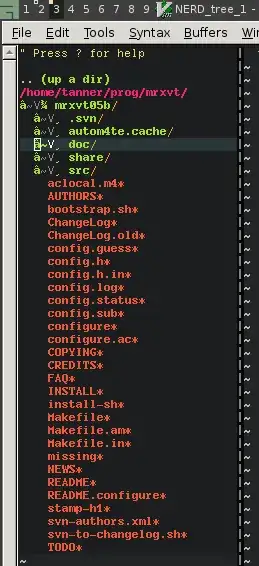
real strange

Tamara Wijsman
  • 57,083
  • 27
  • 185
  • 256
Tanner
  • 361
  • 2
  • 3
  • 7
  • It looks like a charset problem. Your plugin is using the UTF-8 charset while your gvim is probably expecting latin1. I'm sorry I don't have a more complete solution at the moment. You could try executing "`:set fenc=utf-8`", but that's not really the long-term solution. – garyjohn Feb 09 '12 at 05:42
  • 1
    It indeed looks like a character encoding issue. My guess is that the data contains ├ (BOX DRAWINGS LIGHT VERTICAL AND RIGHT, U+251C), which is 0xE2 0x94 0x9C in UTF-8. Interpreted as ISO-8859-1, the first byte is â, the others are control codes. The rest is obscure, but forcing the interpretation of the data to UTF-8 should throw some light to the problem. – Jukka K. Korpela Feb 09 '12 at 06:22
  • Ok yes the box drawing makes sense, I always thought it was just a bar and dash. Anonymous Pro has the box drawing characters. – Tanner Feb 09 '12 at 15:22
  • @Tom Wijsman I'm not sure what you changed about the title. Your edit says you edited the title, but nothing was changed. – Tanner Apr 11 '12 at 23:47
  • @Tanner: I have added "What could cause" and a question mark. – Tamara Wijsman Apr 11 '12 at 23:49

7 Answers7

16

This one liner from scrooloose on this thread fixed it:

let g:NERDTreeDirArrows=0

Try putting that in your .vimrc

(see also: same answer posted here on Stack Overflow)

Skye Giordano
  • 161
  • 1
  • 3
6

I've solved the problem. What I did to solve it:

  • Edited /etc/locale.gen to LC_ALL="en_US.UTF-8" instead of LC_ALL="en_US"
  • Ran locale-gen as root
  • Ran locale -a, it showed en_US.UTF-8; however, locale showed LC_ALL still being en_US, then I remembered I had exported LC_ALL in my .bashrc last night trying to fix this, so I changed my LANG and LC_ALL to en_US.UTF-8
  • Reloaded the terminal, ran gvim, success! It's strange though, it is using the triangle arrow characters now, instead of the box ones. Makes me think it uses the box ones for ISO-8859 and triangles for UTF-8 possibly, which leads me to suspect I might have problems down the road in some other program. I'll fix it when it comes to it.
vabada
  • 103
  • 1
  • 5
Tanner
  • 361
  • 2
  • 3
  • 7
3

Maybe this is not worth a hack but it seems it worked for me.

I changed the line in NERDTree.vim:

call s:initVariable("g:NERDTreeDirArrows", s:running_windows) 

(it was !s:running_windows before)

Now I don't see any fancy + symbol, but at least jumping directories works from within vim. I'm on solaris and I don't think I have root access.

slhck
  • 223,558
  • 70
  • 607
  • 592
Guru
  • 31
  • 2
1

My change was to remove boolean negation (character !). Here is a git diff:

~/.vim/plugged/nerdtree/plugin]$ git diff NERD_tree.vim
diff --git a/plugin/NERD_tree.vim b/plugin/NERD_tree.vim
index bbcc55f..6342b6c 100644
--- a/plugin/NERD_tree.vim
+++ b/plugin/NERD_tree.vim
@@ -66,7 +66,7 @@ call s:initVariable("g:NERDTreeShowHidden", 0)
 call s:initVariable("g:NERDTreeShowLineNumbers", 0)
 call s:initVariable("g:NERDTreeSortDirs", 1)

-if !nerdtree#runningWindows()
+if nerdtree#runningWindows()
     call s:initVariable("g:NERDTreeDirArrowExpandable", "--junk1-here--")
     call s:initVariable("g:NERDTreeDirArrowCollapsible", "--junk2-here--")
 else
Sergei G
  • 113
  • 4
1

Adding values explicitly, to the next 2 variables in .vimrc (vim config) solved the problem for me:

let g:NERDTreeDirArrowExpandable = '▸'
let g:NERDTreeDirArrowCollapsible = '▾'

These should be default values but for some reason they were not set for me on ubuntu/vim.

Upment
  • 111
  • 1
1

If your vimrc is changing guicursor, try removing that line. Other variables which seem to cause/prevent these are:

set guicursor= in vimrc
set t_Co= in vimrc
export TERM=xterm-256color in shell

csghone
  • 11
  • 2
1

In my case issue was related to locale issue. Solution:

  1. Set value:

    export LC_ALL="en_US.UTF-8"

  2. Run vim:

    vim

See details for locale issue here:

Cannot set LC_CTYPE to default locale: No such file or directory

0x8BADF00D
  • 113
  • 5