I'm looking for a way to use a keyboard shortcut to minimize all the windows on the monitor that currently has my mouse on it. I found this page: http://vbcity.com/forums/t/163339.aspx but that appears to be hardcoded to minimize windows on a specific monitor, rather than the active monitor. Plus, I have no idea how to compile that code (not a VB coder). Anybody know a way that I can make this happen? I'm on Windows 7 ultimate, 3 monitors.
Asked
Active
Viewed 2.8k times
22

Kevin Panko
- 7,346
- 22
- 44
- 53

Jake
- 357
- 1
- 3
- 11
-
Have you already tried "Windows Key + D" which is the shortcut to show desktop? I do not have multiple monitors at the moment, that might minimize all windows across desktops. Is it important to just do it on only 1 monitor? – Eric G Oct 19 '11 at 18:35
-
Yeah, I use Windows+D all the time, but when I'm working, I often want to minimize a single monitor so I can get to my desktop files on that monitor. I have virtual machines running all the time, so it's unhelpful to have those disappear when I'm just trying to get to some files. – Jake Oct 19 '11 at 18:47
-
I took that code and starting working on a sample application to do what you want, though it appears to be a bit quirkly because it's finding windows by process instead of by active window. I'll have to play around with it a bit more. – Chris Thompson Oct 19 '11 at 21:18
-
Awesome! Post it as an answer if/when you finish! – Jake Oct 20 '11 at 04:14
3 Answers
27
Under Windows 7, here is the list of the keyboard shortcuts that manage multiple windows :
Win+d
Minimize all windows on all Monitors. Press again to restore previous state
Win+m
Minimize all windows on all Monitors.
Win+Shift+m
Restore previously minimized windows on current Monitor
Win+Home
Set all windows to Minimized on current Monitor except active
Win+Space
Preview Desktop / make windows transparent (May not work with all Settings)
Source : 127 useful Keyboard Shortcuts for Windows 7.
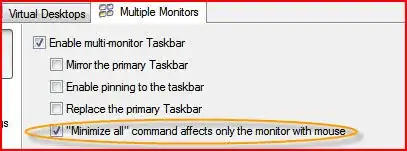
The OP notes that Actual Multiple Monitors has an option for "Minimize All command affects only the monitor with mouse".


-
20
-
This works for me. @csauve - I had another person try it and it didn't work for them. I have Windows Ultimate, dunno if that makes a difference. – Jake Apr 27 '12 at 20:07
-
-
-
5They all work, except remove the text for all shortcuts that say "on current monitor" - they all affect all monitors – csauve Apr 27 '12 at 20:15
-
Win7 x64 w/ SP1, Enterprise and they all work exactly as described for me (three monitors). – BillP3rd Apr 27 '12 at 20:42
-
We need input from another reader using Win7 Pro to reach a conclusion. – harrymc Apr 28 '12 at 07:31
-
I can confirm that those shortcuts affect all monitors on my computers running Win7 Pro x64 nVidia, and Win7 Home Prem x64 Intel HD and Win7 Pro x64 VirtualBox (just in case graphics drivers make a difference). – Bob Apr 30 '12 at 07:46
-
It seems that these shortcuts work on the current monitor only for Windows versions higher than Pro. Weird. – harrymc Apr 30 '12 at 08:20
-
1Nope, not that. I just tested with Win7 Ult on VirtualBox, still nothing... – Bob Apr 30 '12 at 10:58
-
-
@harrymc It does prove that there's no difference between Professional and Ultimate on the VirtualBox WDDM driver, if nothing else. I would assume, since it doesn't look like an OS version restriction, that the same applies on a real machine. It might be an Ultimate only setting, but no difference in vanilla installs - it doesn't work in either. – Bob Apr 30 '12 at 11:17
-
@Bob: I wouldn't generalize from VirtualBox to real machines and video cards. My own theory would have been that the difference is due to some missing capability in the video driver(s). So let us conclude that we have no real conclusion : these shortcuts may or may not work depending on the environment, in ways that we do not fully understand. – harrymc Apr 30 '12 at 12:04
-
@harrymc - I'm on Win 7 x64 SP1 Ultimate, and `Win-M` works across all monitors also (I've never seen it do anything else, across multiple systems). None of the MS documentation (including [this](http://windows.microsoft.com/en-us/windows7/Minimize-all-open-windows-to-view-the-desktop)) has every indicated otherwise, but it would be interesting to understand why it does work in a few cases? – Geoff May 01 '12 at 19:48
-
@Geoff: My own guess it that it has to do with the video driver implementation. If all the commentators above would have detailed their setup, we might have been able to reach a conclusion. If interested, you could launch a polling question on some video forum, but polls are forbidden here. – harrymc May 01 '12 at 19:56
-
@harrymc - My guess was video drivers also, although I struggled to see how the video driver would affect the system from enumerating the top-level windows. I'm wondering if there's some obscure registry setting... – Geoff May 01 '12 at 20:00
-
@Geoff: Documentation for Win-m acting on the current monitor is rare, so it's not well-known and maybe not universally available. The poster was lucky that it works for him, you evidently are not. – harrymc May 01 '12 at 20:32
-
Makes sense that it would be my video drivers (I'm the OP). I have a triple monitor setup using dual NVidia GTX 560s. Video drivers are in "Activate all displays" mode. It's also worth noting that I run Actual Multiple Monitors, which could also be a reason that it works (though I had another person who also is running triple monitors with Actual Multiple Monitors and it didn't work for him). – Jake May 02 '12 at 10:34
-
1Official answer: Turns out it is Actual Multiple Monitors. It has an option called "Minimize All only affects monitor with mouse". @harrymc would you mind updating the main answer with this information so anyone else who finds it will know? – Jake May 06 '12 at 13:22
-
1
-
1As of now the "Minimize all only affects monitor with mouse" doesn't work in windows 8.1. Anybody know of a current way to achieve this function? Perhaps through AHK? – Ahmed Jul 27 '15 at 23:25
-
`Win+m` minimizes windows on all monitors on Windows 10 build 1493. I believe the edit made in 2012 still doesn't make this a correct answer, it should read what Win+m works ONLY with "Actual Multiple Monitors". – bers Jul 28 '16 at 18:07
2
The other answer, although superior, is not as fun as mine. Take one active window and shake it. All other windows will be minimized. Then minimize that window

robreynolds88
- 21
- 2
-
3I believe this minimizes all windows, not just those on the active screen. – Jake Jan 07 '16 at 01:25
1
I found another way to resolve this problem. I write autohotkey script to make all program minimize except some program. I often move Xshell and git command to another monitor, so I make them maximize again. The script like following, hope can help you.
#d::get()
get(){
    WinMinimizeAll
    WinGet, active_id, ID, ahk_exe Xshell.exe
    WinMaximize, ahk_id %active_id%

    WinGet, active_id, ID, ahk_exe mintty.exe
    WinMaximize, ahk_id %active_id%
}
You can replace "Xshell.exe" and "mintyy.exe" with another program and move them to another monitor then press Win+d to make all program minimize exclude you specified. How to run autohotkey you can click here.

xxy
- 111
- 1
- 1
- 3