2

My computer is used by my kids, who are 10 and 15 years old. I want to monitor that what they do in my absence. I want to see when they turned the computer on or off; which websites they opened; whom they chatted with; screenshots every x minutes; etc.

I do not necessarily want this info e-mailed to me, or for their passwords to be saved. I just want to monitor their activities.

How can I keep track of my kids' computer use? Does there exist software for this?

gparyani
  • 1,845
  • 9
  • 30
  • 48
mysterious
  • 121
  • 1
  • 3
  • Welcome to Super User, mysterious! Product recommendations are off-topic here, per [the FAQ](http://superuser.com/faq), so I edited your question to ask about monitoring in general. I did my best to make it what the admins call [a "good subjective" question](http://blog.stackoverflow.com/2010/09/good-subjective-bad-subjective/). – Pops Sep 02 '11 at 20:37
  • @Tom, I struggled with that in the past, so I asked a Meta question about it. See [How literally does SU take "not about a shopping or buying recommendation"?](http://meta.superuser.com/questions/2088/how-literally-does-su-take-not-about-a-shopping-or-buying-recommendation) Summary: you can't say "Please suggest me some good freeware" (which this question did before my edit) but you can ask what features are important to consider (here, the OP already listed specific features he wanted). – Pops Sep 02 '11 at 21:06
  • 3
    mysterious, whatever solution you go with, you may want to consider talking to your children and informing them both of the risks of the Internet generally, and noting that you plan on installing monitoring software, and why. They (particularly the 15 year-old) may view this as an invasion of privacy, but will certainly feel MUCH LESS invaded than if you installed the monitoring software without telling them. Just a suggestion, I'm sure you will do what is best for your children. – ChrisInEdmonton Sep 02 '11 at 21:17
  • @Tom, hm, very interesting. I'm not sure that this specific case is such a niche, but that's good to have as a reference for the future. I guess I'm back to being confused. – Pops Sep 02 '11 at 21:27
  • @LordTorgamus: The FAQ states "a shopping or buying recommendation" which software doesn't fall under (especially in an open-source or freeware context, it can't be called a product); Kronos just refers to the usage of keywords like "best" and "good" in his example which is why some of those questions are subjective. The only problem was that the question here was subjective, it however ask specifically for some [niche](http://meta.superuser.com/questions/2324) features so after the removal of subjective keywords it's on-topic. That's why [tag:software-rec] is still here... – Tamara Wijsman Sep 02 '11 at 21:31
  • 1
    Totally agree with @ChrisInEdmonton, if I would be your 15 year kid and I would find out myself that you spy on me like this, I would think I have a mentally ill parent and I would consider running away from home. – AnonymousLurker Sep 04 '12 at 13:44

3 Answers3

1

Windows has a tool offered through their Live services that offers most of these features. I'm not sure if it does screenshots, but it does monitoring and filtering and reporting on web and apps.

Windows Live Family Safety 2011

Here are the System Requirements for Windows Live Family Safety 2011, it will not run on XP.

As far as screenshots, this may be able to be accomplished with a scheduled task. You'll need to write a screenshot script that then saves the resulting file with a time-stamped filename. Another question here on SU has answered this particular question before.

music2myear
  • 40,472
  • 44
  • 86
  • 127
0

Notice: Don't let your children use an administrator account! Or they'll easily override things...

I want to see that when they turned on or off computer.

There is a folder in the Windows Event logs containing all the start-up and shutdown events.

What sites did they open.

History sites can help you with that, just disable the relevant options and the privacy tab.

With whom they did chat.

For clients, that would be just their friends; I don't see them temporarily adding someone...

There are chat logs for that purpose, just make sure their enabled in the chat client.

Screenshots after every x minutes etc.

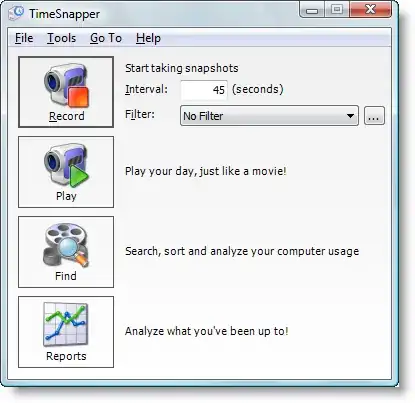
TimeSnapper is a highly configurable program to set this up and play them back as a video.

You might be able to find alternatives by searching for "periodic screen capture software"...

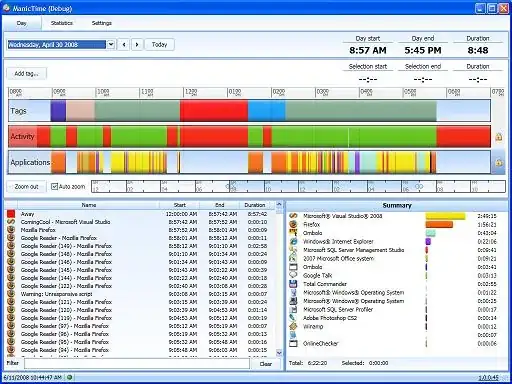
As for logging applications and websites, there is ManicTime.

Tamara Wijsman
  • 57,083
  • 27
  • 185
  • 256
  • The middle 2 are trivial for even a young child to circumvent or erase the logs (and many know how and do, I certainly could erase IE's history at age 12). Assuming they only talk to their friends is baseless and quite likely wrong, kids often chat with others and most chat clients allow conversations with people not in your contacts list (in fact, many then add the person as a temporary or recent contact). – ssube Sep 03 '11 at 01:18
  • History, cookies and cache are all stored in locations which are writable by the user (by necessity), and thus can be overwritten or erased. A basic tool to lock permissions becomes entirely useless when portable browsers are easily available, and even many commercial parental spyware programs have limited functionality with secure connections. – ssube Sep 03 '11 at 06:18
  • @peachykeen: Explain me how to erase IE's history when you are locked out by permissions? If you think your kids are that smart you can just deny the Delete permission on `index.dat` as well as on the MSN log files. There are chat logs along that assumption so I don't see the problem? With your way of thinking, a child can circumvent everything by booting into a Live CD. Yes, I could do that at age 12... – Tamara Wijsman Sep 03 '11 at 06:35
  • If you are willing (and know how) to edit the specific permissions on every possible file, including chat logs (which, depending on the client, made be created for new conversations), then you have a reasonable degree of security. Simple applications that don't take into account fine-grained permissions on all the files will not (which was what your original answer suggested). And kids who actually want to bypass their parent's watching will go to ridiculous lengths (even up to live CDs). – ssube Sep 03 '11 at 16:51
  • @peachykeen: So, are you suggesting to not let the children use the computer? You lost me at trivial... – Tamara Wijsman Sep 03 '11 at 22:57
  • I'm simply saying #2 and 3, as stated in your answer, are respectively ineffective and based on mistaken assumptions. – ssube Sep 04 '11 at 01:14
  • @peachykeen: Of course they can be seen as ineffective and mistaken if a LiveCD lets you surpass them. – Tamara Wijsman Sep 04 '11 at 01:27
  • Both suggestions *in your answer* are ineffective even without a LiveCD. Adding in some of what you've mentioned in the comments would improve them quite a bit (for example, you don't mention removing the delete permissions on history/chat logs). – ssube Sep 04 '11 at 01:30
  • @peachykeen: But, they are also ineffective with a LiveCD; so, that doesn't objectively improve my answer. Your kids are either dumb or smart, I'm not going to discuss an in-between case here... – Tamara Wijsman Sep 04 '11 at 01:39
0

The program Children's Care has history option that allow you to capture the screen every half/1/5 minutes. Check here: Children's Care

Mic
  • 1