10

I am trying to connect to Microsoft SQL Server 2008 R2 from Excel 2007. When it tries to connect I get the error:

[DBNETLIB][ConnectionOpen (Invalid Instance()).]Invalid connection.


Steps to Reproduce

  • On the Data tab, in the Get External Data group, click From Other Sources, and then click From SQL Server:
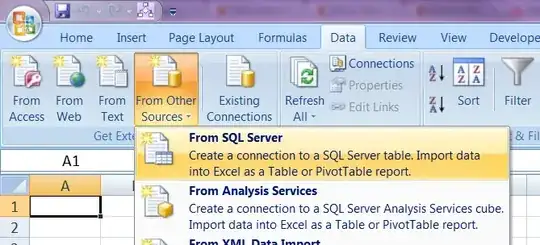
enter image description here

  • type the name of the SQL Server computer in the Server name box.

  • To enter a database user name and password, click Use the following User Name and Password, and then type your user name and password in the corresponding User Name and Password boxes:

enter image description here


Additional information

  • I can connect to SQL Server from SQL Server Management Studio:
    enter image description here

  • I can connect to SQL Server with telnet:

    C:\Users\Ian>telnet avenger 1433
    
  • SQL Server is listening on port 1433:
    enter image description here

  • Excel does connect, and receive response traffic from the SQL Server:
    enter image description here

  • I can ping the server:

    C:\Users\Ian>ping avenger
    
    Pinging avenger.newland.com [192.168.1.244] with 32 bytes of data:
    Reply from 192.168.1.244: bytes=32 time=1ms TTL=128
    Reply from 192.168.1.244: bytes=32 time<1ms TTL=128
    Reply from 192.168.1.244: bytes=32 time<1ms TTL=128
    Reply from 192.168.1.244: bytes=32 time<1ms TTL=128
    
    Ping statistics for 192.168.1.244:
        Packets: Sent = 4, Received = 4, Lost = 0 (0% loss),
    Approximate round trip times in milli-seconds:
        Minimum = 0ms, Maximum = 1ms, Average = 0ms
    
  • Trying to connect by IP address (rather than by name) has no effect:

    enter image description here

  • Windows Firewall is not running on the server:
    enter image description here

Sathyajith Bhat
  • 61,504
  • 38
  • 179
  • 264
Ian Boyd
  • 21,642
  • 49
  • 139
  • 184

4 Answers4

11

I would hazard a guess that you're actually using a named instance and the SQL Native client allows you to get away with using AVENGER as the server name but the DBNETLIB (which I believe is the old SQL Client) is more demanding.

Are you sure it's not AVENGER\SQLEXPRESS,1433?

Ian Boyd
  • 21,642
  • 49
  • 139
  • 184
ta.speot.is
  • 14,205
  • 3
  • 33
  • 48
  • Turns out it *is* that. It should be noted that simply `AVENGER\SQLEXPRESS` didn't work; i **had** to include the (standard) port. – Ian Boyd Jul 25 '11 at 11:00
  • More hazardous guesses, but the computer that Excel is running on cannot communicate with the SQL Browser service on the server (or the service is not running). – ta.speot.is Jul 26 '11 at 02:42
0

Using the SQL server data server name fixed this for me in Excel 2013

  1. Connect to the database server with SQL Server Management Studio
  2. Right-Click the server in the Object Explorer
  3. Select Properties
  4. Use the Name value listed on the server's General Properties page
Jon
  • 817
  • 1
  • 10
  • 18
0

I had the same problem when connecting from Access 2007 to SQL Server 2016. The solution in my case was to enable the TCP/IP protocol (in SQL Server Configuration Manager).

Razvan Socol
  • 309
  • 1
  • 7
0

I had the same problem.

An old application had registered an old version of SQLOLEDB.DLL in

C:\Windows\System32

Fixed by running these commands:

regsvr32 "c:\Program Files\Common Files\System\Ole DB\sqloledb.dll"  

and

del c:\WINDOWS\system32\sqloledb.dll
Ian Boyd
  • 21,642
  • 49
  • 139
  • 184