7

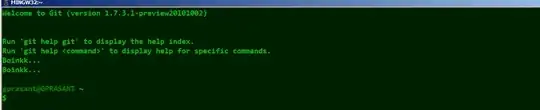
I use MsysGit on windows 7. I have one annoying problem. The entire bash_profile file seems to get executed twice. for example, I have the following echo line in the .bash_profile

echo "Boinkk..."

enter image description here

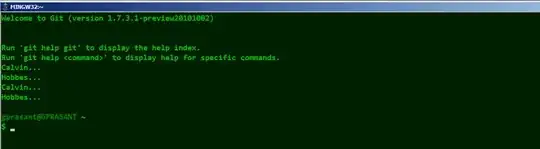
If I have

echo "Calvin..."
echo "Hobbes..."

Then I get enter image description here So I know that the .bash_profile file is getting executed twice and not each statement getting executed twice. The target for the "Git Bash" Executable is

C:\Windows\System32\cmd.exe /c ""C:\Program Files\Software\Git\bin\sh.exe" --login -i"

Does anybody know what I have to do to get the bash shell to execute the bash_profile statements only once?

gdelfino
  • 147
  • 1
  • 1
  • 14
Prasanth
  • 657
  • 3
  • 8
  • 14
  • 1
    because if each statement was getting executed twice, I should have got Calvin... Calvin... Hobbes... Hobbes... – Prasanth Aug 04 '11 at 08:46
  • Do you have any other rc files like bashrc that source bash_profile? I don't think it would do anything but try removing the `-i` from your target. – jw013 Aug 04 '11 at 09:18
  • @jw013 I tried removing `-i`, didn't help. I also tried removing `--login -i`, but then .bash_profile didn't get sourced at all – wisbucky Jan 31 '14 at 00:21

3 Answers3

6

I had the same problem and noticed there was no ~/.bashrc file.

Creating an empty ~/.bashrc resolved the issue:

touch ~/.bashrc

I could only speculate as to why this worked, but it did.

escapisam
  • 161
  • 1
  • 4
1

TL;DR — try removing --login from your bash invocation


If you're using Git for Windows with ConEmu or Cmder, the command to start bash probably looks something like this:

cmd /c ""%ConEmuDir%\..\git-for-windows\bin\bash" -i --login"

Note the --login bit. Apparently, if --login is passed to bash, it will first execute the commands from /etc/profile, then execute one of ~/.bash_profile, ~/.bash_login, or ~/.profile — whichever exists.

Now, msys provides an /etc/profile, which executes all scripts under /etc/profile.d. Cmder offers /etc/profile.d/cmder.sh, which executes ~/.bashrc (excerpt below)

# Source the users .bashrc file if it exists
if [ -f "${HOME}/.bashrc" ] ; then
    . "${HOME}/.bashrc"
fi

That's all done within the execution of /etc/profile. Afterward, bash --login will try to execute ~/.bash_profile. Git for Windows generates this ~/.bash_profile:

# generated by Git for Windows
test -f ~/.profile && . ~/.profile
test -f ~/.bashrc && . ~/.bashrc

Upon execution, ~/.bashrc gets run a second time.

Solution? Remove --login from bash's invocation. In Cmder/ConEmu, this can be done by hitting the down-arrow next to the plus button, finding your bash in the list, and changing the command to:

cmd /c ""%ConEmuDir%\..\git-for-windows\bin\bash" -i"

Without the --login bit, bash will skip executing /etc/profile, and only run ~/.bashrc (... and /etc/bash.bashrc, but msys doesn't execute the ~/.bashrc there)
theY4Kman
  • 111
  • 4
1

I'm not familiar with how to fix on Windows but if it were UNIX/Linux you could do:

echo $PATH <br />

and see where you're getting your double entry from. I'm speculating that your .bash_profile is being added to the path more than once. If you track down where the path is being manipulated you can fix your problem.

C0D3M0NK3Y
  • 575
  • 3
  • 9
  • @Prasanth Can you share what the fix was? I tried `echo $PATH
    `, `echo "$0"`, `echo "$BASH_SOURCE"` to try to find what was sourcing .bash_profile twice, but no luck. I have no .bashrc files. It appears to me that Git Bash is sourcing ~/.bash_profile twice when it starts.
    – wisbucky Jan 31 '14 at 00:44
  • Git bash was sourcing my .bash_profile already. That was my problem. Ive long since moved to a Unix set up. – Prasanth Feb 03 '14 at 04:45
  • 1
    The
    part didn't work for me (is that PHP?). Assuming this command is used to delimit the output, I had better luck running: echo $PATH | tr : \\n
    – Alex Jansen Nov 13 '18 at 21:49