47

Is there any extension to Chrome that will let me force a URL from a particular domain to be redirected to another domain?

(E.g. Redirect http://www.google.com to https://encrypted.google.com.)

Note: I'm looking for an arbitrary redirector, not KB SSL Enforcer, which only works for the specific task of redirecting to HTTPS.

user541686
  • 23,663
  • 46
  • 140
  • 214
  • You could also consider using the HOSTS file as another method. – Synetech May 23 '11 at 20:33
  • @Synetech: Would that redirect just the root page, or anything with a particular domain? – user541686 May 23 '11 at 20:39
  • It would redirect the whole domain (or subdomain as the case may be). – Synetech May 24 '11 at 02:53
  • @Synetech You're confusing redirecting with resolving, changing the IP address that an address resolves to will not work in this case. He wants to redirect to a different domain, not try to load that domain name on the wrong web server. – Justin Buser Jun 26 '12 at 09:19
  • @JustinBuser, *> You're confusing redirecting with resolving*   No, I'm, not. Under certain circumstances, there is no difference. I use the HOSTS file to redirect all ads to a local web-server that is set up to accept any URL and replace pages with a small tiny bit of HTML that simply says `[ad]` and pictures that are a single transparent pixel. In other words, the ad sites are redirected to localhost (though they easily could be redirected to another machine). – Synetech Jun 26 '12 at 15:43
  • @JustinBuser, *> changing the IP address that an address resolves to will not work in this case. He wants to redirect to a different domain, not try to load that domain name on the wrong web server*   He has not indicated what the actual domains he wants to redirect from/to are (he used Google as an *example*), so it may or may not work. That's why I said he could **consider** it as a *comment* and not an *answer*. – Synetech Jun 26 '12 at 15:46
  • @Synetech _No, I'm, not. Under certain circumstances, there is no difference_ You're just wrong, they are two COMPLETELY different things. Putting an entry in your hosts file pointing Domain A to IP X changes what Domain A RESOLVES to, that does not REDIRECT anything because it never goes to the original IP. REGARDLESS, that WOULD NOT solve anything, putting an entry for www.google.com with the IP address for encrypted.google.com into your hosts file would result in Chrome trying to load www.google.com from the wrong IP, it would not REDIRECT (i.e. the address would remain www.google.com) – Justin Buser Jul 15 '12 at 14:35
  • 1
    @JustinBuser, it *would* redirect the browser from the original IP to the specified IP. Imagine digging a ditch to re-route water. You dig a ditch, open the dam, then the water goes to the new spot instead of where it would have gone. I never said anything about 302, so you are only arguing semantics. – Synetech Jul 15 '12 at 17:03
  • 1
    I had no idea https://encrypted.google.com existed! Cool – tony19 Oct 09 '15 at 20:31

4 Answers4

33

I had built a Chrome extension which does this.

Note: I built this for just 2 sites - just for the heck of it - by no means it's professional quality™. Please don't flame me for crappy code :)

Edit: Updated to manifest v2, which brings in certain additional restrictions.

manifest.json

{
  "name": "URL Redirect",
  "version": "0.2",
  "description": "Checks URL and redirects as required.",
  "background": { 
     "page":"bg.html"
     },
   "manifest_version": 2,
   "content_scripts": [
   {
     "matches": ["http://*/*", "https://*/*"],
     "js": ["content.js"]
   }
   ],
  "permissions": ["tabs"]
}

bg.html

<html>
  <script src="redirect.js"></script>
</html>

redirect.js

chrome.extension.onRequest.addListener(function(request, sender) {
        chrome.tabs.update(sender.tab.id, {url: request.redirect});
    });

content.js

var pattern=/\bBlocked/;
var viewtext_base_url = "http://viewtext.org/article?url=";
var newurl;
if (pattern.test(window.document.title)) // if it matches pattern defined above
{
  newurl = viewtext_base_url + encodeURIComponent(window.location.href);
  chrome.extension.sendRequest({redirect: newurl}); // send message to redirect

}

To install this, create files with filenames as mentioned above the codeblock.
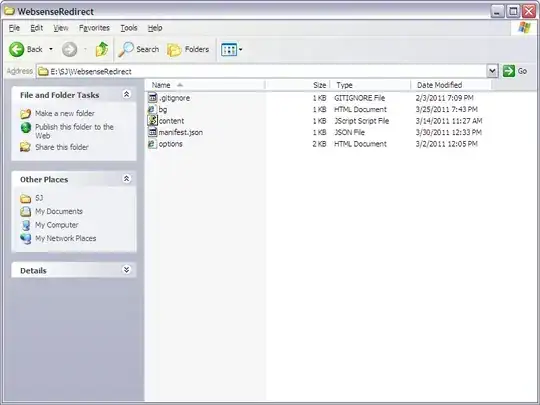
enter image description here

Once all 3 files are created, Click on Chrome Menu → Tools → Extensions. Click the "+" on Developer Mode. Click on Load Unpacked extension and point to the directory where the files are stored.
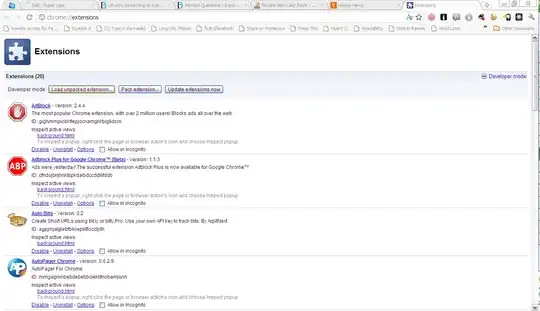
enter image description here

Edit the files are required, and uninstall and reinstall the extension as mentioned above

Sathyajith Bhat
  • 61,504
  • 38
  • 179
  • 264
17

I know I am a bit late in the game to answer this question Still I would like to answer this for future readers. Have a look at

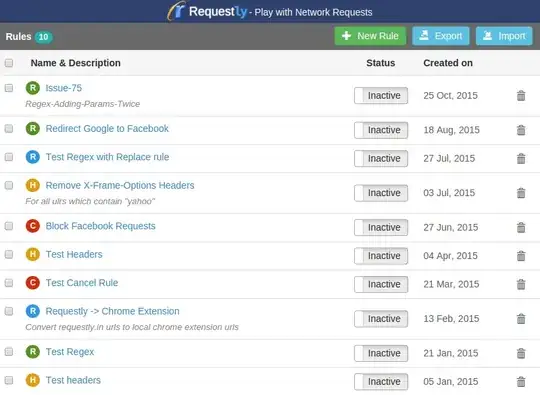
Requestly - Open Source Chrome Extension to modify Network Requests.

Github Repo - https://github.com/requestly/requestly

Currently, You can set up rules for

  1. Redirect a request URL to another url.
  2. Block some requests.
  3. Replace some part in the URL with another string. (Even the whole URL can be replaced)
  4. Add/Remove/Modify Headers in HTTP(s) Request and Response. You can set up Header Modification Rules only for specified URLs now.

Screenshots for more understanding:

  • List of Rules

List of Rules

  • List of Rule Types

List of Rule Types

  • New Redirect Rule

Creating a Redirect Rule

There are a lot of things in the roadmap to be covered like

  • Setting custom headers (Done)
  • Switching User Agents
  • Setting parameters in request (Done)

.. and a lot more.

PS: I have created this So you can blame me if you do not find this helpful :)

Sachin Jain
  • 431
  • 3
  • 15
9

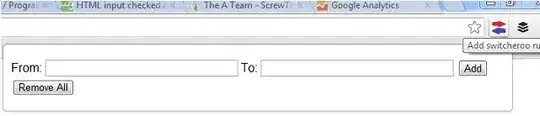
I have developed a pre packaged user friendly redirector called Switcheroo if you're interested:

Setup custom redirect rules for any http request i.e pages, scripts, images etc. Uses a simple string replace to do this.

ranjez
  • 99
  • 1
  • 1
4

A bit late, but this extension should surely do the trick: Redirector.

And it's an arbitrary redirector.