Is there a multi-tab terminal replacement for Cygwin's terminal?
Asked
Active
Viewed 6.1k times
32


-
1@DanielBeck this is not a duplicate *question*. It's a duplicate answer. Randomize is clearly looking for a multitab terminal for a *Unixy shell on Windows*---whereas the question you marked it as a duplicate of seems to be agnostic to shell type. Incidentally, both questions can be solved the same way. But I consider them two separate questions. – Kazark Jun 06 '13 at 15:48
-
@Kazark Your edit made them duplicate, because Cygwin doesn't have its own terminal, but uses whatever you launch it in. – Daniel Beck Jun 06 '13 at 16:25
-
1@DanielBeck But the questioner may not know that. I certainly did not; an item called "Cygwin Terminal" appears in the start menu after install. It has its own icon; are you say that it is the same terminal as the default on on Windows? – Kazark Jun 06 '13 at 17:05
-
As of 2019 `mintty` supports tabs. You still have multiple mintty processes, tabs are just a permanent widget allowing navigation via click. `TabBar=yes` – gavenkoa Apr 06 '21 at 09:49
-
fatty is what you need https://github.com/juho-p/fatty It's the good old cygwin + multi-tab, and nothing else. – Shaohua Li May 27 '23 at 10:36
4 Answers
32
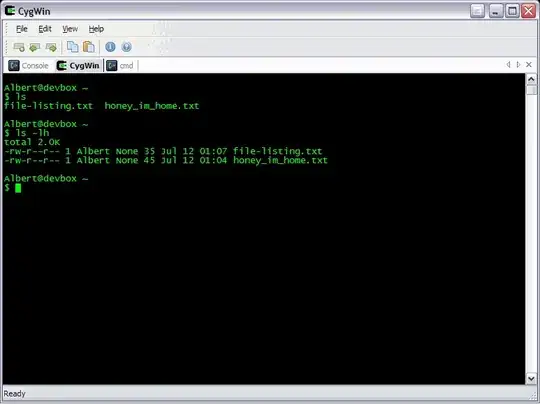
You can use Console to achieve this. Simply configure the Shell under the Settings page to point to Cygwin.bat.

Gaff
- 18,569
- 15
- 57
- 68
-
thanks, it works fine! just a question: in the Settings->Console under Startup Dir if I set the path dos-like (c:\path|...) or in *nix like (/cygdrive/c/... with or without /cygdrive) it doesn't come up at the specified path. Do you know how to set this? Thanks – Randomize Mar 31 '11 at 16:04
-
I'm honestly not sure as it's been a while since I personally used Console. However if you can't find a way to set it properly in there, you could always edit your .bashrc file in your Cygwin installation to change to the desired folder upon login. – Gaff Mar 31 '11 at 16:19
-
But if so every time I launch a new tab it will be CygWin. How can I use different tabs for different programs like what is in your snapshot? – Ziyuan Mar 21 '13 at 00:06
-
8I tried to use Console2 (last release dates 2011) to run Cygwin 64 bits in my Windows 7 64 bits and it didn't work. Researching a bit I was able to find [ConsoleZ](https://github.com/cbucher/console) which is a fork of the former that is properly updated and was able to support the environment I described. – Chuim Dec 04 '13 at 22:33
-
@Chuim - It *seems* to be working fine for me. Console 2.00.148 (32-bit according to Process Manager) running Cygwyn64 Terminal over Win 7 64-bit. – ysap Nov 03 '15 at 18:06
7
The standard answer to this question is GNU Screen.
Wikipedia has some alternatives, such as tmux.

-
-
tmux is working great under cygwin for me at the moment, I just needed to select tmux in the list of installed packages. That said, I still like having tabs in addition to split windows just like the OP. – akom Apr 16 '17 at 15:15
5
If it is not a problem for you to start sshd and use cygwin via "ssh localhost", try MTPuTTY. It worked great for me.
Features:
- full access to PuTTY configurability (and I do not know any better terminal emulator for windows)
- configurable keybindings in MTPuTTY (everything I needed)

Kamil Nowosad
- 51
- 1
- 1
3
mobaxterm might be what you're looking for - basic set of cywin tools (and you can use your own) multi tabs, and an x server baked right in

Journeyman Geek
- 127,463
- 52
- 260
- 430