53

I'd like to hibernate my windows 7 pc in 10 hours after a download is finished. When I execute this:

shutdown -h -t 36000

All I get is the shutdown help text. Doesn't matter if I'm in admin or normal for the cmd prompt. Is there something I'm missing? I've tried -t 36000 only with the same results. Same with / instead of -.

So either a) it isn't working or b) it has a funny way of telling me about it. Do the power management settings interfere with this command?

Update: The /s switch shuts the computer down (not hibernate). /h is a valid switch. Here's a screenshot of my command:
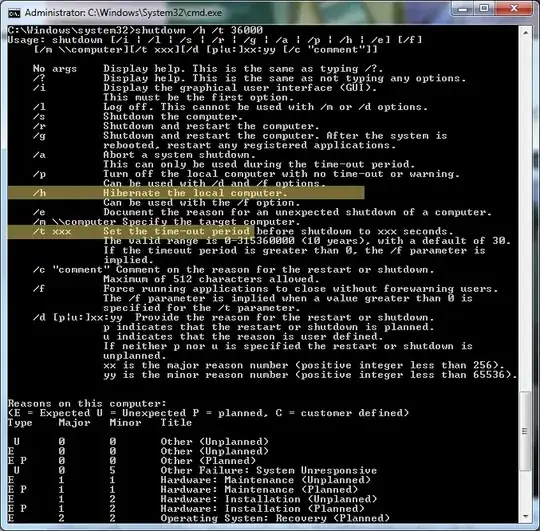
shutdown cmd screen

galoget
  • 393
  • 2
  • 10
jcollum
  • 4,963
  • 11
  • 46
  • 62
  • 1
    Have you run "powercfg /hibernate on" yet? And what happens if you run the command with only the /h switch, and no /t switch? – goblinbox Mar 20 '11 at 20:15
  • @goblinbox I tried it with either switch, neither one worked. Do I need to run powercfg to allow shutdown cmd to run the /h switch? – jcollum Mar 20 '11 at 21:12
  • Hibernate has to be enabled in order to work, yes. – goblinbox Mar 20 '11 at 22:30
  • 1
    I swear I've asked the mods to remove the "duplicate" tag from this several times, yet they refuse. – jcollum Sep 12 '18 at 16:37

3 Answers3

38

The -h switch is used to shut down the computer on Linux, not Windows. The correct command to shut down a Windows computer after 7 hours is:

shutdown -s -t 36000

Windows will show a dialog box with a countdown until the time the computer will shut down.

But, you want to hibernate, not shutdown, and unfortunately, the /h and the /t switch don't work together. As a workaround, you can use the at command to schedule shutdown /h to run at a certain time. For example, it is 3:00pm in my time zone at present, so 10 hours later would be 1:00am. To schedule it to hibernate then, I would run:

at 1:00 shutdown /h

It uses 24-hour time notation, so if you wanted it to hibernate at 1:00pm, you'd run:

at 13:00 shutdown /h

Please note, that while you don't need administrator permissions to run the shutdown command on default Windows installations, you do need them for the at command.

Patches
  • 16,136
  • 3
  • 55
  • 61
  • +1 Shutdown ? will show all switches for the command – Dave M Mar 20 '11 at 18:27
  • 1
    @jcollum: Sorry about that! It seems Windows does not support timed hibernation. Notice if you omit the `/t 36000` switch, the command works. I'll add a workaround to my answer. – Patches Mar 20 '11 at 22:07
  • Thanks. I never tested out the /h command by itself because that would've just shut it down immediately. Also, I didn't see anywhere on the man page where it said that they weren't compatible -- how would I have found that? – jcollum Mar 20 '11 at 23:14
  • The issue with shutting down is that it requires me to go thru and find all the things which might be blocking my computer from shutting down. Hibernating has a lot less friction. – jcollum Mar 20 '11 at 23:15
  • 1
    @jcollum: Unfortunately, they don't say anything. Microsoft's online documentation doesn't even make that clear. I must have tried around 50 different combinations of switches before I gave up and Googled around to see what I might be missing. As for the stuff blocking shutdown, the `/f` switch should tell `shutdown` to force quit everything on shutdown. – Patches Mar 20 '11 at 23:19
  • This is absurd. Timed hibernation **did** work in XP! Windows 7 complicates and breaks things because of the new power modes like hybrid-sleep. – Synetech Mar 21 '11 at 00:15
  • Not that with Win7 you can't have a timed shutdown that ISN'T forced, also different from XP. – Harley Mar 21 '11 at 03:18
  • 8
    Under Win 8.1 `at` command refuses to run, stating that it is deprecated and replaced by `schtasks`. Pity. – Dominykas Mostauskis Oct 29 '14 at 21:25
  • 2
    @DominykasMostauskis I assume this is also true in Windows 10. – jcollum Jun 26 '15 at 17:30
  • 1
    36000 is after 10 hours, not 7 hours. Should mention that the parameter takes seconds as input. – Kevin Van Ryckegem Apr 18 '16 at 00:42
31

It doesn't look like the -t option is supported with the -h option for shutdown.

Under Windows 7, you can duplicate what you're trying to do with a .bat script containing the following:

timeout /t 36000 /nobreak
shutdown -h

It will cause the PC to immediately hibernate once timeout is done counting down.

Joe Internet
  • 5,305
  • 2
  • 18
  • 14
  • 9
    You can avoid the batch-file and run it directly too: `timeout /t 36000 /nobreak & shutdown /h`  Of course if you make a batch-file to simplify it, then you should replace the timeout with `%1` so that it is general-purpose. – Synetech Jan 30 '13 at 06:02
  • 4
    One warning though, you can’t abort the shutdown by pressing a key with the `&` version; doing so will immediately shutdown (you are canceling the wait only). With a batch-file, you can press `Ctrl+Break` and CMD will ask if you want to end the batch-file (and thus abort the shutdown) or continue it. So you have choice of behavior. Or, you can write a more batch file with the `choice` and skip `timeout` altogether: `choice /n /t 3600 /d Y /m "Abort hibernate?" & if errorlevel 2 shutdown -h` (however it doesn’t show the time left and is limited to 9999 seconds—for multi-hour, just use `at`). – Synetech Jan 30 '13 at 14:56
  • 1
    @Synetech: It's possible to cancel by closing the window, just tried it. – Viktor Mellgren Sep 19 '13 at 21:52
  • 5
    Actually the command without a batch file is `timeout /t 36000 /nobreak && shutdown -h` - this will stop if you cancel the timeout. With only one ampersand it would execute the second command then. – Sven Nov 14 '13 at 08:59
  • @Sven I think you meant `shutdown /h`. Notice the `/h`, not `-h`. – Dominykas Mostauskis Oct 29 '14 at 21:31
14

PsShutdown from Sysinternals can hibernate the computer after a specified amount of time.

psshutdown -h -t 36000
paradroid
  • 22,761
  • 10
  • 76
  • 114
  • 4
    This is somehow overkill. Two other answers point out a simpler solution. Anyway thank you for the `sysinternals` reference – Isaac Jul 11 '11 at 22:37
  • 9
    @Isaac: How is it overkill? PsShutdown can do more than shutdown can and so is useful to have. I don't think adding extra programs in your path is such a big deal. – paradroid Jul 11 '11 at 22:55
  • 3
    @Isaac How is that overkill? It's simpler than every other solution and just saved my ass! :) – Razor Oct 22 '14 at 13:00
  • 2
    Unlike built-in shutdown, PsShutdown is unable to display any shutdown notification message on 64-bit Windows OS. It means there is no warning of imminent shutdown/hibernate for the active user. – Weaver Jun 26 '17 at 21:55