2

I'd like to search all files that are different from a specific extension. So, if I search files by using the string *.doc I'd like to see every files that are not .doc.

I also would like to hidden the sub-folders in the result display by using that search (but the search must of course search into sub-folders) :)

Is it possible this on Windows Vista/7?

SOLUTION

Finded the solution by using this string NOT *.doc AND NOT tipologia:=cartella

This for the italian version. English should be similar, somethings like NOT *.doc AND NOT kind:=folder

markzzz
  • 717
  • 3
  • 13
  • 22

2 Answers2

5

You'd search for "NOT *.doc" (without quotes)

From here

NOT will search for all files not containing the search term in question.

The page also notes that operators AND, NOT and OR must be in capital letters, otherwise they will behave as just another search term.

northirid
  • 336
  • 1
  • 4
  • Nice one! It works. And if I'd like to exclude `*.doc` and `folder`? – markzzz Mar 04 '11 at 23:27
  • Exclude a specific folder from the search? Not sure I'm afraid. Are you wanting to search the whole machine for not doc files? Or just a specific area? If you ALWAYS wanted to exclude a specific folder, I guess you could exclude it from the search index (Indexing options in Control Panel) but I don't think you'd be able to do it on a one off basis. Happy to be proven wrong though! – northirid Mar 05 '11 at 05:57
  • Example : I have a main Folder with : 10 Subfolder, 4 mp3 files, 3 jpg files and 3 doc! I'll like to see all files that aren't doc (so only the mp3 and the jpg ones) on the main Folder. I'd like to do somethings like `-*.doc` and a string that tell the search "don't show the folder". Is it more clear? :) – markzzz Mar 05 '11 at 11:23
  • It is, and as you said above, using the combination should do it. :) – northirid Mar 06 '11 at 03:41
1

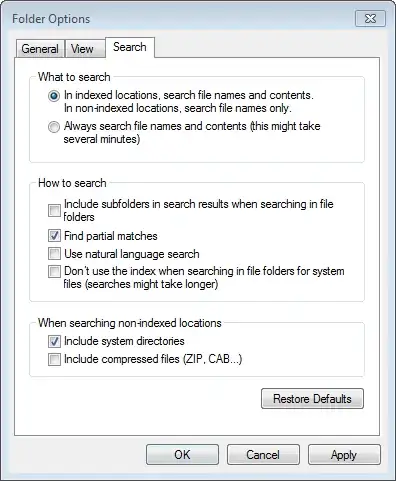
See Set Windows Search to not include sub-folders when typing in the search box.

The first option in "How to search" could thus be disabled:

enter image description here


A very quick light-weight search engine that allows you to search any way is Search Everything.

  1. C:\Path\To\Location\ !.doc

  2. Sort by path, the files not in the sub-folders are listed first.

Gaff
  • 18,569
  • 15
  • 57
  • 68
Tamara Wijsman
  • 57,083
  • 27
  • 185
  • 256
  • Sorry, maybe I've explain my problem in a bad way! I want that search is doing in the subfolder, but I want that they are not be displayed:) – markzzz Mar 05 '11 at 12:52
  • Ah, doesn't matter, I've got reputation for the effort. Yes, it's indeed with `kind`. I like a search on `kind:*` which gives all indexed items... :-) – Tamara Wijsman Mar 05 '11 at 14:21