I have Firefox 3.6 installed and have just seen that Firefox 4 Beta is available. Is it possible for me to install Firefox 4 Beta alongside my current Installation of Firefox?
Asked
Active
Viewed 1.8k times
27


-
I no longer use Firefox, but when I did, their betas were pretty robust and I never bothered keeping an old install and never got burnt. Of course if you are developing against multiple revisions, ignore this. – msw Jul 07 '10 at 16:45
-
@msw - I've gotten burnt when installing **stables** due to extension incompatibility issues. – MiffTheFox Jul 08 '10 at 18:50
5 Answers
30
Yes, it is. This also works fine with the final release of Firefox 4. When you install, choose to customize the install. Then just make sure to select a different directory than where Firefox 3.6 is installed. I just did it yesterday, works fine!
If you want to be able to use both 3.6 and 4 Beta at the same time, you'll need to launch the 2nd one you open with the -no-remote command line, and specify a different user profile (can't open the same user profile twice at the same time). For more details on that, see Firefox command line arguments.
Important: This does not work when using Firefox Portable, it does not recognize the -no-remote switch.
Update: If you want to keep separate profiles for your stable and beta installations, create two different profiles. Start "<path to firefox>\firefox.exe" -ProfileManager. Your existing profile will already be there ("default"). Create a new profile (call it "testing" or whatever), then choose that.
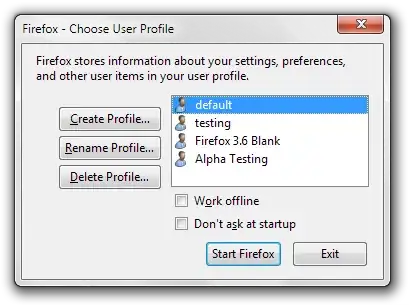
If you want Firefox to choose a specific profile for a specific installation every time you open it, you can modify the shortcuts to specify a profile. Change it to "<path to firefox>\firefox.exe" -P "Profile Name". This is case sensitive. It will then always open that profile. You could also just uncheck the box for "don't ask at startup" and choose yourself every time you start.

nhinkle
- 37,198
- 36
- 140
- 177
-
But this still use same settings addons and history. I trid n-remote option it does not open up new instance of 4beta. – Sharique Jul 14 '10 at 05:07
-
See the information I added about profiles. Using that with `no-remote` should let you choose multiple profiles and multiple sessions at once. – nhinkle Jul 14 '10 at 05:25
-
no-remote open up existing (3.6) firefox,although no-remote with -p open up 4beta. – Sharique Jul 14 '10 at 06:13
-
Are you sure you're typing `firefox.exe -no-remote`, not `firefox.exe no-remote`? You need to have the first dash. Also make sure you're using the path to the right installation and not getting those confused. Check those and it ought to work. – nhinkle Jul 14 '10 at 06:16
-
-
1Using firefox portable might be your issue. I'm not sure if it has the same command line parameters as regular firefox. Try it with a regular local installation of each browser. – nhinkle Jul 14 '10 at 06:46
-
Ohh I was running firefox alpha, after updating to 4beta1 portable, it works. Thanks – Sharique Jul 14 '10 at 07:00
-
-
I followed those steps and lost all my bookmarks, preferences, plugins and search engines when I restarted Firefox 3.6. When you create the new profile for Firefox 4, it is also selected as default. I had to reselect "default" in the profile manager (started with
/firefox.exe -no-remote -ProfileManager) and click "Start Firefox" to run Firefox 3.6 with all my stuff back. – Eric Bréchemier Apr 04 '11 at 07:42 -
This is expected behavior, @EricBréchemier. If you do not check the box to show the profile editor automatically when Firefox opens, it will load whatever is set as the default. Your bookmarks and such were not really lost, they just were not loaded because you didn't tell Firefox to do so. – nhinkle Apr 04 '11 at 08:22
-
@nhinkle I do understand that :) I just did not expect that by running the profile manager with the Firefox4 executable and creating a new profile, which happened to get displayed as selected in the list, it would become the default profile for all instances of Firefox, including Firefox 3.6, thus replacing the profile named "default". This could have been more explicit IMHO, e.g. with a checkbox [] make this my default profile for all installed versions of Firefox. – Eric Bréchemier Apr 06 '11 at 14:32
-
If you feel so inclined, you could go submit a bug report or suggestion to the Mozilla devs. But yes, the way it works is that there is a `profiles.ini` file in your appdata folder, and every version of Firefox looks there for profiles. So unless you explicitly bring up the profile manager, it'll just choose whichever is set as the default in that file, regardless of what version of Firefox you're using. – nhinkle Apr 06 '11 at 16:58
10
There are portable versions of Firefox here:

0
If you are on a Mac, just rename the app before copying it to Applications.

Rich Bradshaw
- 6,416
- 3
- 31
- 43
-
1You'll need to be sure the beta doesn't clobber your profile folder though, right? – Peter Murray Jul 07 '10 at 22:17
-
Both versions of Firefox will use the same Firefox profile, so you'll need to split the profile as well. – Stefan Lasiewski Oct 05 '10 at 22:50
0
Perhaps gross overkill for your particular application, but app developers will spin up a new VM for each version of the browser (in order to eliminate conflicts). VirtualBox and VMWare are 2 popular choices.

Brian Knoblauch
- 4,743
- 12
- 43
- 60

