Clarification
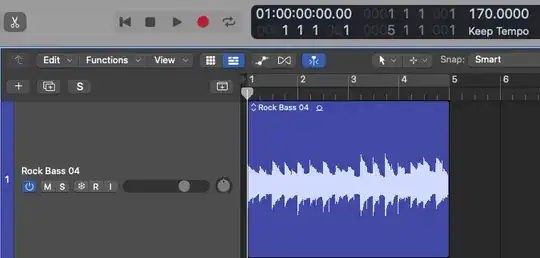
First of all, the track content shown in the screenshot (Rock Bass 04) is NOT a regular audio loop. It's an Apple Loop.
How do you you differentiate just by looking at it?

If you notice, track has a small sign right after track name. That tells the user if it is an Apple Loops , regular stereo audio
 or regular mono audio
 .
.
Apple Loops
These are prerecorded musical phrases or riffs in the Loop Browser which when added to a project creates a region and plays at the project tempo and key
So even if your project is at say 90 BPM/C Maj and the Apple Loop is at 80 BPM/D Maj, it will stretch it automatically to 90 BPM and transpose it to D Maj when you add it to your project.
What about the  label
label
If the project BPM is closer to double the Apple Loop BPM, it will avoid stretching the loop and would show a 1/2X label which means it is playing at half the intended speed.
If the project BPM is closer to half the Apple Loop BPM, it will avoid squeezing the loop and would show a 2X label  which means it is playing at double the intended speed.
In this specific case, the Apple Loop in question - Rock Bass 04 - has a default BPM of 80
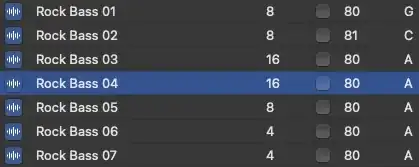
So, when project BPM is 102, the loop gets stretched as it is closer to 80 but when project BPM is 170, it being closer to 160 (2 times 80) it internally stretches to 85 (1/2 times 170) and marks a 1/2x label in the track name to indicate it.
If you try playing the loop in 40, you'll see a 2x label.
The intuitive reasoning behind this is to keep the audio as close to the original as possible and to avoid over-stretching the audio hence reducing artefacts.
How to force follow the project BPM (and remove the label)
There are 2 ways -
Make the project BPM same as the Apple Loop BPM, import the Apple Loop and then change the project BPM
Bounce the Apple Loop as a regular audio loop and then use Time and Pitch Machine (^P) to change the BPM.
Reference Logic Pro ver : 10.7.2


