 Release status: unmaintained |
|
|---|---|
| Implementation | Tag |
| Description | Allow to display go diagrams in MediaWiki |
| MediaWiki | |
| License | No license specified |
| Download | /godiag.php |
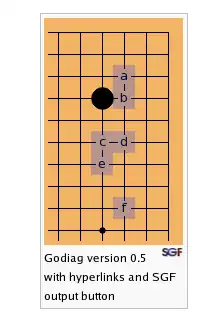
The Go diagrams extension may be used to edit and display go diagrams in MediaWiki. The output looks similar to the one on http://senseis.xmp.net but it's antialiased. SGF is also supported.
Features
- SGF output
- hyperlinks
- different styles ("large", "normal", user-defined)
- (optional) coordinate markers
- anti-aliased output
Download
- 10:03, 2 April 2006 (UTC) version 0.8: /godiag.php
Requirements
- PHP + GD2 and FreeType
- MediaWiki 1.6 or 1.5
- License: GPL
Usage
Installation & config
- Create a directory for godiag and make it writeable by the web server and accessible via HTTP.
- Copy the file to MediaWiki's extensions directory.
- Add the following to your LocalSettings.php:
require_once('extensions/godiag.php');
$wgGodiagDirectory = "/sys/path/to/dir";        // e.g. "$IP/godiags"
$wgGodiagPath = "/url/path/to/dir";         // e.g. "$wgScriptPath/godiags"
$wgGodiagTTFont = "/path/to/truetypefont";  // e.g. "/usr/share/fonts/bitstream-vera/Vera.ttf"
MIME
Note: You may also specify an SGF mime type so your server presents the SGF's correctly to the client. This worked for me:
printf "application/sgf\t\t\tsgf" >> /etc/mime.types
(restart web server)
I18n
You'll need to set a few extra vars in LocalSettings.php, if you want to use the extension in non-English wikis:
$wgGodiagHintRegex— this is the format of hints about additional moves in the title (e.g. "8 at 1"). The default is:
'/(\d|10) (?:at|on) (\d)/'$wgGodiagSgfLinkText,$wgGodiagSgfLinkTitle, and$wgGodiagSgfComment
Example for Bulgarian:
require_once('extensions/godiag.php');
$wgGodiagDirectory = ...;
$wgGodiagPath = ...;
$wgGodiagTTFont = ...;
$wgGodiagHintRegex='/(\d|10) (?:at|on|на|върху) (\d)/';
$wgGodiagSgfLinkText = ''; // usually = '' since an image is used
$wgGodiagSgfLinkTitle = 'сваляне на SGF'; // "download SGF"
$wgGodiagSgfComment = 'SGF diagrama ot RomanizedWikiName'; // ASCII(!) comment
Go diagram styles
Godiag comes with two predefined styles, "normal" and "large". You may specify the style for a diagram by starting it with
<go>
$$#stylename title
...
(put any options like 'W' and 'c' or board size before the '#', like $$Wc13#large title).
You may define more styles, e.g. in LocalSettings.php:
$wgGodiagStyles['mystyle'] = array( /* ... */ ); // see source for two examples
$wgGodiagDefaultStyle='mystyle';                 // make it default
Syntax
The syntax is in most cases compatible with http://senseis.xmp.net/ but usually less strict. There are also a few extensions. In short:
- put things between:
<go>
$$ title
and
</go>
- use these symbols:
| vertical border
- horizontal border
. unoccupied point
, hoshi point
X     black
O     white
B     black circled
W     white circled
#     black with square
@     white with square
C     circled point
S     point with square
0-9   numbered moves (0=10); black is first by default
a-z   marked points
_     empty space (useful as separator and for other effects)
- place options after the initial '$$'
B— black player makes move 1 (default)W— white player makes move 1b— insert a break after the image; The following text will appear below the image.c— draw coordinate markersl— float leftr— float right (default)1–40— specify board size (default is 19). Useful for sizes above 19 and as a hint to SGF.- Example:
$$Wc13 Hello world
- you can add hyperlinks at the end, e.g.:
[a|WikiPageAboutMarkedPointA]
[3|WikiPageAboutMarkedStone3]
[C|http://link.to.example.com/circled-point.html]
- add "X at Y" hints to the SGF generator in the title, e.g. "A mysterious disappearance (9 at 3)" will create an SGF with moves 3 and 9 on the same spot.
Maintenance
- Remove older files in godiag-dir/tmp (files used in previews, leftovers from failed generations)
- If you want to recreate the SGF/PNG files, empty the png/sgf subdir and set
$wgCacheEpochin LocalSettings.php to the current server time:$wgCacheEpoch = 'YYYYMMDDHHMMSS';.
Examples
Example 1
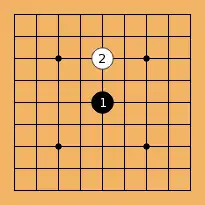
<go>
$$ A simple example with extra spacing
 -------------------
| . . . . . . . . . |
| . . . . . . . . . |
| . . , . 2 . , . . |
| . . . . . . . . . |
| . . . . 1 . . . . |
| . . . . . . . . . |
| . . , . . . , . . |
| . . . . . . . . . |
| . . . . . . . . . |
 -------------------
</go>
Example 2
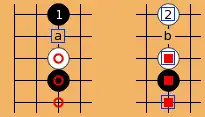
<go>
$$ A complicated example with marks, numbers, hyperlinks, border just on one side
|..1.__.2.
|..a.__.b.
|..W.__.@.
|..B.__.#.
|..C.__.S.
[2|Wikipage]
[a|http://example.com]
[S|Wikipage2]
[@|Wikipage3]
</go>
Example 3
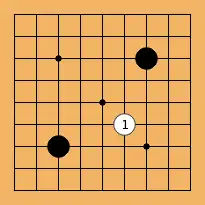
<go>
$$W White can also be first (begin with $$W) + there are shortcuts
-
|.
.
..,...X
.
....,
.....1
..X...,..|
.
.
-
</go>
Stylesheet example
Add this to MediaWiki:Monobook.css (or MediaWiki:Yourskin.css) within the wiki for a start:
 .godiag-left { /* for br and div */
        clear: left;
 }
 .godiag-right { /* for br and div */
        clear: right;
 }
 div.godiag { /* for backwards compatibility with ver <= 0.7 */
        float: right;
        clear: right;
        margin: 0 .5em .5em 1em;
        background-color: #f9f9f9;
        border: 1px solid silver;
 }
 div.godiag-left {
        float: left;
        margin: .5em 1em .5em 0;
        background-color: #f9f9f9;
        border: 1px solid silver;
 }
 div.godiag-right {
        float: right;
        margin: .5em .5em .5em 1em;
        background-color: #f9f9f9;
        border: 1px solid silver;
 }
 div.godiagi {
        padding: 0.5ex;
 }
 div.godiagheading {
        font-size: 94%;
        padding-top: 0.5ex;
 }
 div.godiagsgf {
        width: 22px;
        height: 9px;
        float: right;
 }
 div.godiagsgf a {
        background: url("/path/to/Download_sgf.png") 0 0 no-repeat;
        display: block;
        width: 22px;
        height: 9px;
 }
Download_sgf.png = 