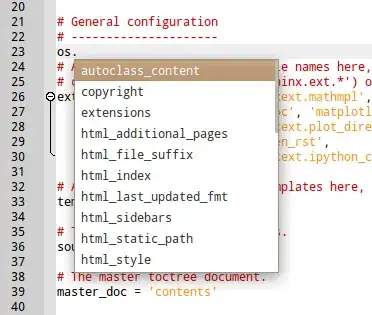
I don't believe it's possible with a gtkrc modification.
Even if you add this code to the end of your gtkrc:
style "fontchangetest" {
    font_name = "Sans 20"
}

class "GtkWidget" style "fontchangetest"
Restart Geany (or any GTK2 application for that matter) and a lot of the UI widgets will take this property, however the actual code editor and autocomplete list will retain the font designated by Geany.
However, let's check out the source code:
apt-get source geany
cd geany-0.20
The font for the autocomplete box is defined in scintilla/ScintillaBase.cxx, line 264:
ac.lb->SetFont(vs.styles[STYLE_DEFAULT].font);
The SetFont function is only used for the autocomplete listbox (verified with 'ack SetFont'), so no harm in changing it.
Open up scintilla/PlatGTK.cxx, navigate to line 2029. You'll see this code:
void ListBoxX::SetFont(Font &scint_font) {
    // Only do for Pango font as there have been crashes for GDK fonts
    if (Created() && PFont(scint_font)->pfd) {
        // Current font is Pango font
        gtk_widget_modify_font(PWidget(list), PFont(scint_font)->pfd);
    }
}
Replace it with:
void ListBoxX::SetFont(Font &scint_font) {
    // Only do for Pango font as there have been crashes for GDK fonts
    if (Created() && PFont(scint_font)->pfd) {
        // Current font is Pango font
        PangoFontDescription* pf = pango_font_description_from_string("Sans 6");
        gtk_widget_modify_font(PWidget(list), pf);
    }
}
Obviously you can change the 'Sans 6' to be whatever font and size you like. This is a very hacky solution, however I don't know C/C++ so perhaps there's a more elegant way to do it.
Then you can either:
./configure && make && sudo make install
To do a quick compile and install (would seriously advise removing the existing geany package first though)
Or the more correct way:
sudo aptitude install build-essential devscripts ubuntu-dev-tools \
debhelper dh-make diff patch cdbs quilt gnupg fakeroot lintian \
pbuilder piuparts intltool chrpath

debuild
cd ..
sudo dpkg -i geany_0.20-1.1ubuntu1_amd64.deb
To build a new package including the changes and then install it.