4

I'm trying to install Genymotion on ubuntu 16.10 here is what I did:

wget https://dl.genymotion.com/releases/genymotion-2.8.1/genymotion-2.8.1_x64.bin
sudo chmod +x genymotion-2.8.1_x64.bin
sudo ./genymotion-2.8.1_x64.bin

Then I installed VirtualBox

sudo apt install virtualbox

Then I tried to lunch Genymotion

cd /opt/genymobile/genymotion/
./genymotion
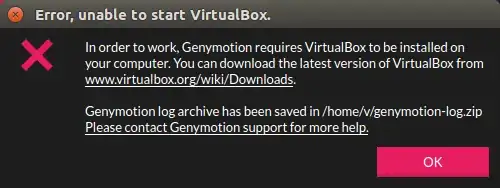
enter image description here

I also tried with sudo

sudo ./genymotion

but no difference

janos
  • 4,848
  • 23
  • 50
  • 1
    I have Genymotion working on 14.04. I did not use the VirtualBox package from the repository, but used the installer on https://www.virtualbox.org/wiki/Linux_Downloads because I wanted the latest version. You could try that. Also, the error in the image says there is a log file. It would probably be helpful to see the contents of that log file. – blendenzo Dec 29 '16 at 16:23
  • Well you're lucky. I just get `./genymotion: symbol lookup error: /usr/lib/x86_64-linux-gnu/libpangoft2-1.0.so.0: undefined symbol: FcWeightFromOpenType`. Straight upgrade from 16.04 to 16.10 btw. Edit1: Apparently, I got it working by adding `sudo`. Also, protip: For ease of access, try `sudo ln -s /opt/genymobile/genymotion/genymotion /usr/bin/genymotion` – dat tutbrus Mar 12 '17 at 13:13
  • Same issue, nothing found – mohammed amine bourkadi Sep 04 '17 at 18:59

3 Answers3

1

First Unistall Previous Version Of virtual Box. Then follow two steps below

sudo apt-get install linux-headers-generic build-essential dkms
sudo apt-get install virtualbox-dkms

Then start genymotion again. It should work

joash
  • 111
  • 3
1

I did the following steps to resolve that issue.

  1. Restart the machine and logged into the BIOS settings (Press F1 while rebooting the machine).
  2. Under the “Security” tab “Disabled” the “Secure Boot”.

Hope this will help.

TheMatrix
  • 11
  • 1
1

Got and solved the same problem on Ubuntu 17.10:

  1. Install the latest version of VirtualBox for your Ubuntu release

  2. Fix the "missing headers" error:

    $ sudo apt install virtualbox-5.2
    [...]
    This system is currently not set up to build kernel modules.
    Please install the Linux kernel "header" files matching the current kernel for adding new hardware support to the system.
    The distribution packages containing the headers are probably:

        linux-headers-lowlatency linux-headers-4.13.0-16-lowlatency
    

    There were problems setting up VirtualBox. To re-start the set-up process, run /sbin/vboxconfig as root.

    by installing the missing headers:

    sudo apt install linux-headers-lowlatency linux-headers-4.13.0-16-lowlatency
    
  3. Rerun the setup process by running:

    sudo /sbin/vboxconfig
    
Murmel
  • 245
  • 1
  • 7