I recently upgraded to 14.04 from 12.04. doing the correction of audio, I stopped getting the audio icon itself. Now it is not shown from the top right corner(it was being shown when ubuntu instatlled). Also, now I am seeing only 4 icons in All settings window of Ubuntu. Audio setting icon is not there in system settings ( all settings ) window too.
Asked
Active
Viewed 1,550 times
0

-
Hi Sathian, what is the output of `gsettings get com.canonical.indicator.sound visible` (run in a terminal window). could it be this: `http://askubuntu.com/a/477251/72216`? – Jacob Vlijm Jun 07 '15 at 18:44
-
Hi Jacob, Thanks for your Answer.I ran the same. Please find the answer I got: sathian@sathian-Lenovo-3000-G530:~$ gsettings get com.canonical.indicator.sound visible No such schema 'com.canonical.indicator.sound' – Sathian Thekken Jun 13 '15 at 12:56
-
That is odd! could you (temporarily) rename the directory `~/.config/dconf`, log out and back in and see what happens? The key is one of the default keys in 14.04. possibly your `dconf` database is corrupted. The procedure above forces to recreate it. – Jacob Vlijm Jun 13 '15 at 14:36
2 Answers
0
Open unity menu
Go to settings
Select "Sound"
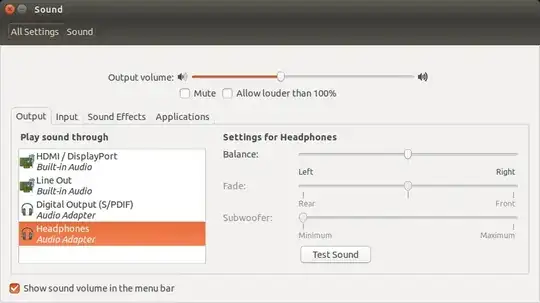
Now check "Show sound volume in the menu bar".

davidbaumann
- 1,850
- 1
- 17
- 31
0
Run this commands in a terminal:
sudo apt-get install --reinstall ubuntu-desktop pulseaudio

laugeo
- 2,807
- 1
- 12
- 12
-
hi Laugeo, thanks for the answer. I ran the script. the result is seen below: – Sathian Thekken Jun 13 '15 at 12:59
-
Reading package lists... Done Building dependency tree Reading state information... Done The following packages were automatically installed and are no longer required: account-plugin-windows-live gamine-data libtimezonemap1 libupstart1 libvirtodbc0 odbcinst odbcinst1debian2 qapt-batch signon-keyring-extension virtuoso-opensource-6.1-bin virtuoso-opensource-6.1-common Use 'apt-get autoremove' to remove them. 0 upgraded, 0 newly installed, 0 to remove and 39 not upgraded. – Sathian Thekken Jun 13 '15 at 13:01
-