7

I have installed 11.04 Ubuntu. I can play music i can listen. But i cant use the microphone input, i tried with alsamixer + pavucontrol+(arecord -d 10 /tmp/test.wav), pavumeter (apt-get install pavumeter), also tried with all related settings. But microphone audio does not get captured.

What can be the issue, it was a new PC just installed Ubuntu 11.04

*** Note:

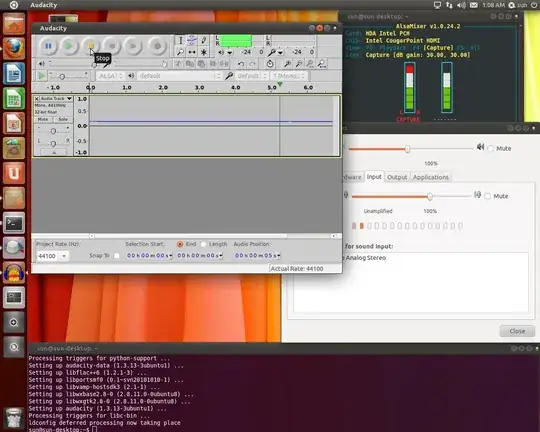
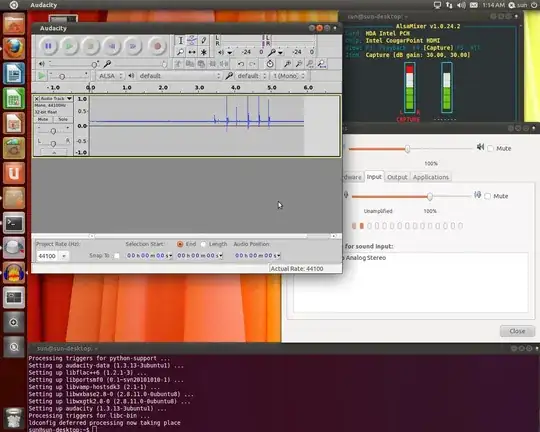
  • laurent advised, i see a noise in equalizer as following: (but real microphone is not getting captured)**

enter image description here

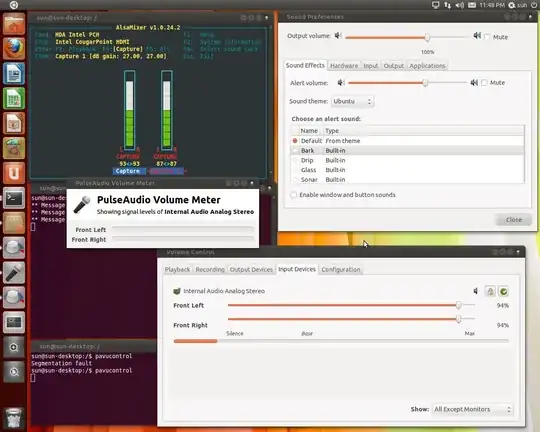
  • Enabled one capture only

enter image description here

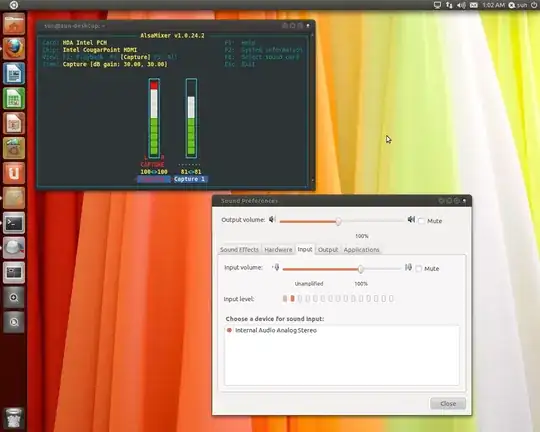
  • Device detection approval

enter image description here

enter image description here

  • Is this a laptop? – RolandiXor Sep 13 '11 at 21:40
  • @Roland Taylor: No, its a desktop PC. –  Sep 13 '11 at 22:03
  • What application are you using to record the audio? – RolandiXor Sep 13 '11 at 23:02
  • @Roland Taylor: Please see above, audacity. When i press record and talk/shout. Equalizer shows none no capturing. When i play it, i hear nothing "silence" –  Sep 13 '11 at 23:10
  • 1
    i am also getting this same problem in 11.10 on my laptop. I have tried all the steps listed in the answers here. Btw, my mic was working perfectly earlier in Lucid on the same laptop. – rigved Sep 14 '11 at 11:32

3 Answers3

4

Parts of this answer comes from: Sound doesn't work with Intel 5 Series/3400 chipset

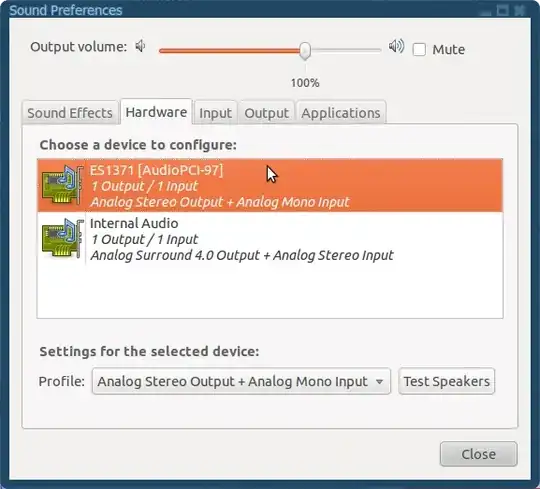
Maybe you are experiencing an issue with your sound engine. Make sure you are using the appropriate sound profile for your case.

In this image we are choosing the appropriate sound device. Which will offer several sound profiles, based on the abilities of the sound device itself. Of those, we should at least choose one of those that mentions a sound input: "Analog Stereo Output + Analog Mono Input" is working for this case but you may have 4.0, 5.1 Sound profiles plus Analog Mono Input. Any of these that features a Mono Input will do the trick.
enter image description here

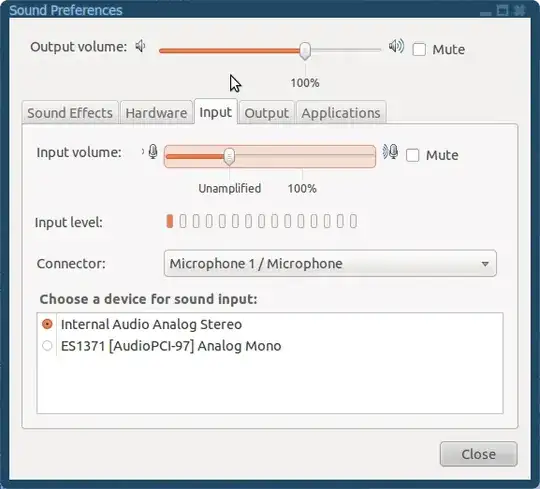
In this window we are going to choose the right place from where the computer is going to gather sound. Let's say: the place where the microphone is plugged in.
enter image description here

You can enter the sound preferences by clicking the Main Menu, then hit "System", "Preferences" and finally choose "Sound"

Give this a try and please inform if you face additional issues (like: having not "plus Analog Mono Input" sound profile).

Good luck!
Geppettvs D'Constanzo
  • 19,364
  • 7
  • 51
  • 106
  • please see above my post update, i have tried those, still when i talk, you can see no audio is getting captured. My microphone is connected. –  Sep 13 '11 at 21:50
  • Show me the input tab, please. – Geppettvs D'Constanzo Sep 13 '11 at 22:44
  • Please see above my main post, updated with the input tab. –  Sep 13 '11 at 22:51
  • The suggestion from @Dominic Jordan Hasford sounds logic, disengaging the stereo from the mic's input may do the trick, nevertheless, I can't see your sound device's connector combo box, as shown in the screenshot provided in my answer. Which -considering that you have an Intel Sound Card, may lead that you are not using an analog sound input but a digital one. I can't say it for sure but may be a problem with sound drivers? Sorry if my answer wasn't helpful for you. – Geppettvs D'Constanzo Sep 13 '11 at 22:58
3

To test the microphone, you can plug the speaker in the mic input, maximize the input volume and see if you get something with audio preferences on the input tab (input level bar). Most speaker will work as a very bad microphone. If you don't get anything, probably your input is not working or ubuntu didn't recognize it. If you get some input, the microphone is dead (usually the case).

(obs: you can also test your mic on another machine or device if available)

laurent
  • 6,639
  • 1
  • 26
  • 28
  • I have side by side PC1 (other linux), PC2 (Ubuntu 11.04). PC1 same microphone works with micin and audio out. PC2 same microphone in microphone input if i connect i do not see any audio gets in. I also tried to track with Audacity (Equalizer), nothing gets in. Tried with alsamixer and device properties it shows Ubuntu 11.04 has detected my motherboard sound device too. –  Sep 13 '11 at 21:40
  • I did your tricks. I connected my headphone speaker jack into Microphone input. And then i hit my speaker while recording, and then i see it detects noise. –  Sep 13 '11 at 23:14
  • Please see above the first picture, your tricks was applied. Which representing the capture but it was not a microphone it was speaker connected to microphone input. –  Sep 13 '11 at 23:18
  • Same microphone, is working in my other Linux PC (Fedora). –  Sep 13 '11 at 23:21
  • I purchased a new MICROPHONE TO TEST. Its same issue, some its somewhere with Ubuntu sound drivers for microphone capture. –  Sep 16 '11 at 22:39
2

You must mute one of the audio channels for the microphone, either the left or right one. Afterwards it should work perfectly. Cheers :)