2

dialogue box on my system

I am using Ubuntu 14.10. Ethernet keep disconnecting after 1 min and displaying below message.


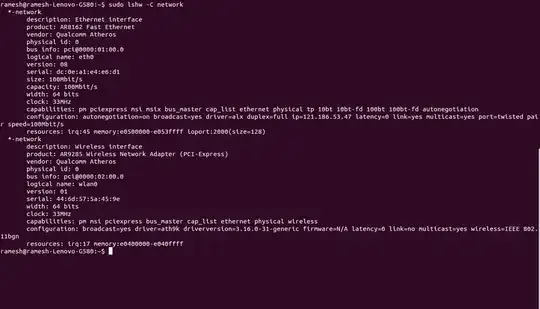
result of command "sudo lshw -C network"

sudo lshw -C network

Seth
  • 57,282
  • 43
  • 144
  • 200
Ramesh Manda
  • 49
  • 1
  • 10
  • Please edit your question, and add hardware information about your system, and the output of `sudo lshw -C network`. – Mitch Mar 04 '15 at 13:21
  • In the panel you can see that the "two arrows" icon is bright, which means that your Ethernet is connected at this moment. So could you please describe the problem with more details?.. I guess that you mean "any websites don't load after 1 minute"? – user300458 Mar 04 '15 at 13:35
  • 1
    when I plug an Ethernet cable into laptop it will work for some time (1 minute) and then stop working. If I re-plug the wire it will start working for 1 min then repeat the problem. The two arrow marks are shows always connected but an ethernet stop working. This is not the same case for other systems with the same cable. – Ramesh Manda Mar 04 '15 at 13:54
  • possible duplicate of [Network service discovery disabled: What does this mean for me?](http://askubuntu.com/questions/339702/network-service-discovery-disabled-what-does-this-mean-for-me) – David Foerster Mar 19 '15 at 00:41
  • It's working well now. I did as David Foerster said above, "sudo -i" "gedit /etc/default/avahi-daemon" and changed to 1 to 0 on below line "AVAHI_DAEMON_DETECT_LOCAL=0" – Ramesh Manda Mar 25 '15 at 02:30
  • I am sorry for the last post. The problem is repeating again. It's keep disconnecting after 10 minutes. I mean when I plugged the wire it will work for 10 minutes and after stop working. The Ether net indicator is always shows connected. When re-plug the ether net wire it's working well. I am always re-plugging after 10 minutes. – Ramesh Manda Mar 25 '15 at 12:06
  • sudo lshw -C network output,, **description**: Ethernet interface,,, **product**: AR8162 Fast Ethernet,, vendor: Qualcomm Atheros,, physical id: 0,, bus info: pci@0000:01:00.0,, logical name: eth0,, version: 08,, serial: xx,, size: 100Mbit/s, capabilities: pm pciexpress msi msix bus_master cap_list ethernet physical tp 10bt 10bt-fd 100bt 100bt-fd autonegotiation,, configuration: autonegotiation=on broadcast=yes driver=alx duplex=full ip=xx latency=0 link=yes multicast=yes port=twisted pair speed=100Mbit/s resources: – Ramesh Manda Jun 14 '15 at 11:57
  • @RameshManda have you solve this STUPID issue? – Paschalis Aug 12 '16 at 04:58

0 Answers0