How can I make the Image viewer fit all images to width?
Asked
Active
Viewed 3,694 times

1 Answers
6
Install the eog-plugins package.
sudo apt-get install eog-pluginsOpen Image Viewer and navigate to Edit ➜ Preferences ➜ Plugins and check the Zoom to fit image width plugin:
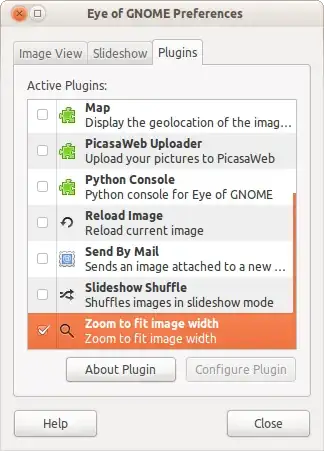
Restart Image Viewer for the change to take effect.


-
1Sigh, so I need to install yet another extra `deb`... – Oxwivi Aug 21 '11 at 07:51
-
1this doesn't work for me on ubuntu 13.04, image viewer 3.6.2 – Tosho May 28 '13 at 10:40
-
Hrm, there's no setting available to make "fit to width" the default `eog-plugins-3.16.2` :/ – lkraav May 13 '16 at 19:56
-
1Can't see any ability to fit width after installation `eog-plugins` on my Ubuntu 16.04.1 – Andriy Kryvtsun Sep 06 '16 at 12:09
-
Installing all plugins isn't required, `eog-plugin-fit-to-width` is already enough. – asynts Apr 03 '19 at 16:56