0

We have a specific need for OpenSSL 0.9.8za, and cannot rely on back-ported support for these features in newer versions of OpenSSL (1.0.1).

After installing checkinstall (sudo apt-get install checkinstall), here's the commands I've run:

sudo apt-get remove openssl libssl-dev
wget http://www.openssl.org/source/openssl-0.9.8za.tar.gz
tar -xzf openssl-0.9.8za.tar.gz
cd openssl-0.9.8za.tar.gz
./config --prefix=/usr
sudo make
sudo checkinstall

At this point, OpenSSL tries to install, and gets hung up with this output: enter image description here
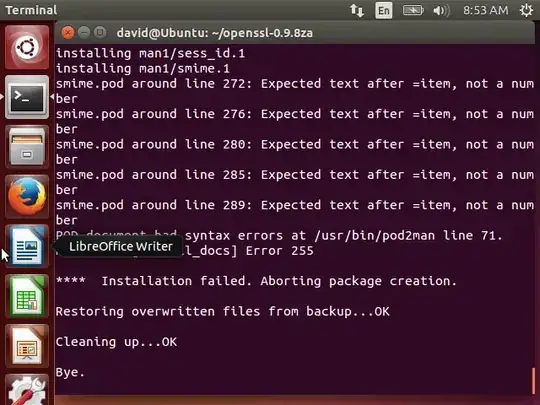
Is there a way we can fix this to compile and install correctly on Ubuntu 14.04?

David W
  • 155
  • 9

1 Answers1

0

This question is very similar to this one asked here on Ask Ubuntu: Error 255 when trying to install openssl-1.0.1g from source

The issue I was having, according to that question as well as an issue filed on GitHub (linked to from the previous question) is that the Perl version on newer systems breaks compatibility with the older OpenSSL's documentation building configuration.

The easiest fix is to build OpenSSL without its corresponding documentation, with the following command in place of "checkinstall":

make install_sw

The only (harder) other option is to (try) to apply this patch: https://gist.github.com/martensms/10107481

(Note that the patch was developed for OpenSSL 1.0.1g, and not for my version, OpenSSL 0.9.8za - I haven't tested it, so I make no guarantees that it'll work. My solution was just to compile without documentation, per the links above)

David W
  • 155
  • 9