8

I can't find a drop-down like 10.10 where I could list all the applications/menu. I understand that the launcher is there for it now, but somehow, I currently feel that I was more comfortable with the drop-down menus.

Any fix for this one?

(segregated from this question)

Aman Alam
  • 385
  • 1
  • 5
  • 14

6 Answers6

10

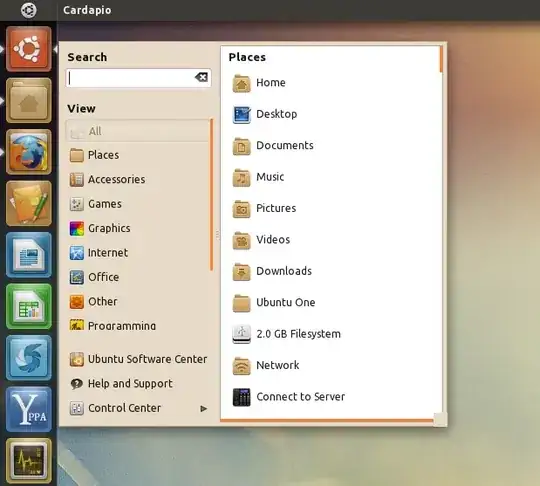
Cardapio is a nice middle-ground between the old and new interfaces:

Cardapio from Web Upd8

This screencast shows it in action. The custom launcher available from Web Upd8 makes it quite convenient to use.

It's currently only available from a PPA:

sudo add-apt-repository ppa:cardapio-team/unstable
sudo apt-get update
sudo apt-get install cardapio
ændrük
  • 75,636
  • 74
  • 233
  • 365
5

Run these commands:

sudo add-apt-repository ppa:diesch/testing
sudo apt-get update
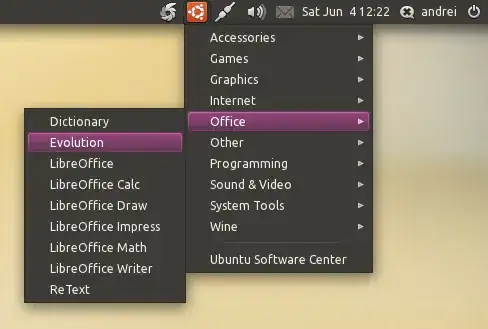
sudo apt-get install classicmenu-indicator

enter image description here

3
  • You can select "Classic Ubuntu" environment at the log-in screen if you prefer classic Ubuntu.
  • Optionally, you can get this classic menu indicator: OMG Ubuntu

However, my personal suggestion is to try to get used to it. I didn't like it at first too, but now I love it.

Karolis
  • 1,851
  • 1
  • 11
  • 10
  • Nice idea, but I just want to have it handy in case I need it – Aman Alam Jun 10 '11 at 06:27
  • 2
    The "Classic" option [will be dropped](https://bugs.launchpad.net/ubuntu/+source/unity/+bug/739812/comments/5) in October, so it's only a short-term solution. – ændrük Jun 10 '11 at 06:28
  • Surely you would be able to install it through Software Center? It will just not be available on the CD afaik. – Egil Jun 17 '11 at 07:55
1

If Cardapio fails to launch for you in 11.10 you may have to also use

sudo apt-get install python-glade2

per the bug report at https://bugs.launchpad.net/cardapio/+bug/878219

James
  • 16,746
  • 5
  • 23
  • 37
1

If you right click the Applications icon in the launcher, then you'll get a list of categories like you did in the Applications menu in Gnome-panel. If you select a category, then you'll get a lense with only the applications in that category. You can get the same list of categories if you just click it too. There is a drop down menu on the right of the search field.

Jo-Erlend Schinstad
  • 29,477
  • 6
  • 67
  • 114
0

Actually, you can get a 'menu' of sorts with the Dash. Click on the Ubuntu logo to get the dash, click on 'More Apps', in the top right corner of the dash, there is a drop down menu, allowing you to filter by category of apps (accessories, games, ...)

geoffrey
  • 2,339
  • 2
  • 25
  • 34