5

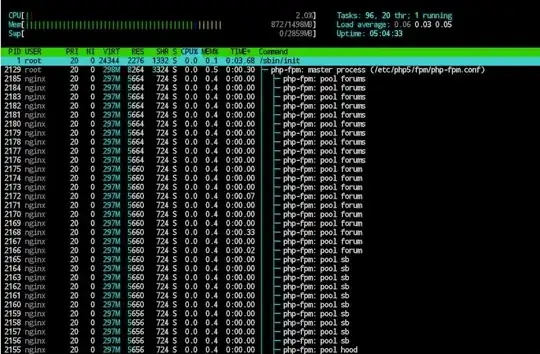
I set up my nginx with php-fpm. each vhost has its own unix-socket and separate POOL.
But the problem is that php-fpm is creating 7 thread for each config pool that I created in /etc/php5/fpm/pool.d/

why? and how could I define that the pool creates only when the url related to VHOST is viewed.

enter image description here

Braiam
  • 66,947
  • 30
  • 177
  • 264
r004
  • 163
  • 1
  • 1
  • 8
  • Out of curiosity: what program does that screenshot come from? It looks like top, except for the line drawing and visual meters at the top. – MvG Dec 20 '13 at 09:03
  • 1
    @MvG it is htop and this screenshot is taken by android device connecting to server with juicessh by MOSH protocol. – r004 Jan 26 '14 at 15:23

2 Answers2

9

The number of children is controlled by the process manager configuration directives in the pool configuration file. I guess the current settings are either pm = static with pm.max_children = 6 or pm = dynamic with pm.start_servers = 6. One process would be the controlling process, the others would be children ready to handle requests. If you only have 5 not 6 children configured, then I must confess I don't know what that last process is used for. On large high-throughput sites, such a configuration with many ready-to-use children makes sense, but in a memory-constrained (probably virtual) environment where you only expects PHP scripts to execute every now and then, a different configuration might be more appropriate.

To achieve this, edit the pool config files and set pm = ondemand. Then children will be created only to handle requests. This will mean less memory consumption while no requests are active, although it might also mean more time required to create a child. The latter can be reduced by choosing a reasonable pm.process_idle_timeout, so that a sane number of php processes remain idle while users can be expected to use them again soon. That “sane number” is controlled by pm.max_children.

Note: This advice is based on my experience with Debian 7, but it should apply to Ubuntu as well.
MvG
  • 1,486
  • 1
  • 13
  • 27
  • Thanks MvG; there is two side to this problem here; firt why 7 processes for each `VHOST.conf` file that reside in `/etc/php5/fpm/pool.d/`. clearly there is something wrong? yes? and the second part of my Q? that you answered rather nicely. – r004 Dec 19 '13 at 17:44
  • @r004: I tried to shed more light on what's happening here, but there is more guesswork involved there: I understand the cure better than the problem. – MvG Dec 19 '13 at 18:06
  • No, I got what yo were trying to explain. Now with these directives or switches in php-fpm; a door way got open for me; to take control of my PHP environment. Now i am trying to findout more about these directive related to php-fpm. – r004 Dec 19 '13 at 19:55
  • all these directive is being set in `/etc/php5/fpm/php-fpm.conf`? – r004 Dec 19 '13 at 19:57
  • So between less memory and more time to process the request is it sane to set an static pool but with fewer children especially in a VPS environment? – r004 Dec 19 '13 at 20:01
  • @r004: A static pool makes imho sense if you want to fine-tune resources to exactly match what is available. Then you want a fixed number of FPM processes, a fixed number of apache processes, and so on. But on VPS I believe overcommittment is more common: you grant more resourcs to individual components than could be satisfied simultaneously, and hope that they won't be needed all at the same time. That way, you have the benefit of more children when needed, but without the constant cost of a static pool. – MvG Dec 20 '13 at 08:34
0

Lots of people encourage to use pm=ondemand to save memory. However, it also means that your time to first byte (or server answer ) is going to be very big because if your web server had no recent visits, the php-fpm module will have to first create a child before answering a request. If you use pm=dynamic, it means you will always have at least 1 child ready to answer a client request. The following will load 1 child per user after restarting php-fpm

pm=dynamic
pm.start_servers=1
pm.min_spare_servers=1